EasyManua.ls Logo

Aiwa NSX-430 - PROGRAMMED EDIT RECORDING

Aiwa NSX-430
84 pages
Print Icon
To Next Page IconTo Next Page
To Previous Page IconTo Previous Page
Loading...
iaetel
sisi
fey
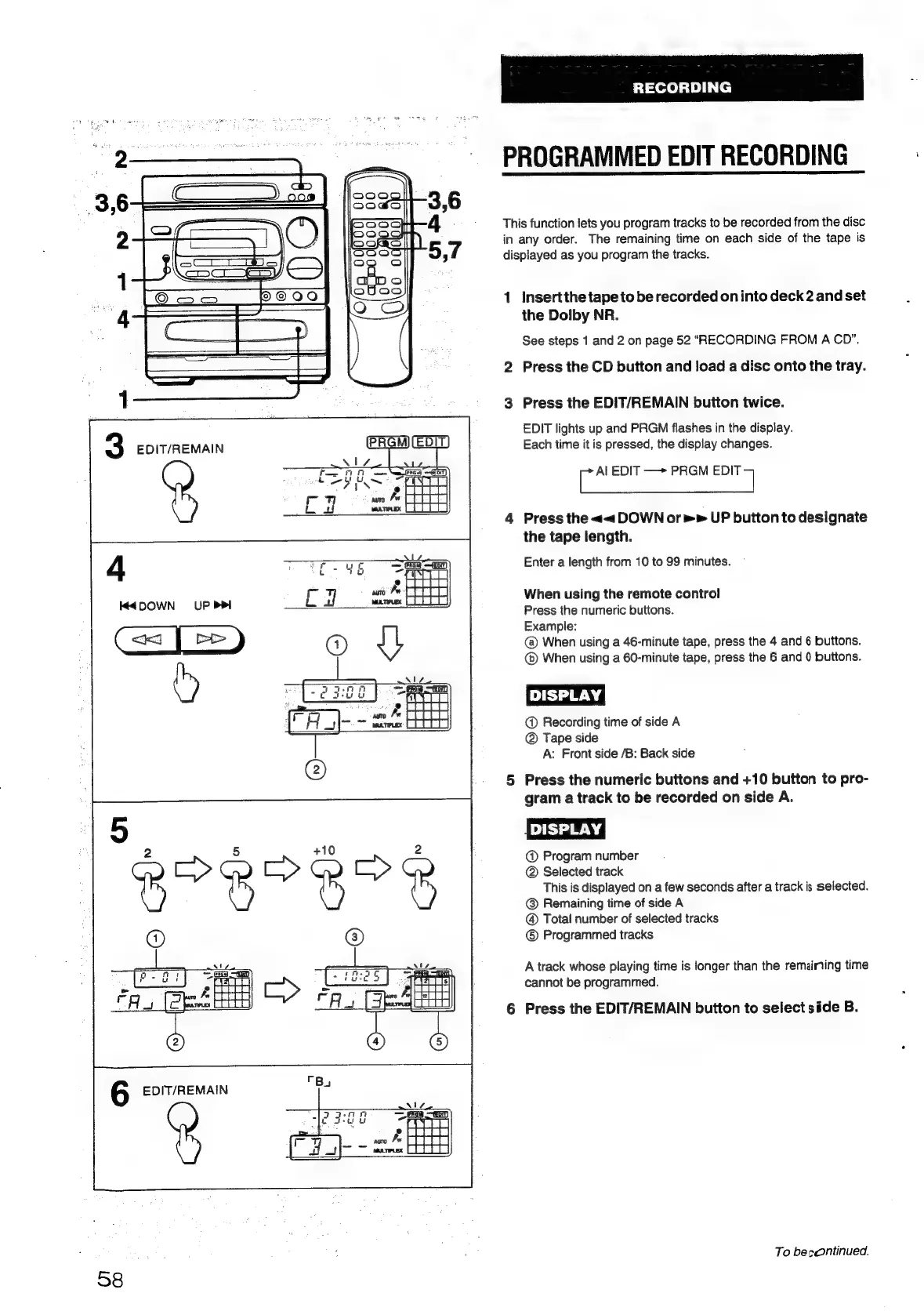
PROGRAMMED
EDIT
RECORDING
This
function
lets
you
program
tracks
to
be
recorded
from
the
disc
in
any
order.
The
remaining
time
on
each
side
of
the
tape
is
displayed
as
you
program
the
tracks.
1
Insertthe
tape
to
be
recorded
on
into
deck
2
and
set
the
Dolby
NR.
See
steps
1
and
2
on
page
52
“RECORDING
FROM
A
CD”.
2
Press
the
CD
button
and
load
a
disc
onto
the
tray.
3
Press
the
EDIT/REMAIN
button
twice.
EDIT
lights
up
and
PRGM
flashes
in
the
display.
3
EDIT/REMAIN
Each
time
it
is
pressed,
the
display
changes.
fi
EDIT
—>
PRGM
eal
2%
4
Press
the
<<
DOWN
or»
UP
button
to
designate
the
tape
length.
4
3
x
Enter
a
length
from
10
to
99
minutes.
When
using
the
remote
control
Press
the
numeric
buttons.
Example:
Cac
|
|
>
)
@
When
using
a
46-minute
tape,
press
the
4
and
6
buttons.
When
using
a
60-minute
tape,
press
the
6
and
0
buttons.
@
Recording
time
of
side
A
@
Tape
side
A:
Front
side
/B:
Back
side
K4DOWN
UP
PP
5
Press
the
numeric
buttons
and
+10
button
to
pro-
gram
a
track
to
be
recorded
on
side
A.
DISPLAY)
@
Program
number
@
Selected
track
This
is
displayed
on
a
few
seconds
after
a
track
is
selected.
@
Remaining
time
of
side
A
@
Total
number
of
selected
tracks
Programmed
tracks
A
track
whose
playing
time
is
longer
than
the
remaining
time
cannot
be
programmed.
6
Press
the
EDIT/REMAIN
button
to
select
side
B.
To
becontinued.
58

Table of Contents

Related product manuals