Allworx
®
Verge™ IP Phone Series User Guide
Page 38 866.ALLWORX * +1 585 421 3850
www.allworx.com
Version: D Revised: June 1, 2017
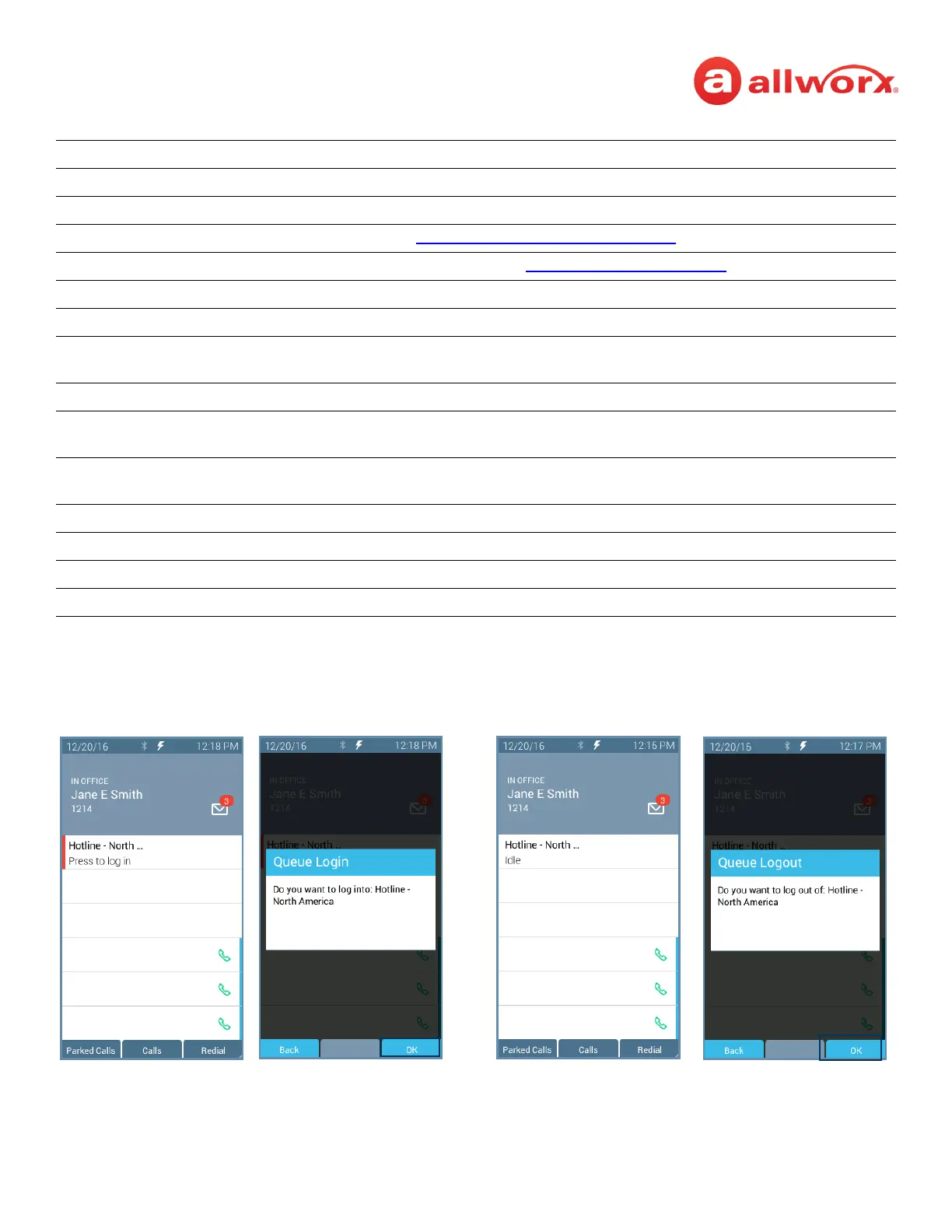
To manually log in to or out of the Queue Appearance:
Press the Queue Appearance programmable button, and then press the OK soft key. The phone
automatically logs in to or out of the call queue, respectively.
Done all field entries or selections are complete.
Clear clear the previously entered character.
Select All / Clear All choose all options at once / unselect all options at once.
Park a system wide hold. See “
Park a Call/Park Monitor” on page 18 for more information.
Conference connect up to four parties together. See “
Conference Call” on page 23 for more information.
Merge Calls Combines all calls into one conference call. Only available when performing a conference call.
Options Enables placing a party on hold or hangs up a party. Only available during a conference call.
Leave Enables dropping off the conference call while the other parties remain active. Only available
during a conference call.
Add Call Enables a fourth party to join a conference call. Only available during a conference call.
Queue Stats/Hide Stats displays the number of queued calls and the longest wait time information. Available during
an active ACD call.
Add Contact opens the phone screen to add a new contact (available for callers not in the Contacts). Only
available during an active ACD call.
Dismiss return to the idle screen.
Queues displays queues assigned to the agent.
Log out all logs out the agent from all ACD queues.
Busy immediately opens the Select Busy Reason screen.



 To Next Page