Allworx
®
Verge™ IP Phone Series User Guide
Page 40 866.ALLWORX * +1 585 421 3850
www.allworx.com
Version: D Revised: June 1, 2017
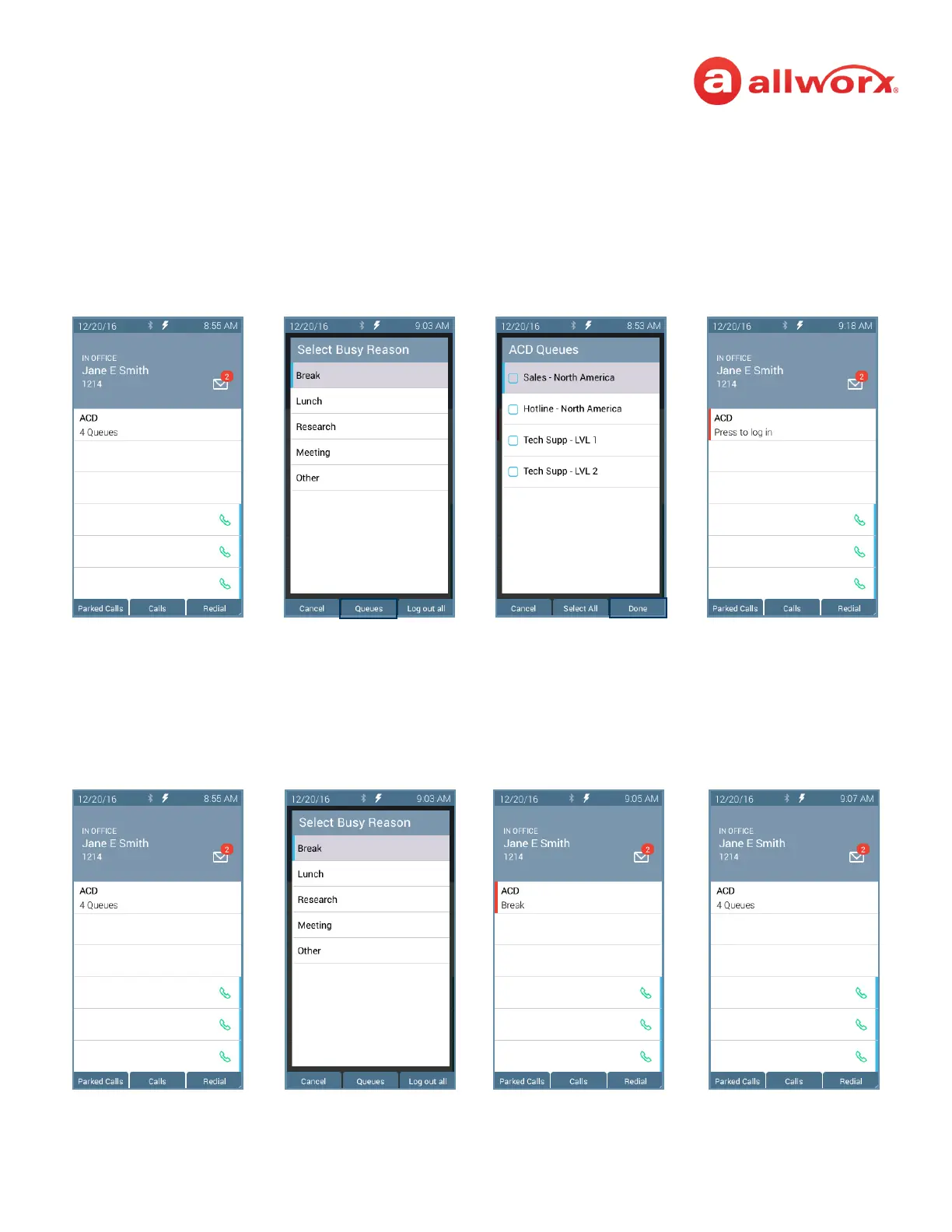
To log out or change ACD queues:
1. Press the ACD Appearance button, and then press Queues or Log Out All soft key. If pressing
Queues, use the up/down navigation buttons and press Select button or the Clear All soft key.
2. Press the Done soft key. Re-enter the Allworx PIN, and then press the Done soft key.
Verge IP phone ACD log out sequence:
To change the ACD Queue busy state:
Agents do not receive calls while in a busy state. Press and release the ACD programmable button. The
Select Busy Reason screen displays. Use the up/down navigation and the Select button to choose the
busy reason. To leave the busy state and resume taking calls, press the ACD programmable button.
Uncheck the queues and
press the Done soft key.
Press the ACD
programmable button.
Press the Queues soft key.
ACD returns to logged out
status.
The agent is unavailable to
accept ACD calls.
Press the ACD
programmable button.
Highlight the busy reason,
and press the Select
button.
Press the ACD programmable
button to end the Busy
Reason.



 To Next Page