102
NEO 1 and NEO 2
User Manual
W ORKING WITH ALPHAS MART MANAGER
Installing SmartApplets on NEOs Using AlphaSmart Manager
. . . . .
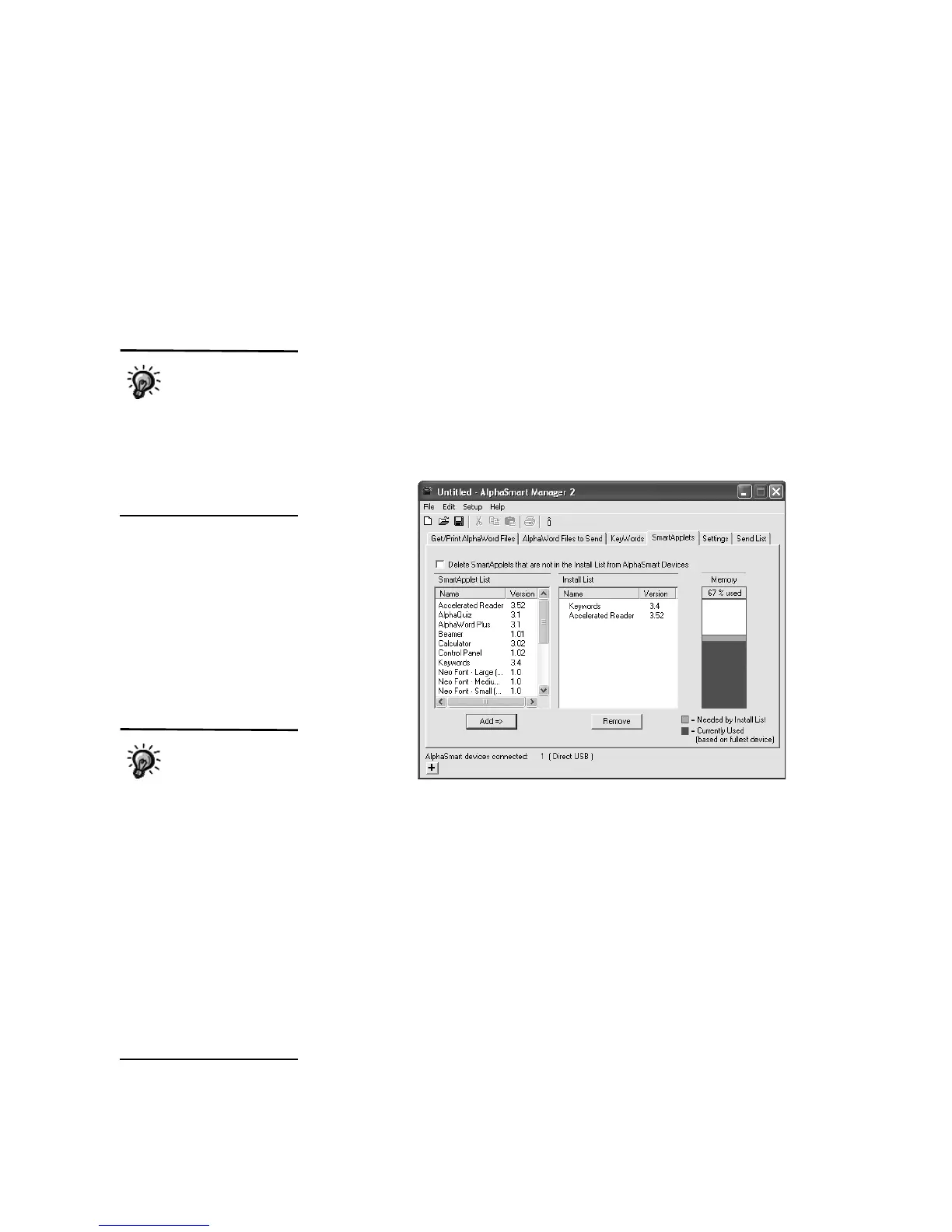
2. In AlphaSmart Manager, click the SmartApplets tab.
3. There are two ways to choose the SmartApplets you want to install on
NEOs:
• Click a SmartApplet in the SmartApplet List
A and drag it to the Install
List B. (If you don’t see the SmartApplet that you want to install and
you know it is installed on your computer, click the File menu and
choose Add to Applet List; then, browse to the SmartApplet’s
location on your computer.)
• Select the SmartApplet(s) in the SmartApplet List
A; then click
Add => to move them to the Install List B. To select more than one
SmartApplet to add, you can hold down the Ctrl key (Windows) or the
a key (Macintosh) as you click the SmartApplets you want to add. To
select a group, click the first one in the group, hold down the Shift key,
and click the last one in the group.
As you add SmartApplets to the Install List, check the Memory column
C
to make sure there is enough memory available on the NEO to install the
SmartApplets you want. The darker color shows the space used on the
NEO, and the lighter color shows what is needed by the SmartApplet(s)
you want to install. If you don’t have enough memory to install the
SmartApplets you want, you could delete some from NEOs as described
on page 104.
A
B
C
Not everything in the
SmartApplet list is a
SmartApplet. The list
includes your NEO fonts,
Spell Check, the Thesaurus,
and the Spanish-English word
lookup. You can install and
delete these items just as you
would SmartApplets.
If you have a mixed
SmartOption Mobile
Lab with both NEO 1
and NEO 2 laptops, please
keep in mind the following:
1. SmartApplets that are only
for NEO 2 (the Responder and
Accelerated Reader
SmartApplets) will not be
installed on NEO 1 laptops.
2. NEO 1 laptops do not have
as much space as NEO 2
laptops. The information
shown in the Memory column
is based on the space left on
NEO 1 laptops, not NEO 2
laptops, since NEO 1 laptops
have the smallest amount of
space available.



 To Next Page