W ORKING WITH ALPHAS MART MANAGER
Replacing the Thesaurus with the Spanish-English Word Lookup
119
. . . . .
NEO 1 and NEO 2
User Manual
5. If you have a SmartOption Mobile Lab and you want to send the changes
to some, but not all, of the NEOs, click Select Devices, check the
numbers to which you want to send the text, then click OK. (To send to all
connected NEOs, skip this step.)
6. Click Send. If you have set a send list password (see page 116), you must
enter the password and click OK.
Replacing the Thesaurus with the Spanish-English Word
Lookup
If you’re not using the thesaurus that comes preinstalled on NEO, you can
remove it and replace it with a Spanish-English word lookup utility, which
lets you look up Spanish words to find their English equivalents. You can have
either the thesaurus or the Spanish-English word lookup on the NEO, but you
can’t have both, so you need to remove one as you’re installing the other.
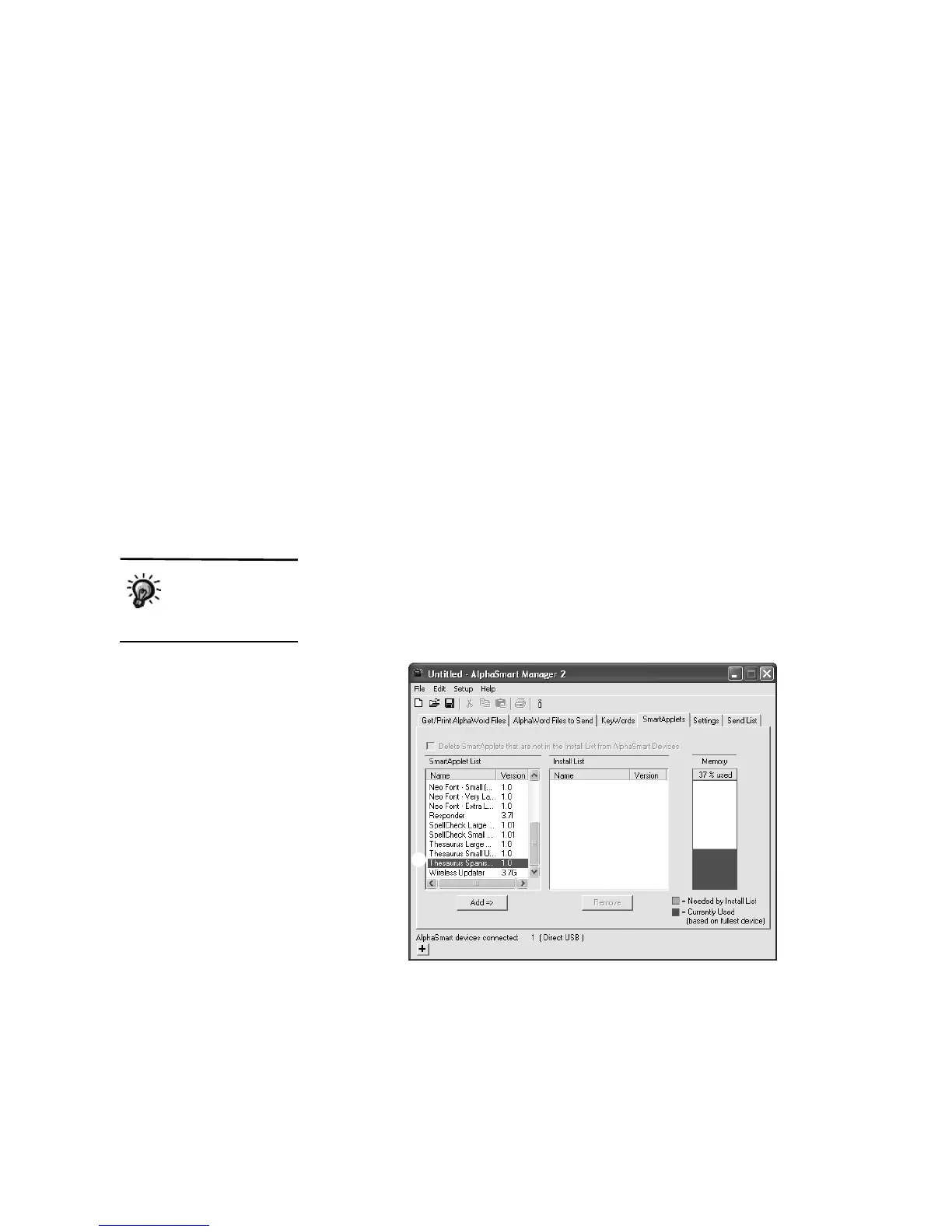
Follow these steps to install the Spanish-English word lookup:
1. In AlphaSmart Manager, click the File menu and choose New Send List.
2. Click the SmartApplets tab.
3. Click Thesaurus-Spanish in the Install List
A, then click Add =>.
To find out how to
use the Spanish-
English word
lookup, see page 40.
A


 To Next Page