G ETTING STARTED
Sending Files to Your Computer
9
. . . . .
NEO 1 and NEO 2
User Manual
The Quick Guide that you received with your NEO provides basic instructions
for using most of these SmartApplets. For detailed instructions, see the NEO 1
and NEO 2 SmartApplet User Manual on our Web site or the Documentation
CD for NEO 1 and NEO 2. For more general information about SmartApplets,
see page 54.
Sending Files to Your Computer
There are two ways to send files from the NEO to your computer:
• You can use a USB cable to connect the NEO to your computer. Then, you
can send the files via the cable connection. See the instructions below.
• You can send the files using infrared beaming. See page 11.
Sending Files Using a Direct Cable Connection
Connecting Your NEO to a Computer Using a USB Cable
1. If this is the first time you have connected the NEO to your computer,
make sure you are logged in to your computer as an administrator or that
you have permissions that allow the device drivers to load properly. Also,
make sure AlphaSmart Manager is not running.
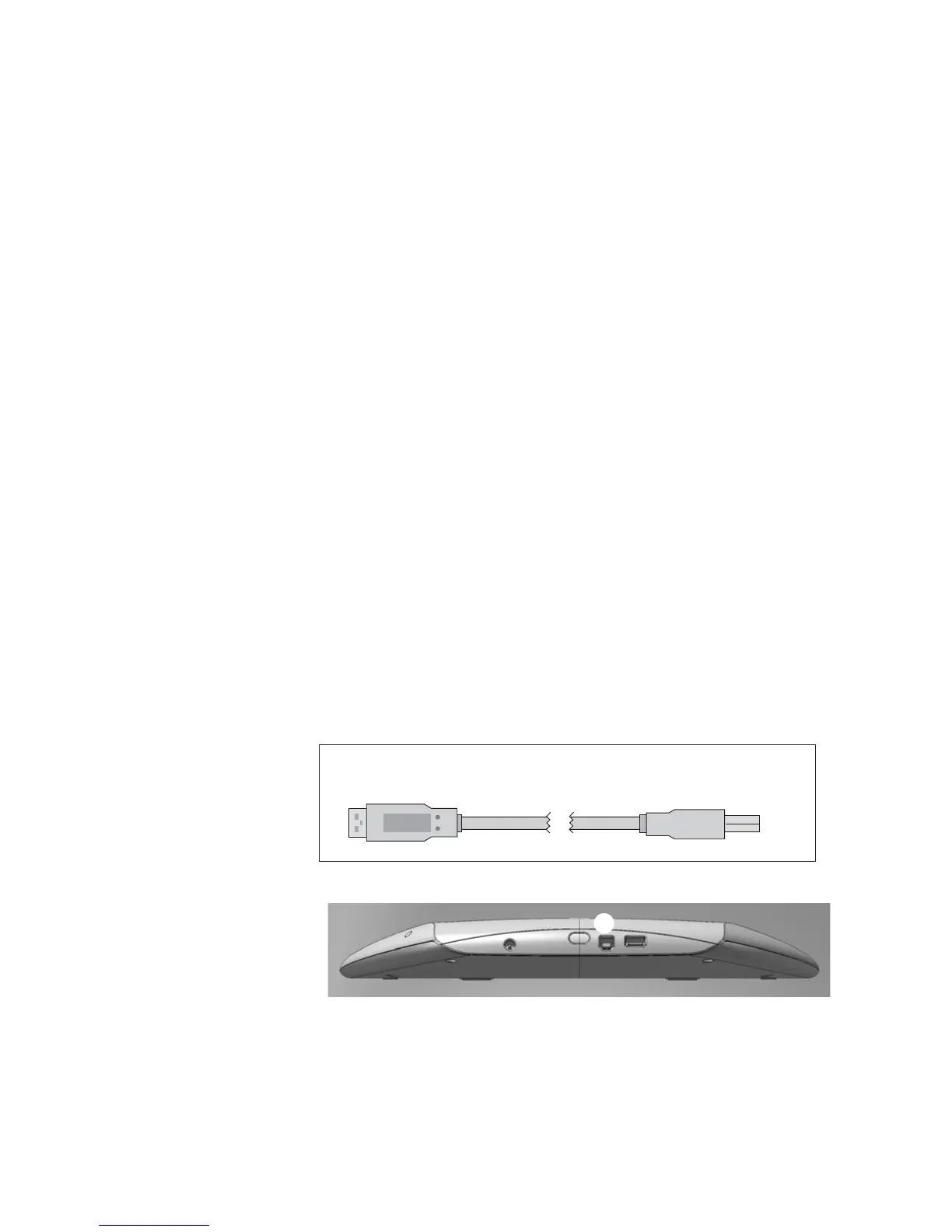
2. Using the cable that came with the NEO, connect the thin, rectangular
end of the cable into a USB port on your computer. Connect the smaller,
square end of the cable into the computer port along NEO’s top edge
A.
To the
computer
USB port
To the
Neo
computer port
The USB cable for connecting to USB computers
A



 To Next Page