CHAPTER 2: INSTALLATION AND SETUP
HF-2500A HIGH FREQUENCY WELD CONTROL
990-371 2-3
Section II: Setup
Connections to External Equipment
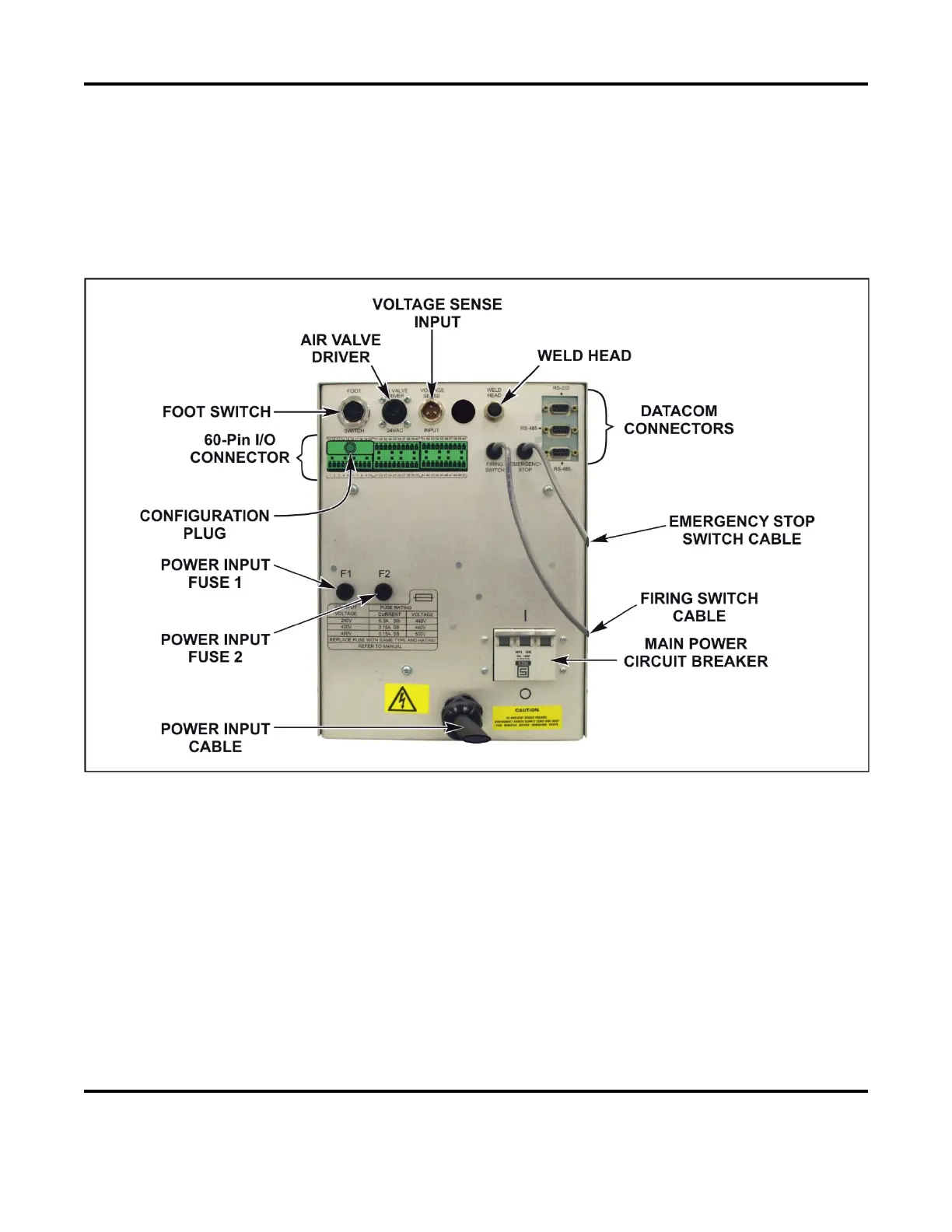
All connections, other than the weld cable connections, between the Power Supply and external equipment
are made through the rear panel.
Rear Panel Components and Connectors
NOTES:
• The weld cable connections from the weld head are made at the weld cable terminals on the front
panel.
• The pre-wired Configuration Plug above is colored red for clarity, actual color may vary. This
plug allows the use of AMADA WELD TECH standard foot switches and weld heads without
further configuration. The Power Supply requires configuration of the I/O’s to accept any inputs.
For normal use, this plug must be connected to pins 11 through 20 on the 60-pin connector. For
other configurations, see Appendix B, Electrical and Data Connections.



 To Next Page