13
NORMAL SWITCH-ON PROCEDURE
Fi g. 14
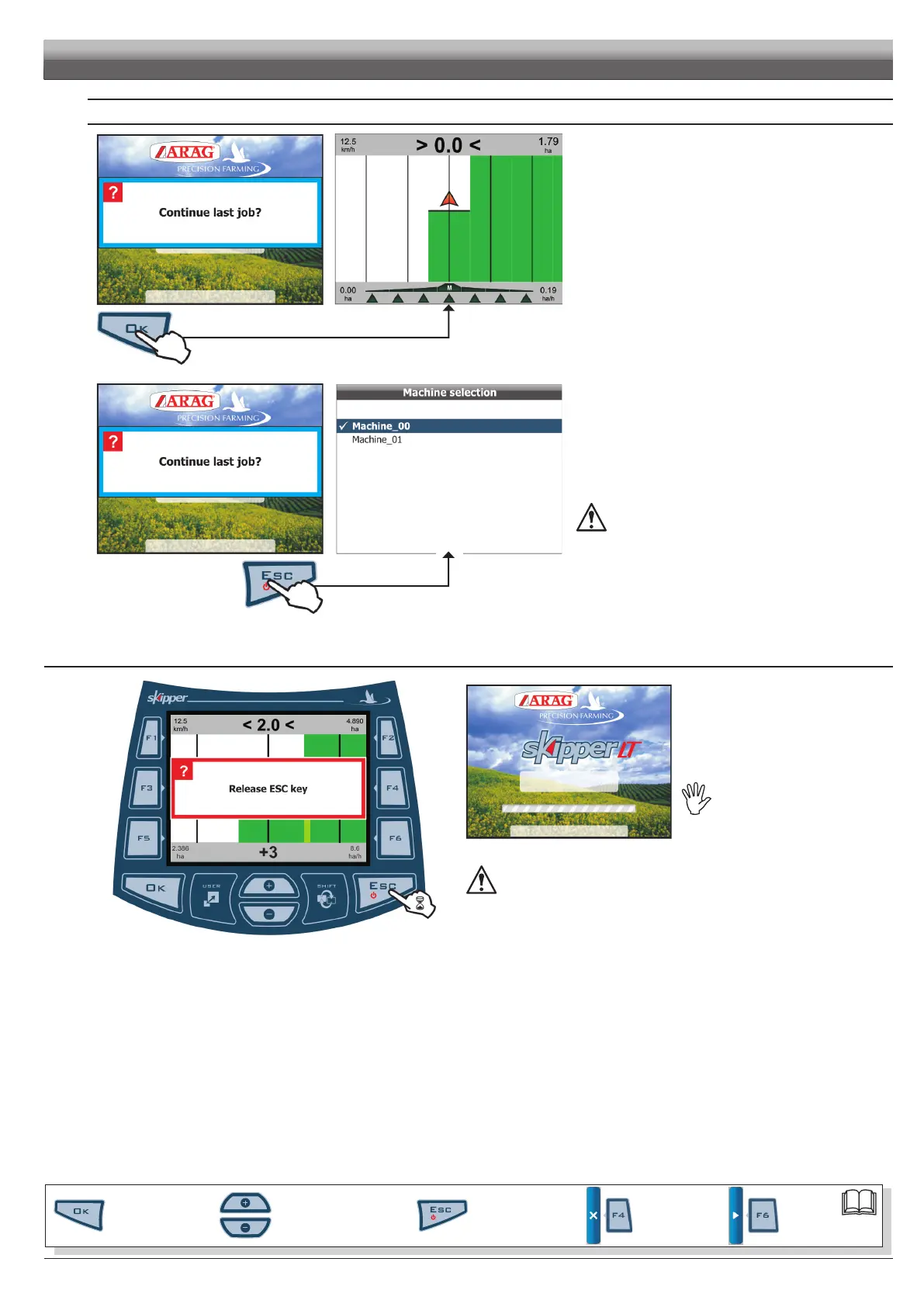
After showing the software version, Skipper LT displays the follow-
ing message
Continue last job? (Fig. 15).
Button
OK allows you to continue the last job done before
switching off, using the active machine.
Fig. 15
Button
ESC moves on to a new job without saving the last one
done before switch-off.
WARNING:alljobdatanotdulysavedwillbelost.
6.2 Switchingoff
Fig. 16
Fi g. 17
Hold
ESC push-button depressed until
Skipper LT displays the page shown in Fig. 16.
Release the button and device will switch off
after a few seconds.
Whileswitchingoff,SkipperLT
automaticallysavescurrentjob.
Whilesystemisswitchingoff,DONOTpressanybutton,DONOTcutoff
powerandallowforSkipperLTtoswitchoff.
WARNING:ALWAYSusethesuitablebuttontoswitchdeviceoff;failuretodosowill
causeALLjobsandprogrammingdatatobelost.
PROGRAMMING
Par.
6.3
Scrolling menu items.
Increase / decrease data
Quit the function or
data changes
Conrm access or
data changes.
Shift the
cursor
Reset / disable
data



 To Next Page