28
6.6.4 - Preparing the Pendrive for data exchange
Introduction
Fig. 83
To prepare the pendrive, you need a Personal computer* (we suggest you use Windows XP operating system).
* Not compatible with Apple Macintosh.
Formatting the Pendrive
Format the Pendrive before attempting any operation (note: icons may vary according to installed operating system).
IMPORTANT:beforeformatting,saveabackupofallPendrivedatasinceformattingwilldeletealldata.
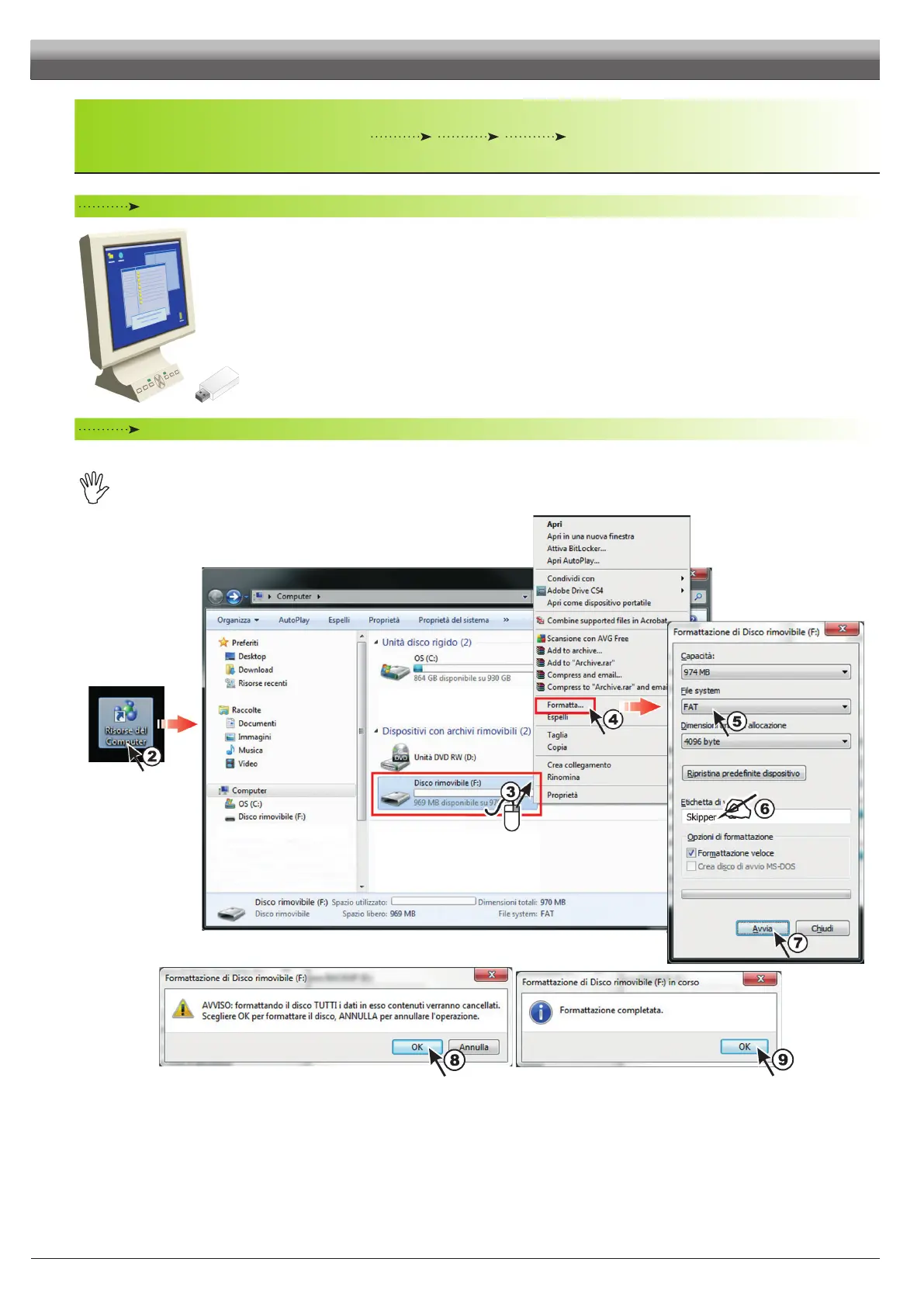
Fig. 84
1 Insert the Pendrive into the relevant computer drive.
2 Click twice on My computer icon. Content window will open.
3 Click with the mouse RH button on the icon corresponding to the connected Pendrive
(Removable drive F: in Fig. 84).
4 Select Format. The window showing formatting settings will open.
5 Select the FAT system File
6 OPTION: enter the name you want to assign to the Pendrive
(Skipper LT, in Fig. 84).
7 Click to start formatting.
8 A warning reminds you that formatting entails deletion of all data.
Conrm with OK.
9 Once procedure is completed, a warning is displayed. Click on OK.
PROGRAMMING - MEMORIES MANAGEMENT



 To Next Page