31
7 USE
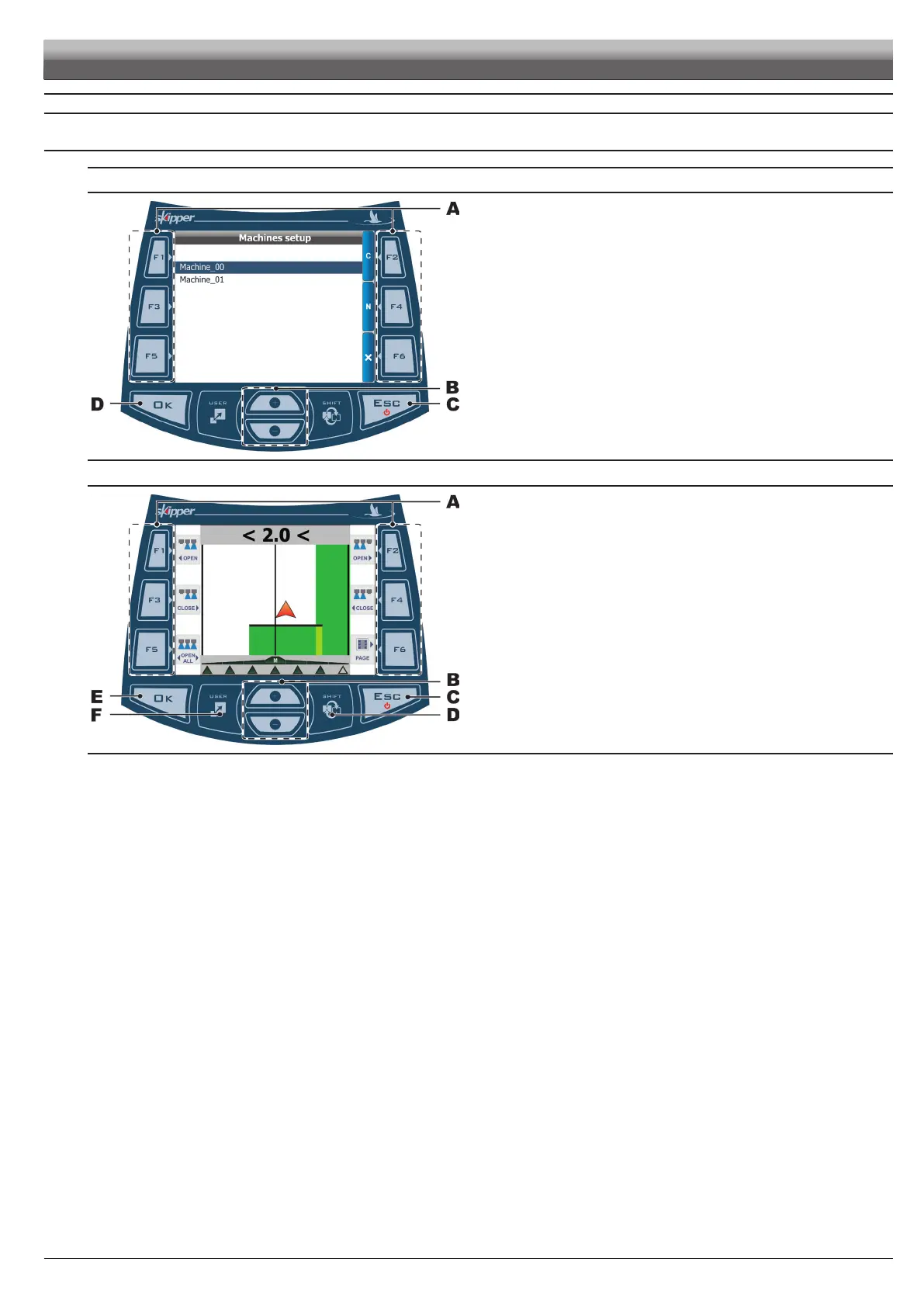
7.1 Usingkeys
SELECT / EDIT/ SAVE DATA
Fig. 92
A
F1÷F6 Context-sensitive keys.
Use these keys to edit data: their function is linked to displayed content, so useofthese
keyswillbeexplainedduringthedescriptionoftheprocedures.
B + / -
Scroll menu items; edit data (increase or decrease).
C ESC
Switch on / off; stop modifying data.
D OK Conrmation key.
NAVIGATION
Fig. 93
A
F1÷F6 Job functions (chapt. 8).
Use these keys to do specic job functions: their function is linked to displayed content
when functions list is displayed.
B + / - Display zoom (+ zoom in, - zoom out).
Hold depressed the corresponding key to toggle from max.zoom in to max. zoom out.
C ESC
Switch on/off; disabling the functions list; interrupting a function.
D SHIFT Scrolling pages of guidance / spraying data / prescription map.
Hold depressed key (1 s) to go back to guidance page.
E OK Conrmation key.
F USER Key with customisable function (par. 6.5.4).
USE



 To Next Page