40
8.2.3
F3Return
Activate the procedure to go back to job breaking point
, as previously stored using the function "Pause" (Fig. 102)
Press
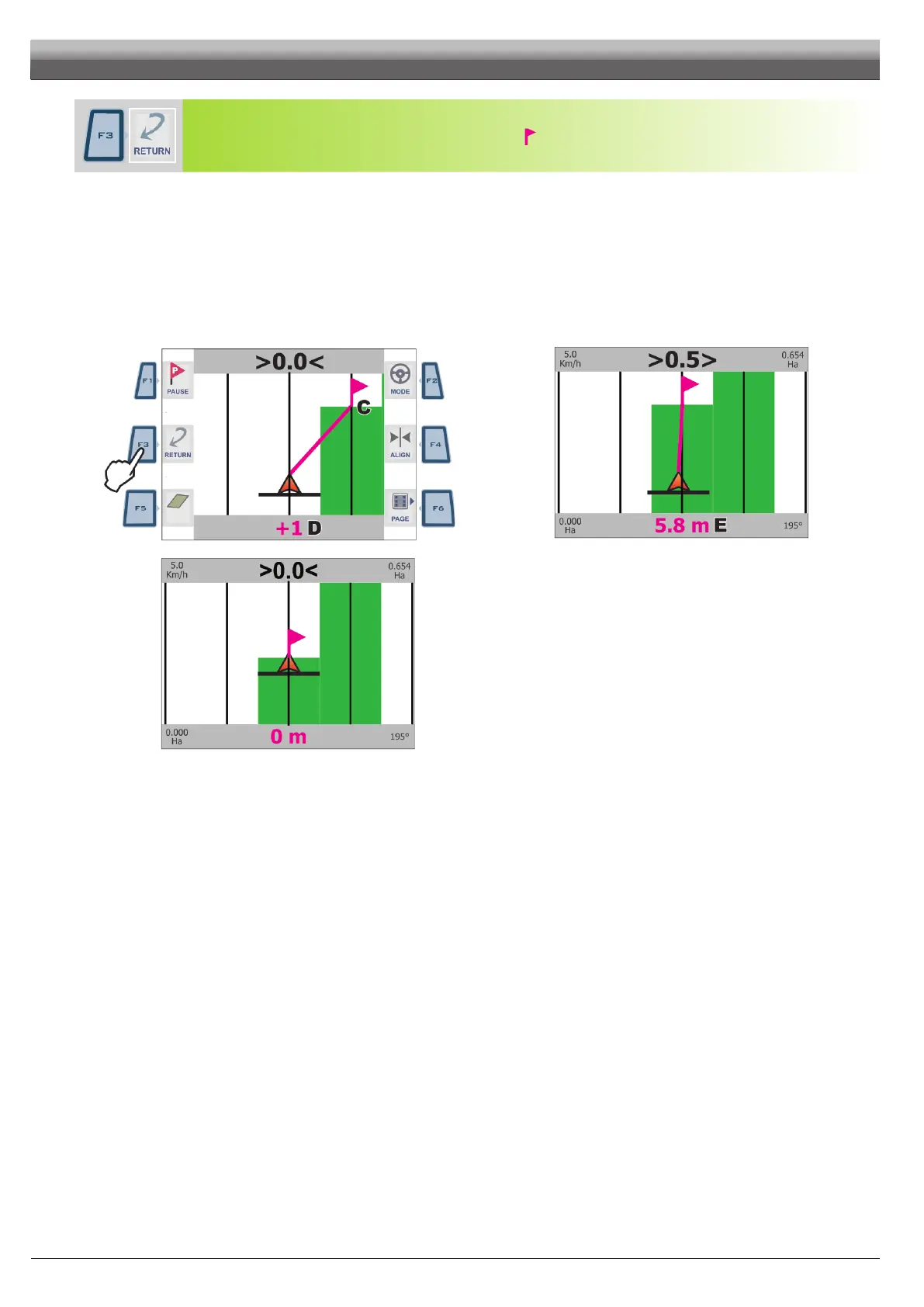
F3 to receive guidance information and go back to point of interest "Pause" (Fig. 117):
- A fuchsia line connecting the middle position to the ag shows the trajectory to be followed to get closer to marked point (C in Fig. 117).
- The display shows in fuchsia the number of tracks to be crossed before reaching point (D in Fig. 117):
in the example,+ next to the number indicates you shall move to the right, - indicates you shall move to the left.
Carry on driving.
- When you reach the track with the point of interest, the display shows the distance between your position and the point (E Fig. 118).
- Move along the track and check that distance in metres decreases: you are getting closer to the point.
When you are nearby, you can see the ag displayed.
- Once you reach the ag position, distance value gets to "zero" (Fig. 119): press OK or ESC to quit this procedure.
OK Skipper LT recalls spraying job guidance information and ag is deleted.
ESC Skipper LT recalls spraying job guidance information but ag remains memorised.
Fi g. 117
Fig. 118
Fig. 119
WORK FUNCTIONS - PAGE 2



 To Next Page