20
6.5.4 - User Preferences
Fig. 40
Guidance settings
• Spraying activation
Fig. 41
Allows you to determine how the spraying state signal is output to Skipper LT.
Skipper LT must know when the machinery is working in order to make all necessary spraying calculations (for
instance tractor could move forward but not spray).
•
Keyboardoption: spraying job state is indicated through keyboard using USER key.
•
Remoteoption: connection to a remote device supplies Skipper LT information about spraying job state, for
instance a switch for the main valve of a spraying machine.
Skipper LT shall be duly connected to it to be able to receive information about its state (par. 5.7).
WARNING:Keyboardoptionlocksthe"User" key functionmenudescribedbelow.
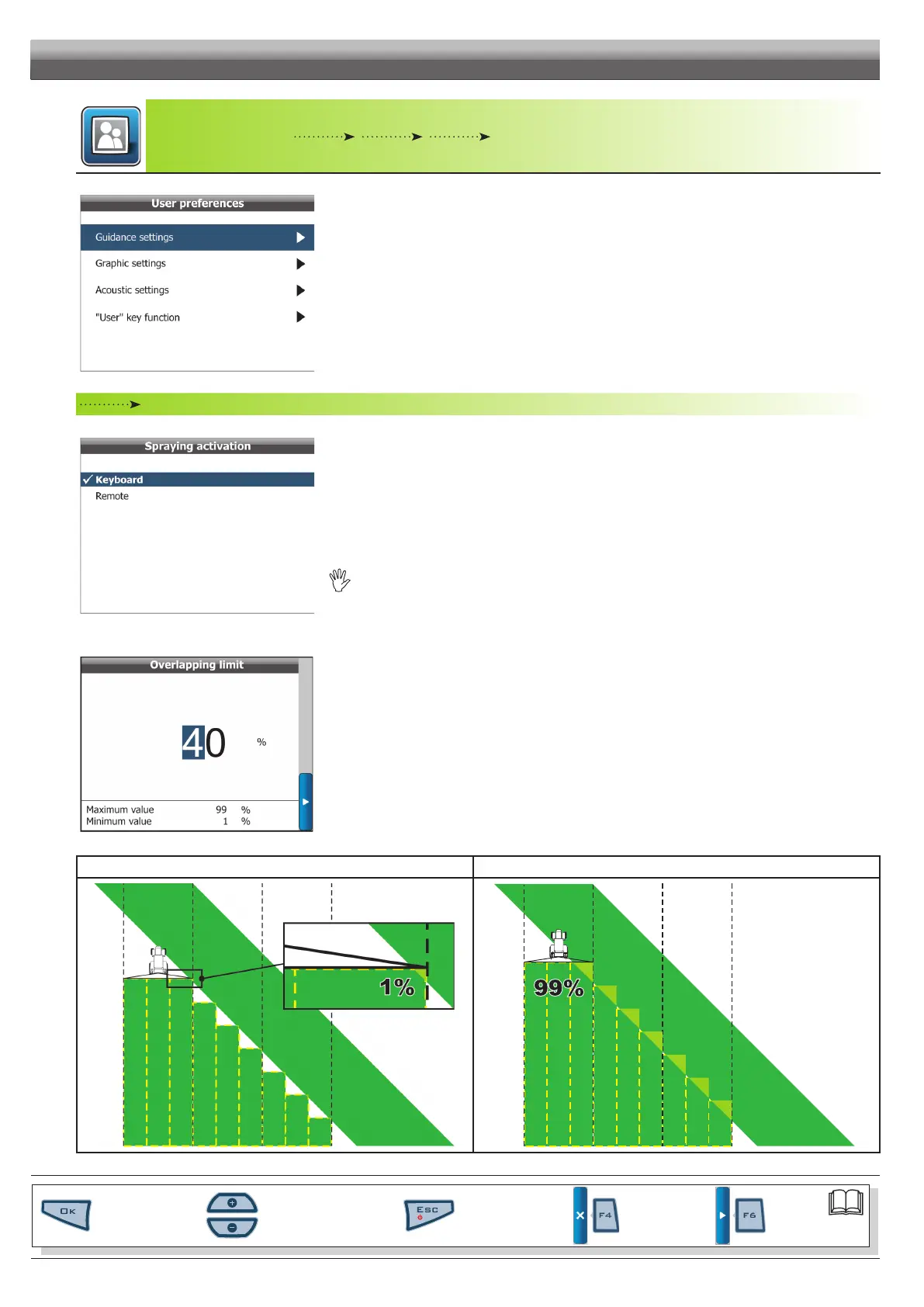
• Overlapping limit
Fig. 42
Enables you to set the allowed threshold for spraying overlapping.
When this value is exceeded, Skipper LT indicates to close the relevant valves.
Overlapping limit: 1% Overlapping limit: 99%
Fig. 43 Fig. 44
CONT'D
PROGRAMMING - MACHINES SETUP
Par.
6.3
Scrolling menu items.
Increase / decrease data
Quit the function or
data changes
Conrm access or
data changes.
Shift the
cursor
Reset / disable
data



 To Next Page