21
Guidance settings (CONTINUED)
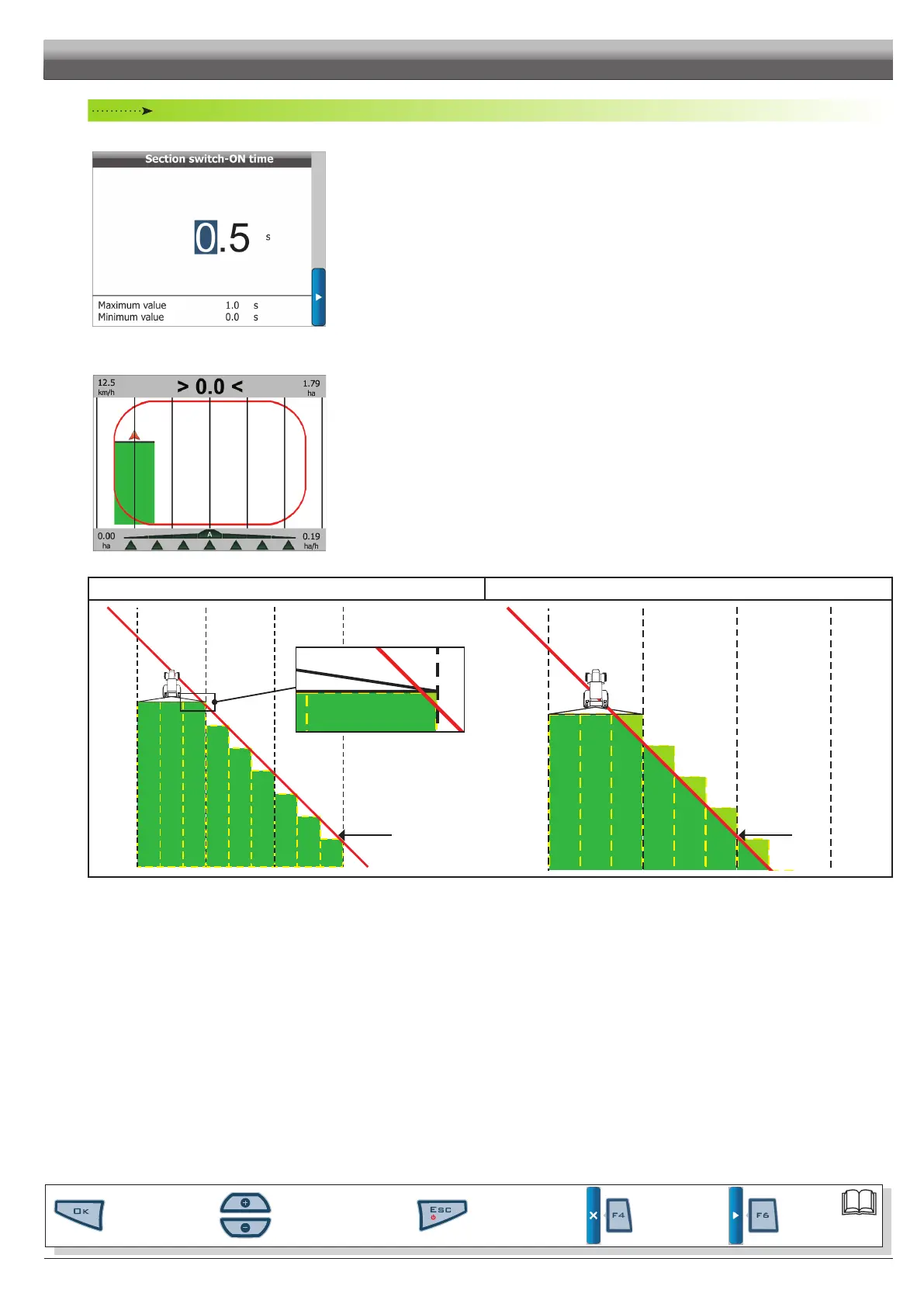
• Section switch-ON time
Fig. 45
Set this menu to indicate time elapsed between sending the control to the section valve and the actual product
spraying stop.
Skipper LT will use this information to make all calculations concerning the spraying job.
• Boundary sct. management
Fig. 46
Sets the moment when Skipper LT will signal that the section valves spraying out of the eld boundaries must be
opened or closed.
•
Min. overstep option: in Fig. 47 the close / open the section valves signal will be triggered upon any eld
boundaries overstep.
•
Max. coverage option: in Fig. 48 the close section valves signal will occur ONLY when the machine is spraying
outside the eld boundaries for the whole coverage.
Tousethesesettingsyouneedto:
-havemarkedeldboundaries(redtrackinFig.51),usingthefunction"Area"(par.8.2.5).
Min. overstep Max. coverage
FIELD
BOUNDARY
Fig. 47
FIELD
BOUNDARY
Fig. 48
PROGRAMMING - MACHINES SETUP
Par.
6.3
Scrolling menu items.
Increase / decrease data
Quit the function or
data changes
Conrm access or
data changes.
Shift the
cursor
Reset / disable
data



 To Next Page