38
8.2 FunctionsList:PAGE2
8.2.1
F1Pause
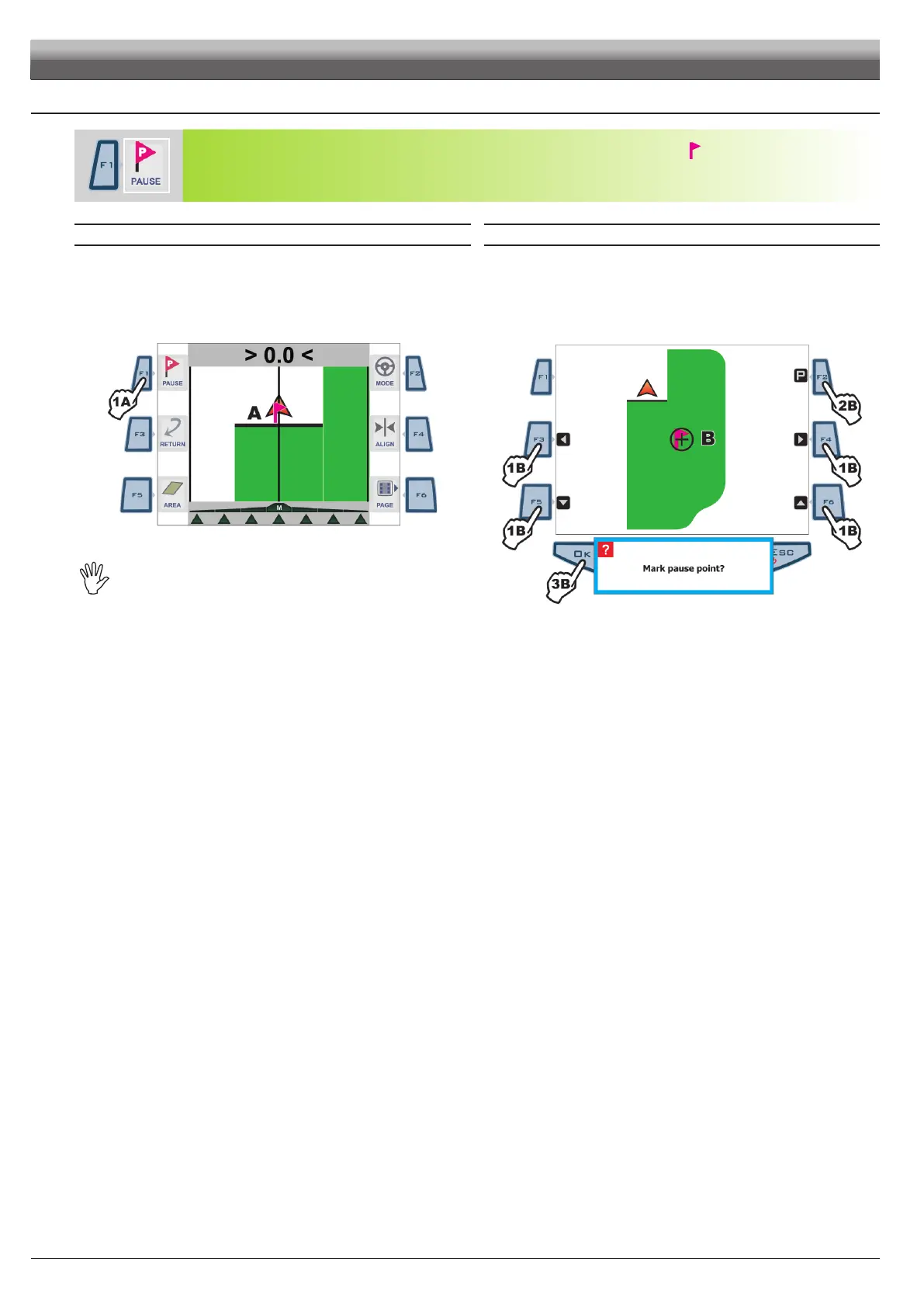
Store job breaking point "Pause" on eld, represented by a ag at the point where it is stored
.
Flag can be seen on guidance page (Fig. 111) and on eld full zoom page (Fig. 112).
"Pause" breaking point can be stored using the two procedures described below:
GUIDANCE PAGE FIELD FULL ZOOM
1a Press
F1 when you are in the position to be stored:
ag will be positioned at that point (A in Fig. 111).
From this page, you can store a eld point even if tractor is in another position.
1b Press keys
F3, F4, F5, F6 to shift position of cursor B (Fig. 112) on eld.
2b Once you reach the desired position, press F2.
3b Conrmation prompt is displayed: press OK.
Fig. 141
SkipperLTcanstoreonlyonebreakingpoint,sothat
everytimeyousetaag,thepreviousonewillbe
deleted.
Fi g. 112
WORK FUNCTIONS - PAGE 2



 To Next Page