18
6.5.2 - GPS antenna
Within every item, active options are marked with .
Fig. 33
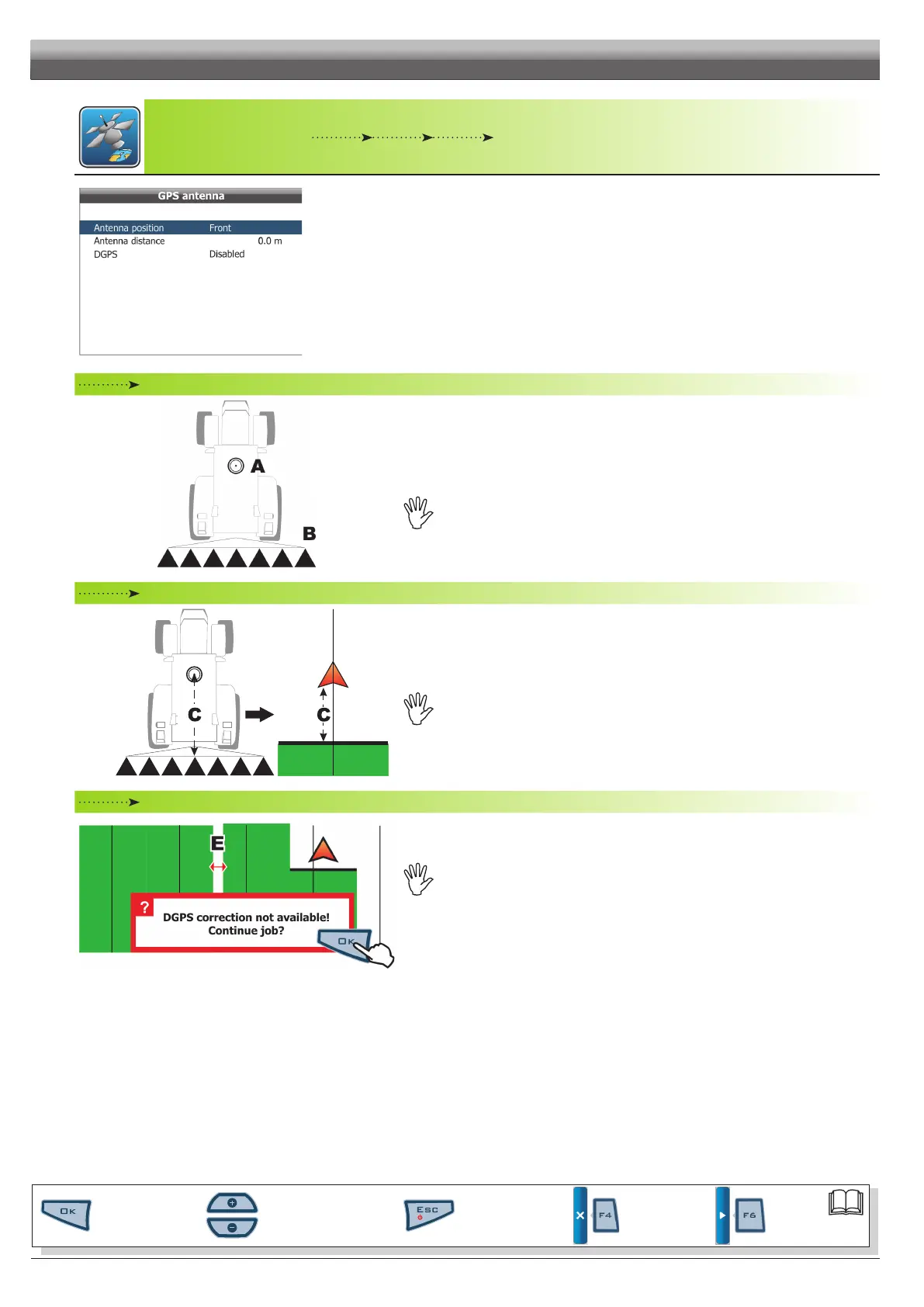
Antenna position
Fig. 34
Indicate the position of the antenna with respect to the point where tractor is spraying (crop spraying
boom, spreader plate, etc.).
In the example shown in Fig. 34, antenna A is installed in
Front of the spraying boom B.
Warning:Beforesettingthisitem,modifytheAntenna distance(Fig.35):ifAntenna
distanceiszero,itemAntenna positioncannotbemodied.
Antenna distance
Fig. 35
Indicate distance C between antenna and work point (Fig. 35).
Dependingonenteredvalue,thedisplayedsketchwillchangeaccordingly.
DGPS
Fig. 36
Allows you to enable the DGPS differential correction function (SBAS): SBAS differential correction
signal is a free signal only available in some areas world-wide that ensures a higher work accuracy.
WARNING:thisfunctioncanonlybeusedinEurope(EGNOS),UnitedStatesofAmerica
(WAAS)andJapan(MSAS).
Enabling / disabling the differential correction during the job could lead to a rather big measurement
error between the vehicle and the tracks sprayed until that moment (E in Fig. 36). The following
passes will be correctly measured (equidistant one from the other).
In the example shown in Fig. 36, press
OK to continue job. It is recommended to perform a track
alignment JUST AFTER THIS, using function "Align" (par. 8.2.4 - F4 Align).
PROGRAMMING - MACHINES SETUP
Par.
6.3
Scrolling menu items.
Increase / decrease data
Quit the function or
data changes
Conrm access or
data changes.
Shift the
cursor
Reset / disable
data



 To Next Page