14
6.3 Usingtheprogrammingkeys
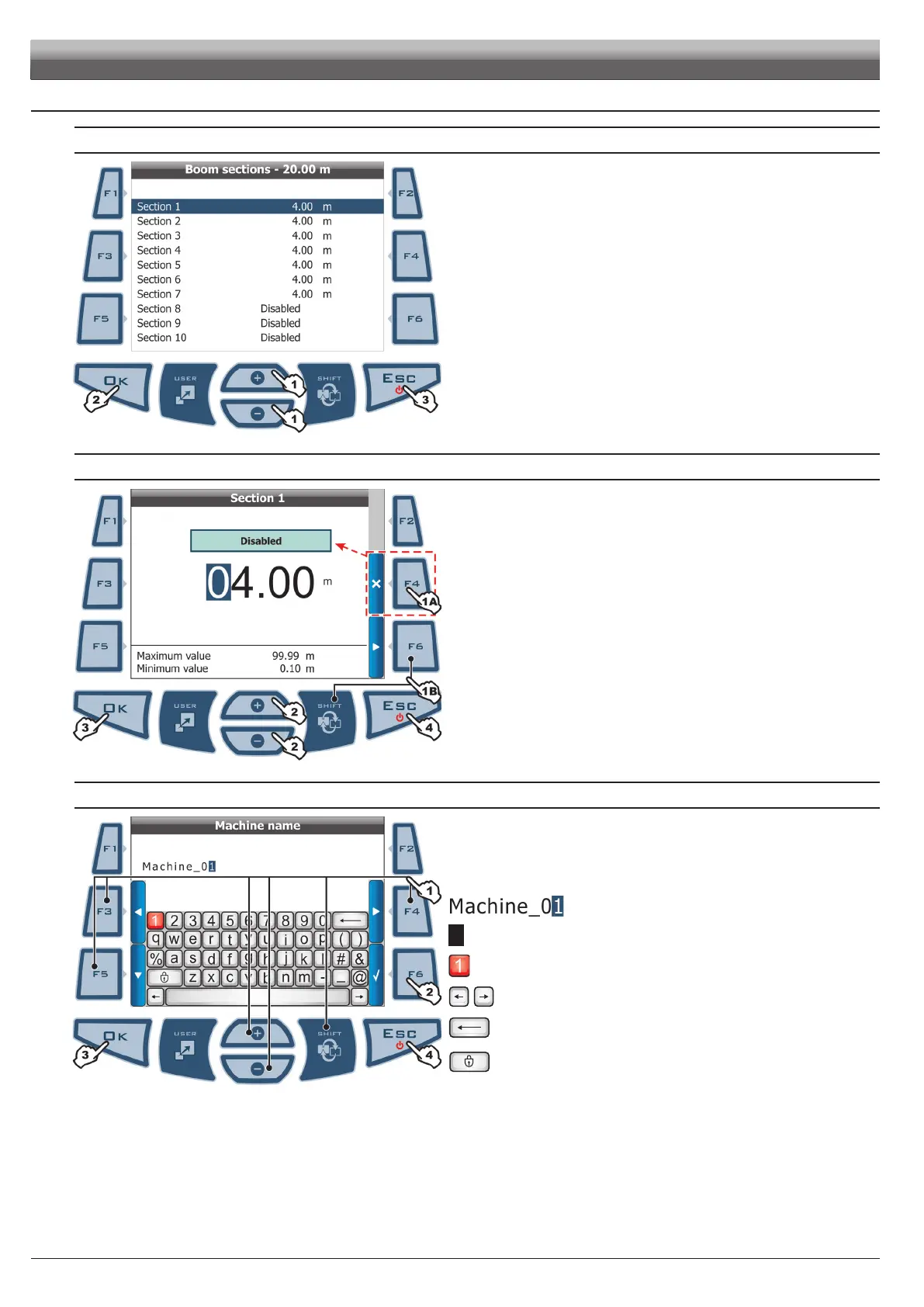
SELECTION AND ACCESS TO MENU ITEMS
Fig. 18
1 Press repeatedly to toggle from one item to another
(selected item is highlighted by a blue line)
2 Press to open the selected item or conrm any changes
3 Press to quit current page or exit without conrming changes
ENTERING A NUMERICAL VALUE
Fig. 19
1A Press to disable displayed data (in the example
Section 1):
in this case, display will show item Disabled
1B Press to activate data and shift cursor from one gure to another
2 Press to edit highlighted gure
(+ increase, - decrease)
3 Press to conrm entered value
4 Press to quit current page or exit without conrming changes
ENTERING TEXT
Fig. 20
1 Press a few times to select character to type
2 Press to conrm selected character
3 Press to save name
4 Press to quit current page or exit without conrming changes
Legend:
Entered name
Cursor
Selected character
Shift cursor across name characters
Delete character before cursor
Caps lock on / off
PROGRAMMING



 To Next Page