15
6.4 Programmingmenu
Enter this menu to set all Skipper LT features necessary to correctly use the device.
Before programming, ensure:
• correct installation of all components
• connection to the power source
Failuretocorrectlyconnectsystemcomponentsortousespeciedcomponentsmightdamagethedeviceoritscomponents.
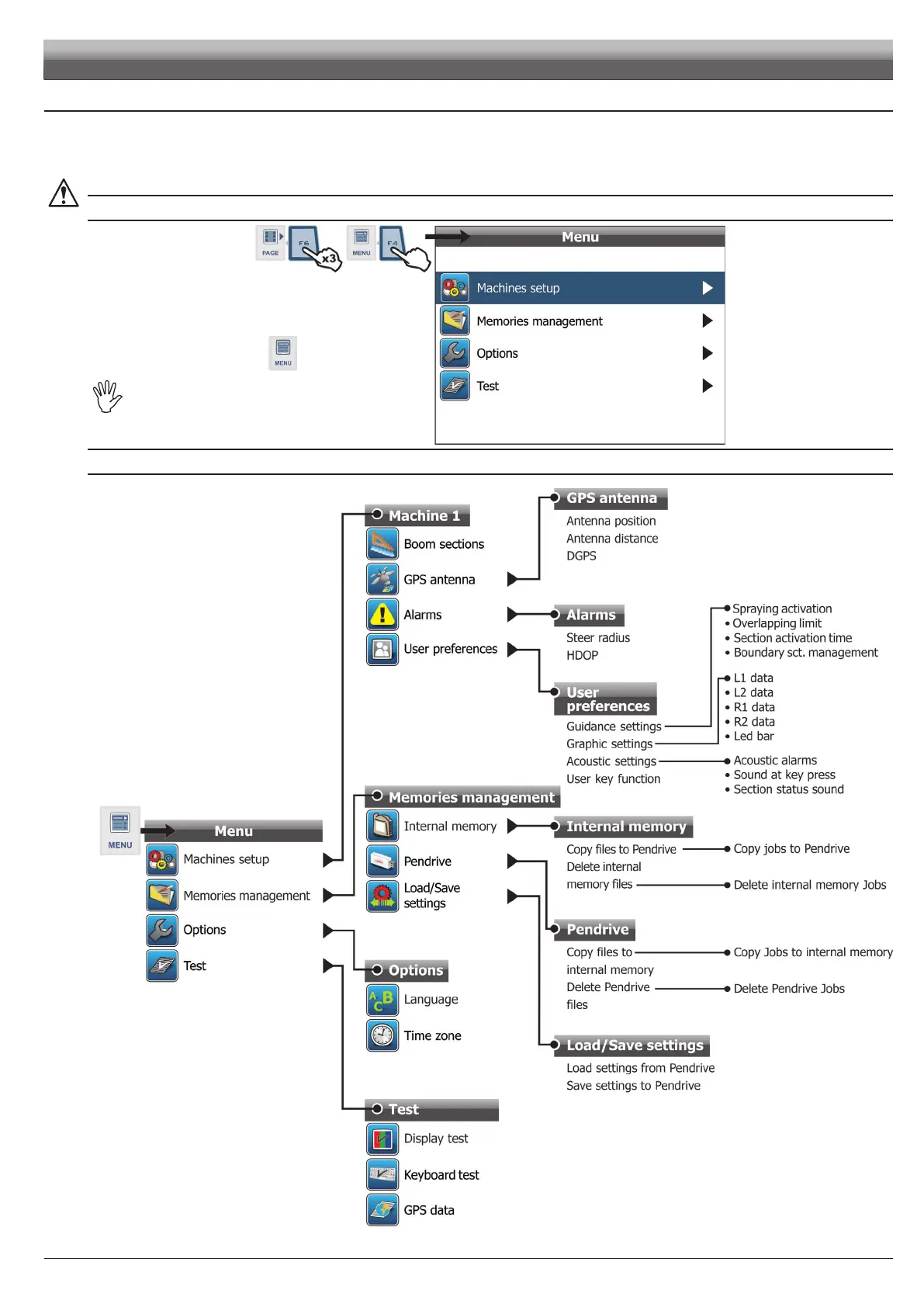
ACCESS TO MENU
MENU STRUCTURE
Fig. 22
Par. 6.5
SAVE MACHINE 1
Par. 6.5.2
Par. 6.5.1
Par. 6.5.3
Par. 6.5.4
Par. 6.6
Par. 6.6.1
Par. 6.6.2
Par. 6.6.3
Par. 6.8
Par. 6.8.1
Par. 6.8.2
Par. 6.8.3
Par. 6.7
Par. 6.7.1
Par. 6.7.2
- Press F6 to display functions list.
- Scroll list pages by pressing a few times
F6,
until you see the icon of the function
- Press F4.
Forcorrectuseofkeyswhile
programming,refertopar.6.3.
PROGRAMMING
Fig. 21



 To Next Page