25
6.6.2 - Pendrive
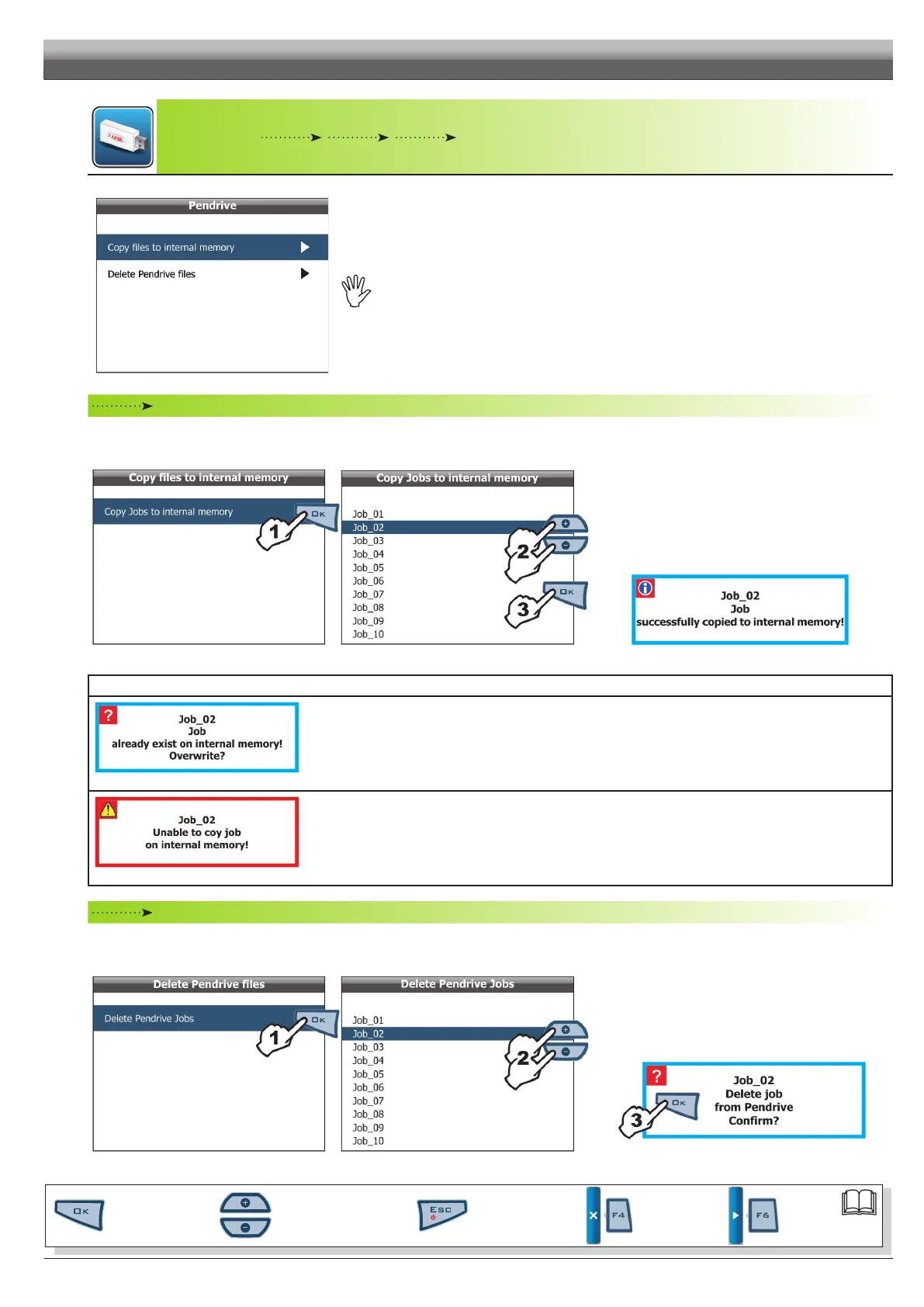
Fig. 63
TodisplaythemenuitemsitisnecessarytoconnectthependrivetoSkipperLTusingthesuitable
connector(par.5.4).
Ifconnectionisnotestablished,themessage
Pendrive not found! isdisplayed.
Copy files to internal memory
Allows you to transfer saved data, about jobs, from a pendrive to Skipper LT internal memory.
• Copy Jobs to internal memory
Fig. 64 Fig. 65
1 Select item
Copy Jobs to internal memory (Fig. 64)
and press OK;
2 Scroll the jobs list (Fig. 65) using keys
+ or - and select
the le to copy;
3 Conrm copy by pressing
OK.
A conrmation message is displayed once copy is completed
(Fig. 66). Press ESC.
Fig. 66
ERROR MESSAGES
Fig. 67
The internal memory already contains a le with this name.
Following are the two possible instances:
- Press
OK to replace les.
WARNING:ALLdataconcerningreplacedlewillbelost.
- Press ESC to avoid replacing the le: check le content or change name before repeating save option.
Fig. 68
Possiblecauses:
- Space available on internal memory is over: eliminate some les from pendrive as explained under
par. 6.6.1
Internal memory / Delete Internal memory les and try saving again.
Delete Pendrive files
Allows you to delete saved data, about jobs, from pendrive.
• Delete Pendrive Jobs
Fig. 69 Fig. 70
1 Select item
Delete Pendrive Jobs (Fig. 87) and press OK;
2 Scroll the jobs list (Fig. 88) using keys + or - and select
the le to delete;
3 The message shown in Fig. 89 is displayed:
conrm deletion by pressing OK.
Fig. 71
PROGRAMMING - MEMORIES MANAGEMENT
Par.
6.3
Scrolling menu items.
Increase / decrease data
Quit the function or
data changes
Conrm access or
data changes.
Shift the
cursor
Reset / disable
data



 To Next Page