16
6.5 Machinessetup
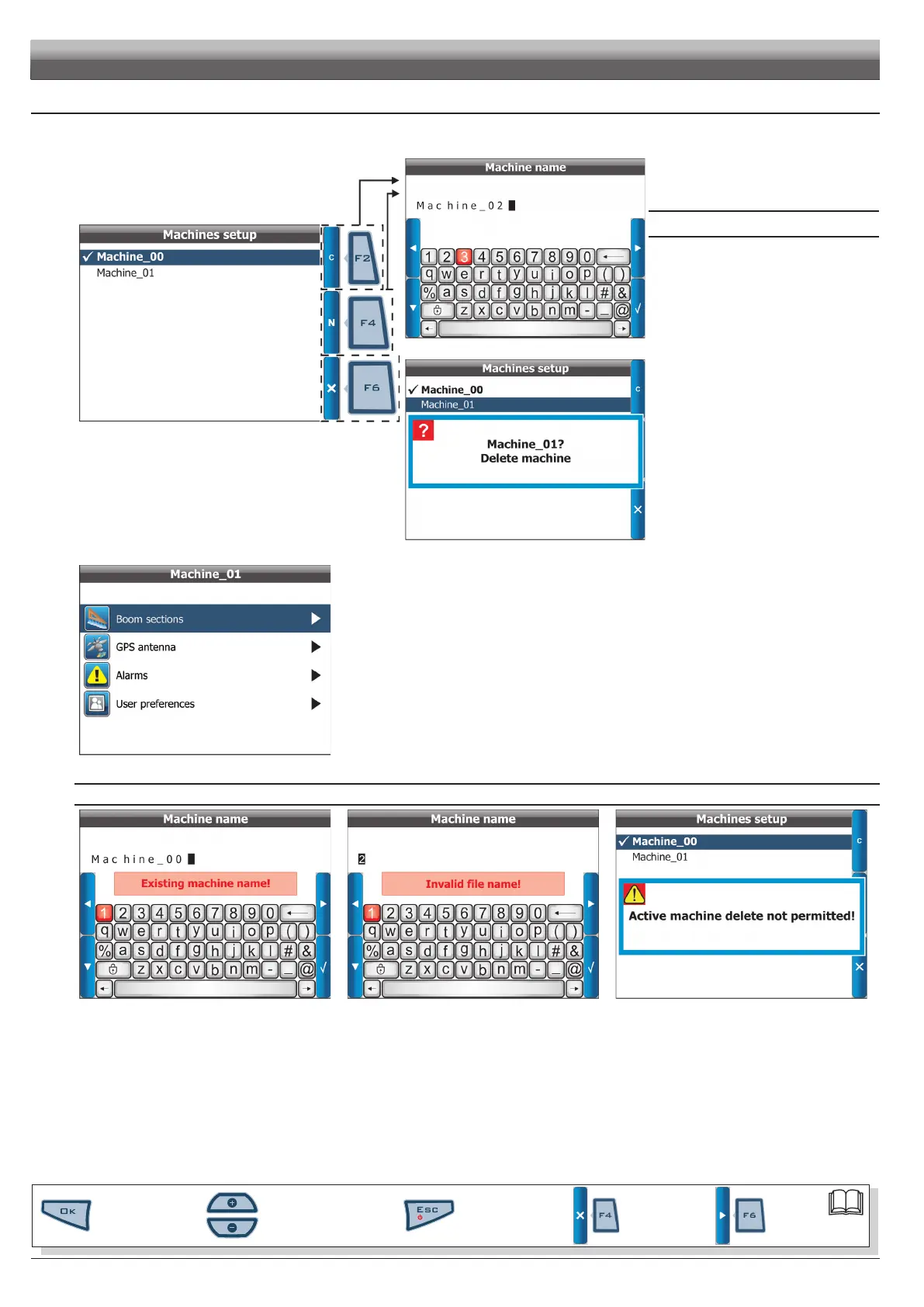
Enter Machines setup menu (Fig. 21) then select machine* to be set using buttons + or - and press OK;
as an alternative, create a new one using the function keys (Fig. 23).
Fig. 23
* "machine": includes all tractor settings you use to carry out the
spraying job.
For instance, you could use Skipper LT with many machines so to
obtain the correct information you shall recall the features of the
machine in use.
Active machine is marked with the symbol
(Fig. 25 , Machine_00).
Fig. 24
FUNCTION KEYS
F2 Clonemachine
It creates a machine conguration by exactly
copying an existing one;
select name of machine to be cloned using +
or - keys (in the example Machine_01) and
press F2: Skipper LT will ask you to allocate a
new name (Fig. 24).
F4 Newmachine
It creates a new machine with the default
settings;
press
F4: Skipper LT will ask you to allocate a
new name (Fig. 24).
F6 Deletemachine
It deletes an existing machine and its settings.
Select name of machine to be deleted using +
or
- keys and press OK: Skipper LT asks your
conrmation before deleting (Fig. 25).
Press
OK to conrm.
Fig. 25
Fig. 26
Once machine is selected, set up the items in Fig. 28.
The following paragraphs will deal with setting every parameter.
SAVE ERRORS
Fig. 27 Fig. 28 Fig. 29
The desired operation can not be performed in the following cases:
-Existingmachinename(Fig.27)
Entered name has already been allocated to another machine: edit name.
-Invalidlename(Fig.28)
Entered name is not correct: edit name.
- name can not start with a number or space.
- max. number of characters allowed: 16.
-Activemachinedeletion(Fig.29)
The machine conguration you would like to delete is the active one (checked): activate a different machine conguration before deleting.
PROGRAMMING - MACHINES SETUP
Par.
6.3
Scrolling menu items.
Increase / decrease data
Quit the function or
data changes
Conrm access or
data changes.
Shift the
cursor
Reset / disable
data



 To Next Page