HARDWARE INSTALLATION
19
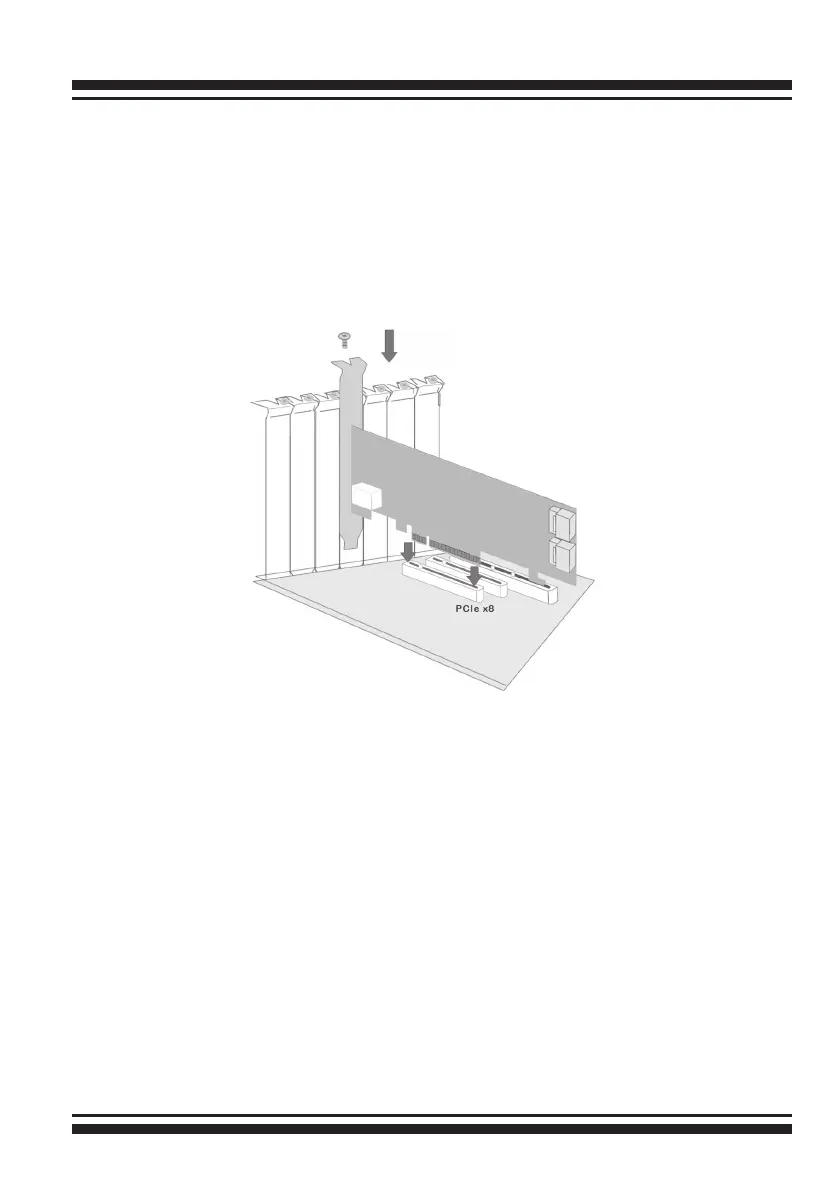
Figure 2-2, Insert SAS RAID controller into a PCIe slot
Step 3. Install the PCIe SAS RAID Cards
To install the SAS RAID controller, remove the mounting screw and
existing bracket from the rear panel behind the selected PCIe slot.
Align the gold-ngered edge on the card with the selected PCIe
slot. Press down gently but rmly to ensure that the card is prop-
erly seated in the slot, as shown in Figure 2-6. Then, screw the
bracket into the computer chassis. ARC-1212/1222 series cards
require a PCIe x8 slot.
Step 4. Mount the Drives
You can connect the SAS/SATA drives to the controller through
direct cable and backplane solutions. In the direct connection,
SAS/SATA drives are directly connected to SAS RAID controller PHY
port with SAS/SATA cables. The SAS RAID controller can support
up to 4/8 PHY ports. Remove the front bezel from the computer
chassis and install the cages or SAS/SATA drives in the computer
chassis. Loading drives to the drive tray if cages are installed. Be
sure that the power is connected to either the cage backplane or
the individual drives.



 To Next Page