TD 92483GB
2008-06-05/ Ver. B
Installation and Operation Manual
UPAC- Unite Packet for Messaging and Alarm
20
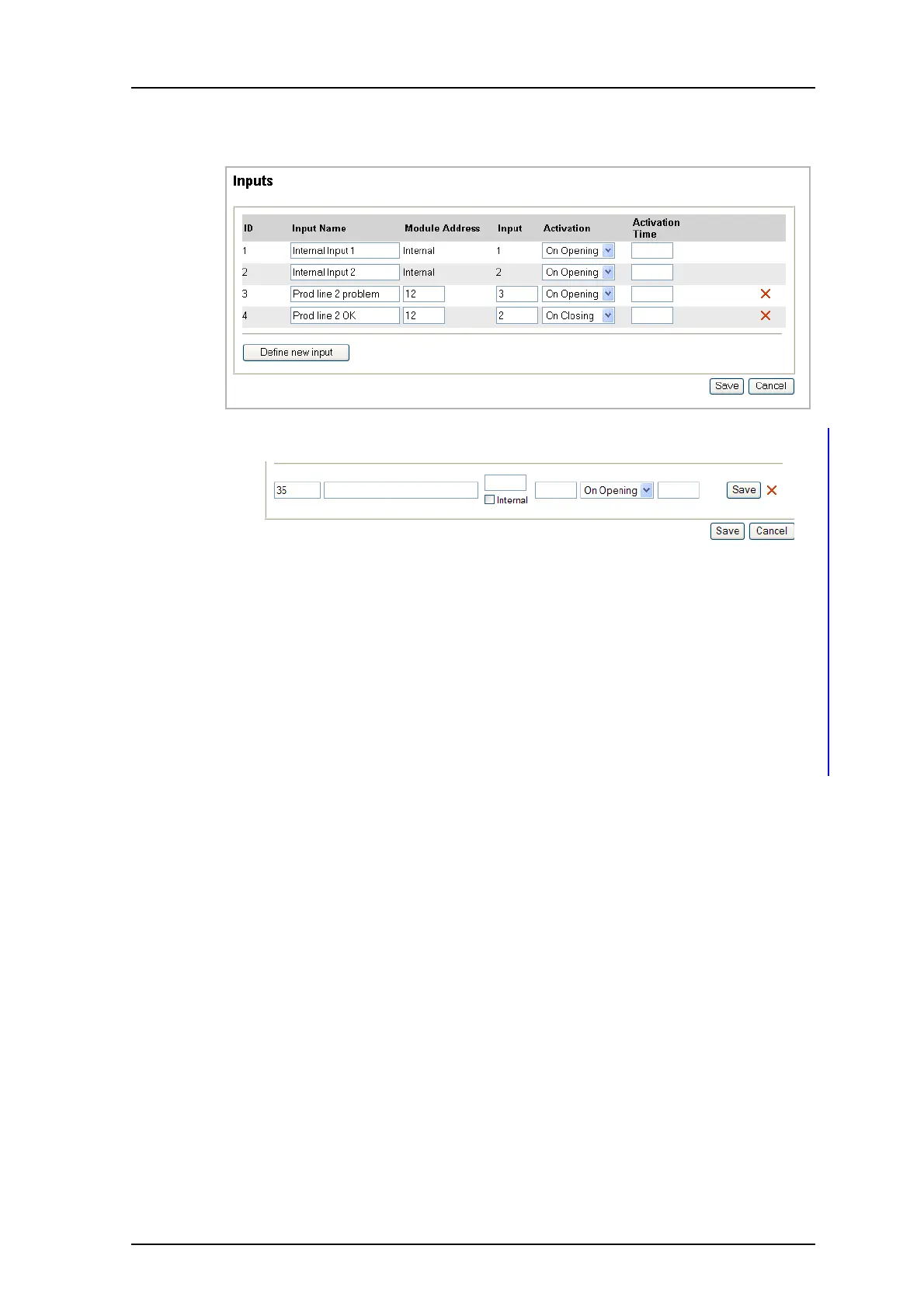
4.5.3 Define Inputs
1 Click “Define new input”.
2 Enter a unique Input Name.
3 Enter "A-bus Module Address" or select "Internal "depending on if the input is
connected via A-bus module or to the UPAC hardware directly.
If you want to trigger on both opening and closing or using different "Activation
time" you can define multiple inputs for the same physical input. This can for
example be used if you at a door (by using a microswitch) want an activation on
both opening and closing the door. Please see Appendix D for other examples.
4 Enter Input number.
Note: If you have selected the internal checkbox in the previous step, enter the
number of the internal input (1 or 2).
5 Select Activation condition.
6 Enter Activation Time. By default a notification will be sent immediately. If you enter
activation time, the input has to be active for the set time before a notification is
sent.
7 Click “Save”.
Figure 28.
Figure 29.



 To Next Page