CHAPTER 4 REFERENCE GUIDE
EFD1000 VFR PFD Pilot’s Guide
Page 4-31
091-00028-001 ( )
Select the CDI Navigation Source
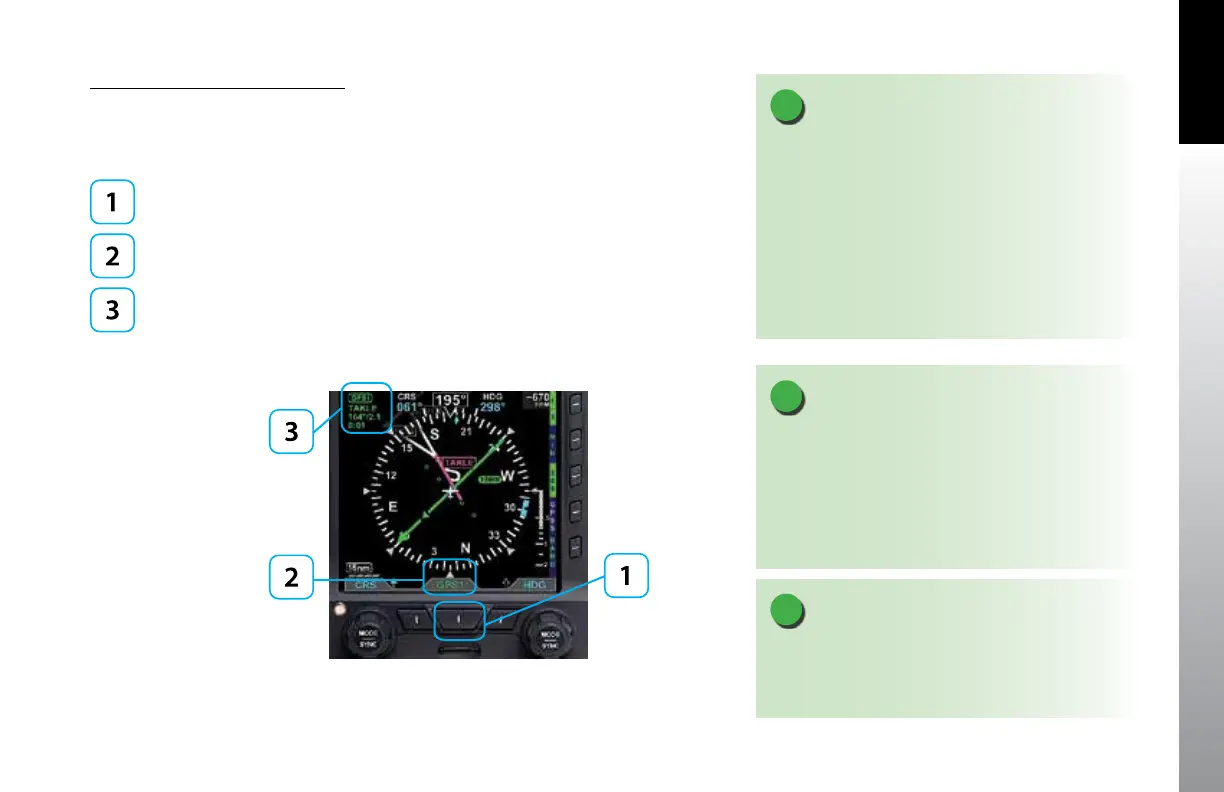
• Press the CDI Navigation Source Select button until the desired navigation
source is displayed above the button (e.g., GPS1, GPS2, VLOC1, VLOC2)
(Figure 4-63).
CDI Navigation Source Select Button
Selected CDI Source Label
CDI Source Information Block
Figure 4-63
CDI Source selection and Information
NOTE
For integrated systems, the CDI navigation source label
indicates the current operating mode (GPS or VLOC) of
the GPS/VHF NAV system.
When an integrated system is selected but not
reporting its operating mode, VLOC1 or VLOC2 is
shown as the Selected CDI Navigation Source.
Refer to the GPS or VHF NAV AFMS for information on
the operation of the connected navigation equipment.
NOTE
There are many radio congurations available. Your
authorized Aspen Avionics Dealer can explain the
conguration used on your aircraft.
NOTE
When the PFD is connected to some GPS and the
active ight plan is changed (e.g. “Direct To” is selected),
the display of the active (magenta) leg on the Nav
Map may be delayed for up to 20 seconds. The Course
Pointer and autopilot will react immediately to the
ight plan change.



 To Next Page