CHAPTER 4 REFERENCE GUIDE
EFD1000 VFR PFD Pilot’s Guide
Page 4-55
091-00028-001 ( )
NEXRAD coverage displays using the following methodology:
• If US Precipitation Type is unavailable and US NEXRAD Radar is available, the US
weather depiction is displayed as rain.
• If US Precipitation Type is available and US NEXRAD Radar is unavailable, the US
weather depiction is not displayed.
• If US coverage is unavailable or expired and US NEXRAD is available, the US
weather depiction is displayed as if all US radar sites are valid.
• If Canada coverage is unavailable and Canada radar is available, the Canada
weather depiction is displayed as if all US radar sites are valid.
• If US NEXRAD Radar or Canada Radar exceed the specied expiration time, the
depiction for the respective radar is displayed as no Radar Coverage.
• If Puerto Rico NEXRAD Radar exceeds the specied expiration time, the Puerto Rico
NEXRAD Radar depiction for the respective radar displays as no Radar Coverage.
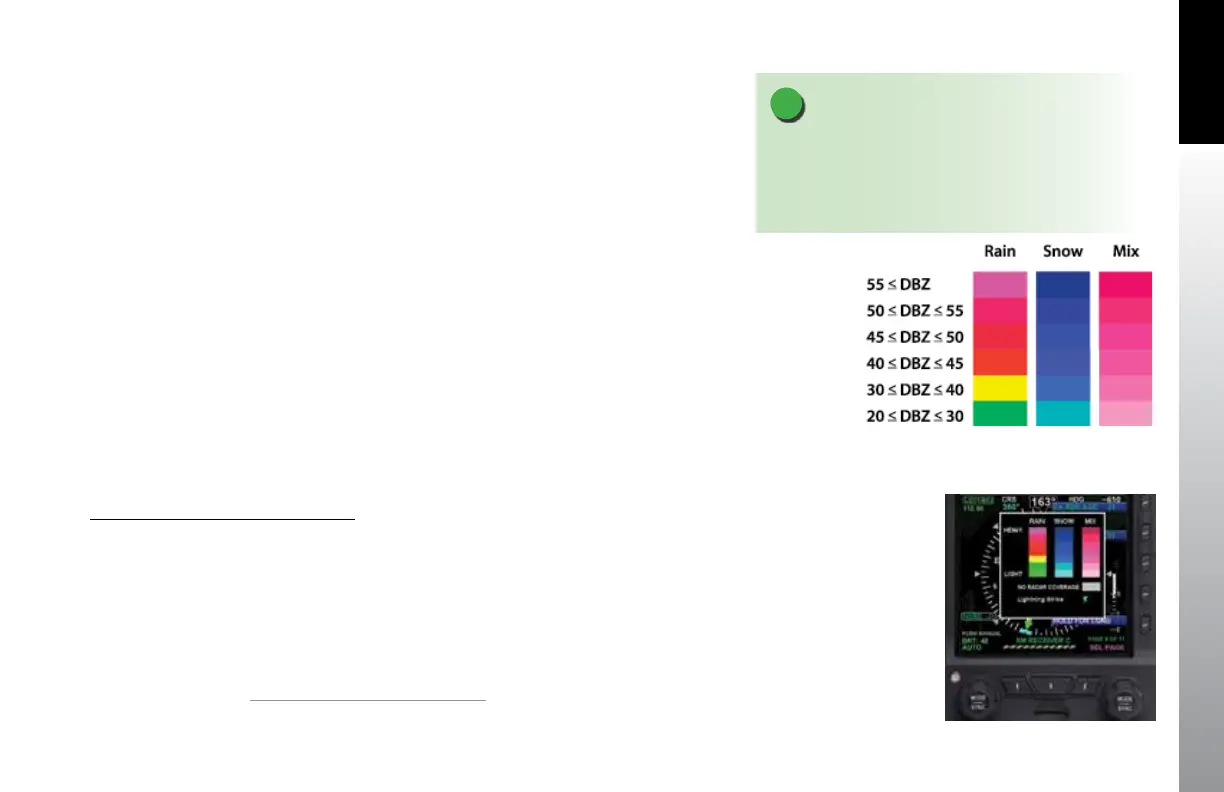
• Radar data is displayed as outlined in Figure 4-124. Areas without radar coverage
are indicated by translucent gray. Radar cells indicating reectivity below 10 dBZ
are not displayed. The PFD oers a Data Link Weather legend accessible from the
MENU.
Display Data Link Weather Legend
1. Press the MENU Button.
2. Rotate the Right Knob to the XM RECEIVER C Menu page.
3. Press and hold the HOLD FOR LGND Menu Key.
The Data Link Weather Legend displays until the Menu Key is released (Figure 4-125).
4. Press the MENU Button to exit.
1.
VFR PFD option and standard Pro PFD feature
NOTE
Areas of no coverage are gray. If the aircraft is on the
ground before data is received, or in an area of no
coverage and the range setting is low, the entire CDI
may be underplayed in translucent gray.
Figure 4-124
NEXRAD Radar Data
Figure 4-125
Data Link Weather Legend



 To Next Page