How to Use - Fine Adjustment of the Incubator
24
1-14 CO
2
Offset Setting
CO
2
offset setting allows to adjust so that the output value of the CO
2
sensor will be 0% in the
atmospheric environment.
Enter the difference from CO
2
indication values so that 0.0% will be indicated when detection is
performed by the CO
2
sensor in the atmospheric environment.
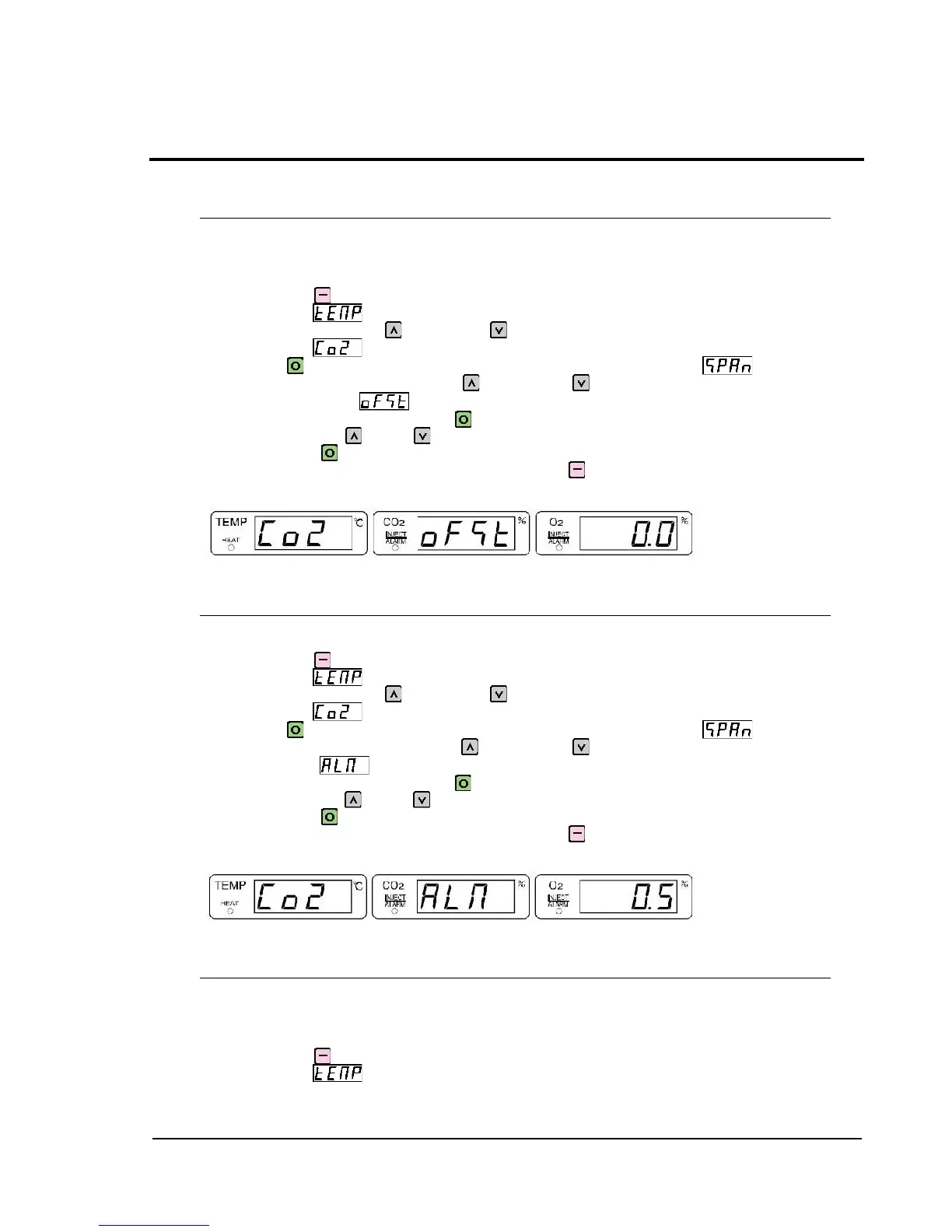
Press and hold SILENCE for 1 second or longer to display temperature fine-adjustment
mode indication .
When in this display, press UP once or DOWN five times to display CO
2
fine-adjustment
mode indication .
Then, press SET to switch the indication to CO
2
SPAN setting indication .
Moreover, when in this display, press UP once or DOWN three times to display CO
2
offset setting indication .
To change the current setting, press SET again to make the CO
2
offset setting indication
flash, and then press UP or DOWN to select the desired CO
2
offset value. After changing
the setting, press SET to complete the setting.
To return to the previous layer of the setting item, press SILENCE.
Example of CO
2
offset setting indication (Numeric value: Shown for reference)
1-15 CO
2
Alarm Setting
CO
2
alarm setting allows to set a tolerance for alarm generation, relative to the CO
2
concentration
preset through CO
2
setting. If 1.0 is set for example, the tolerance will be ±1.0%.
Press and hold SILENCE for 1 second or longer to display temperature fine-adjustment
mode indication .
When in this display, press UP once or DOWN five times to display CO
2
fine-adjustment
mode indication .
Then, press SET to switch the indication to CO
2
SPAN setting indication .
Moreover, when in this display, press UP twice or DOWN twice to display CO
2
alarm
setting indication .
To change the current setting, press SET again to make the CO
2
alarm setting indication
flash, and then press UP or DOWN to select the desired CO
2
alarm value. After changing
the setting, press SET to complete the setting.
To return to the previous layer of the setting item, press SILENCE.
Example of CO
2
alarm setting indication (Numeric value: Shown for reference)
1-16 CO
2
Alarm Delay Time Setting
CO
2
alarm delay time setting allows to set delay time to alert.
Alarm will be triggered when current CO
2
concentration on the display deviates more than the
preset at CO
2
alarm setting after the time set in this menu has passed.
The unit of the numeric value to be set is "minute".
Press and hold SILENCE for 1 second or longer to display temperature fine-adjustment
mode indication .



 To Next Page