35
PC Operations - Start and Login
2. PC Operation Procedures
2-1 Start Screen
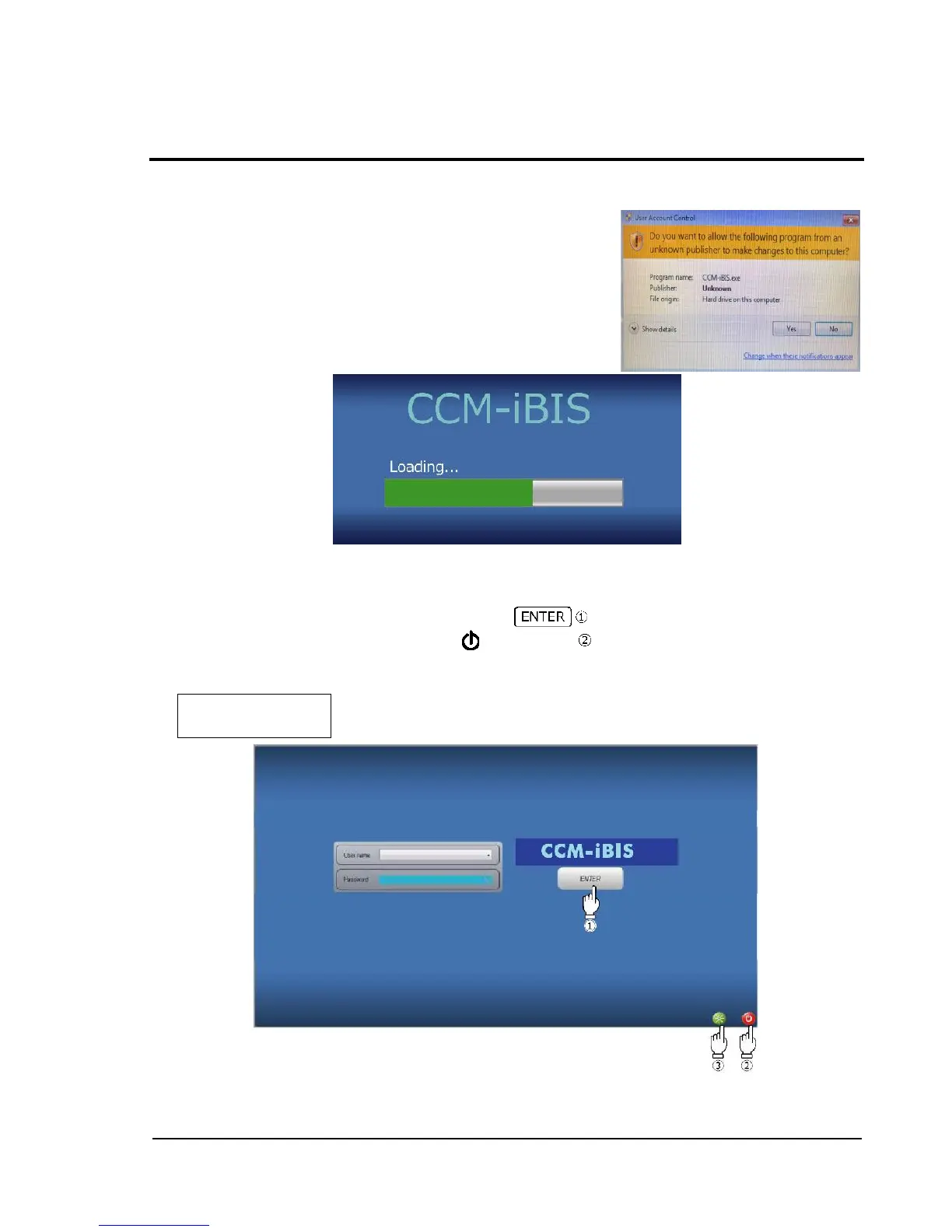
When the PC in connection is started after the main body is
turned On, the confirmation window below is displayed on the
screen of the PC. Press [Yes] to proceed to the next step.
The screen which indicates start of CCM-iBIS is displayed as below.
When the software is started, checkup of the saved files and the
database is executed and progress is shown with a progress bar.
* Note that as the number of saved images increases, more time
will be spent to finish starting.
2-2 Login Screen
After completion of the processing for the start screen, the login screen is displayed.
Enter a user name and password, and then touch .
To cancel logging in and terminate, touch power button at the bottom right of the screen.
Before the delivery, the user name and password below are preset. See "2-12 User Management"
and change them as needed.



 To Next Page