56
PC Operations - Schedule Pattern Settings
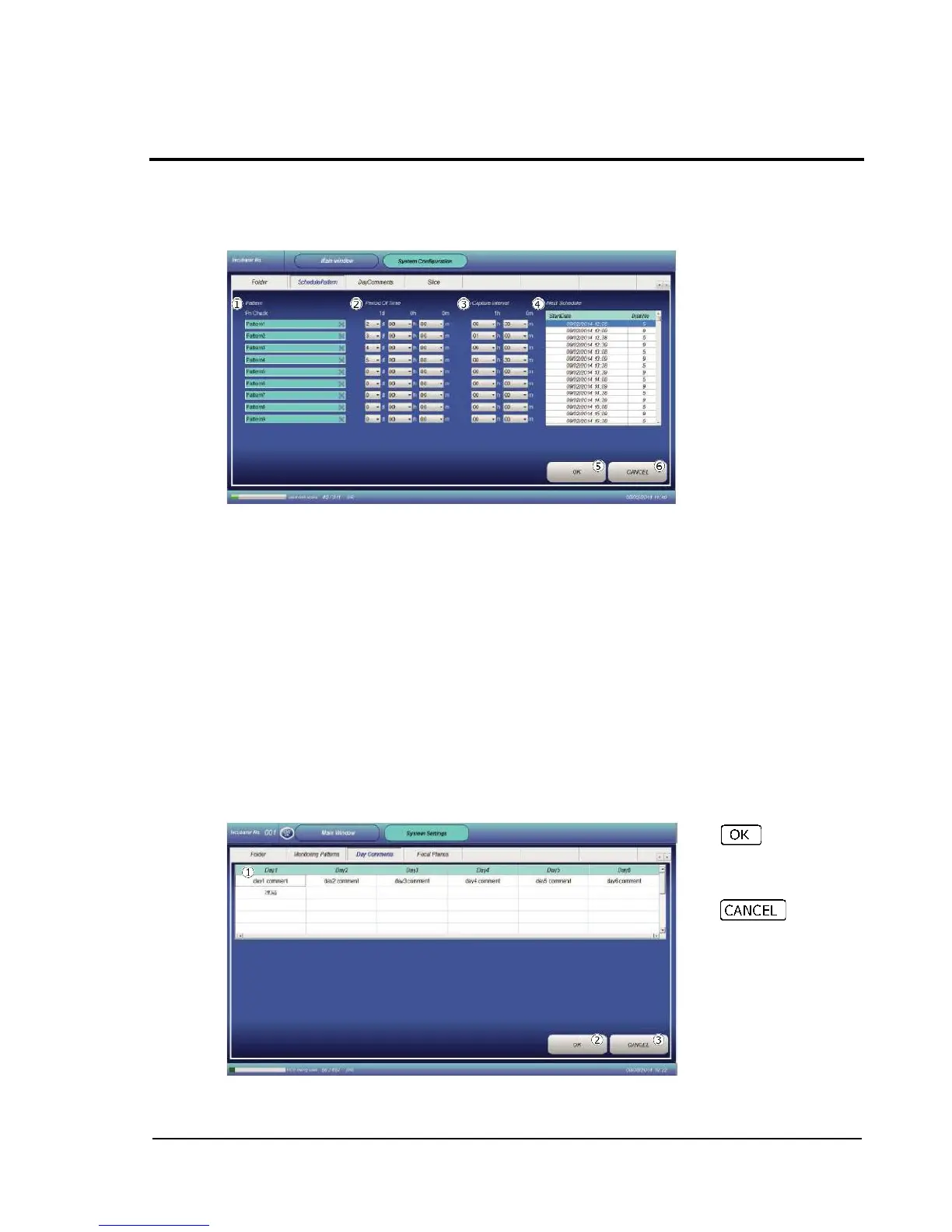
2-14-2 Schedule Pattern Settings (Monitoring Patterns)
Set schedule for auto image capture.
The settings made here can be selected in the "Dish-In" procedure.
Pattern: As a schedule pattern, nine customizable patterns can be selected besides fixed PN
Check. For patterns other than PN Check, arbitrary names can be set.
Monitoring Schedule: Set the time period from execution of Dish-In to end of image capture.
Capture Interval: Set an image capture interval. Minimum setting unit is 15 minutes or 20
minutes.
Settable values are multiples of 15 or 20 (minutes).
Next Schedule: Shows the nearest schedule list which has been set.
OK: Confirms the changed settings and restores the Main window.
CANCEL: Restores the Main window without confirming the changed settings.
2-14-3 Day comment settings (Day Comments)
This function allows editing of items to be shown when "Day Comments" is selected on the report
generation screen.
Up to 10 items can be set for each of Day1 to Day6.
To make settings, double-tap desired field , so that entry becomes possible.



 To Next Page