55
PC Operations - System Settings/ Folder Settings
2-14 System Settings
Make system-related settings including file save location and schedule settings.
2-14-1 Folder settings (Folder)
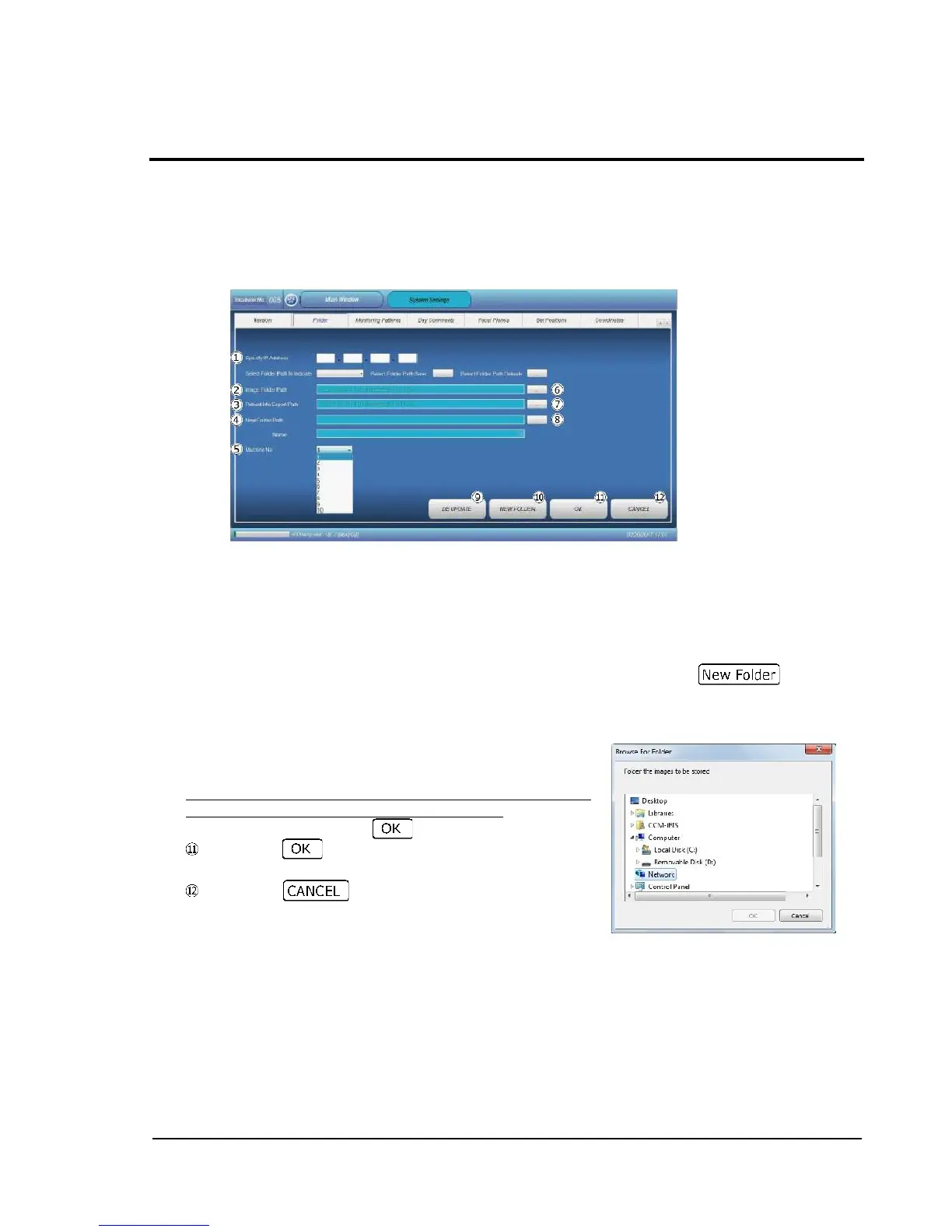
Specify a folder for saving captured images and output sample-related information.
Specify IP Address: Enter the IP number of save location NAS.
Image Folder Pass: Specify a folder for saving captured images.
Patient Info Export Pass: Specify a folder for saving text file generated at the time of
sample-related information output (TEXT EXPORT) in the "Dish Info" procedure.
New Folder Path and Name: Use when creating a new folder. Enter a save destination
directory of folder to be created and new folder name. When creating, tap .
Machine No: Set the ID No. of this equipment. Select ID Nos. 1 to 10 from the pull-down menu.
DB UPDATE: Re-organizes the database in the system. Use to sort out information remaining
in the database when deleting sample data, for example.
Tapping button , , or displays the corresponding folder
browse dialog (as shown to the right) for setting.
To set a network-connectable hard disk drive (NAS) as a save
location, select the IP No. of NAS from "Network", specify a
desired folder, and then tap .
Pressing confirms the settings and restores the
Main screen.
Pressing restores the Main screen without
confirming the settings.



 To Next Page