Ch. 8. Conductive AFM (ORCA) Sec. 8.3. Preparing for Imaging
5.
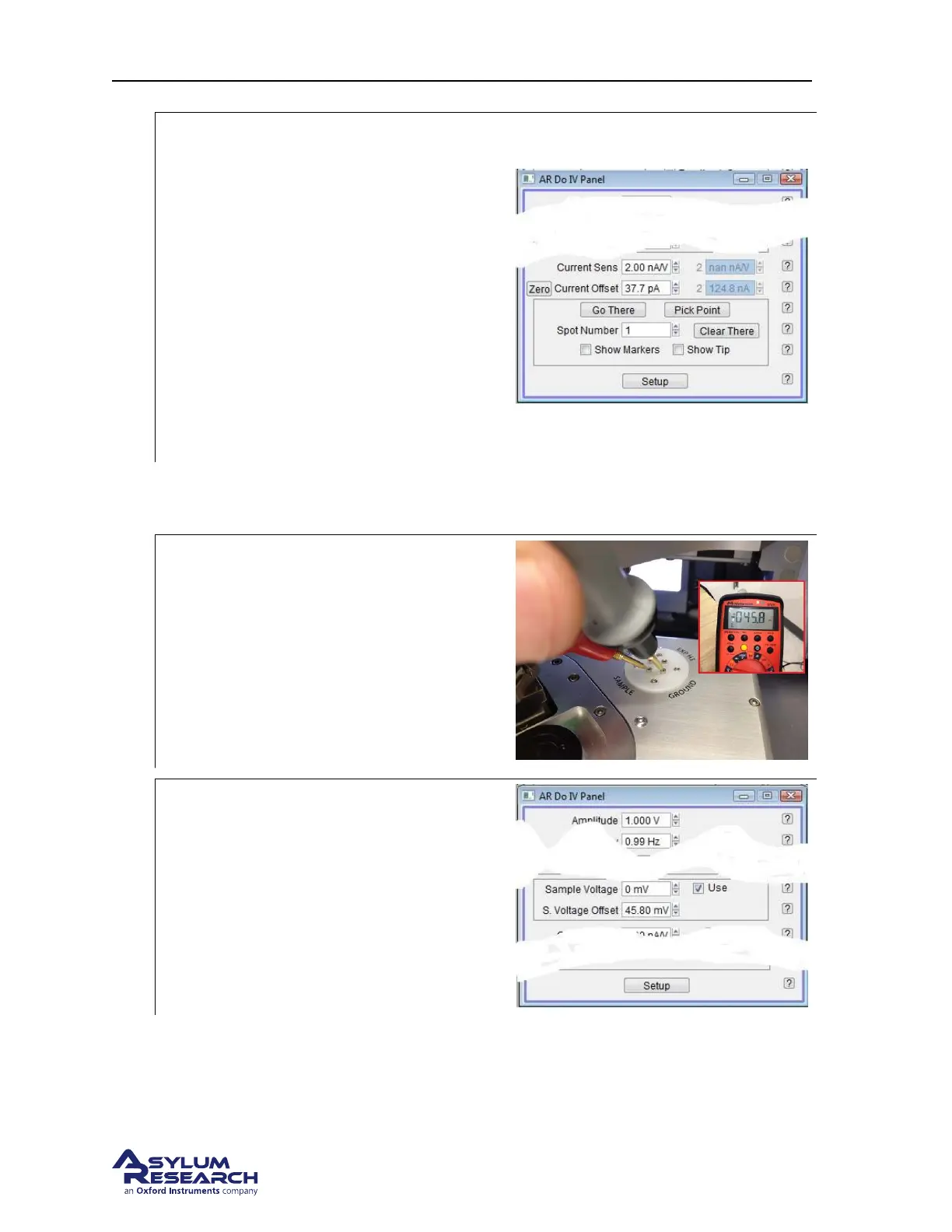
Press the ’Zero’ button to zero the current
• The Software will add the appropriate
offset from the Current data to make the
Current 0A.
• Verify that the current is zeroed.
Note This is only a software offset. The
actual electrical offset in the instrument is
still present.
Note If the zero button is not present in your
version of the software, zero the offset current
by typing the amount of current shown in the
Cur value in the SUM and Deflection meter
panel.
8.3.1.2. Zeroing the Sample Bias
1.
Measure the Sample Bias voltage on the
scanner’s terminal block.
• Check the ’Use’ check box next to the
Sample Voltage parameter in the DoIV
control panel.
Note In this example, the measured offset
Bias voltage is -46mV
2.
Enter the amount of offset voltage needed
in the S. Voltage Offset control parameter.
• Use the opposite sign of the voltage
measured on you voltmeter to negate the
actual voltage.
Note Make sure that the Sample voltage
parameter is set to 0 volts when making this
adjustment.
3. Change the Sample voltage parameter and verify that the corresponding voltage appears on the
Sample pin on the scanner’s terminal block.
DRAFT
Page 97



 To Next Page