Ch. 11. Tutorial: AC Mode in Air, ES Sec. 11.2. Loading the Cantilever and Sample
26.
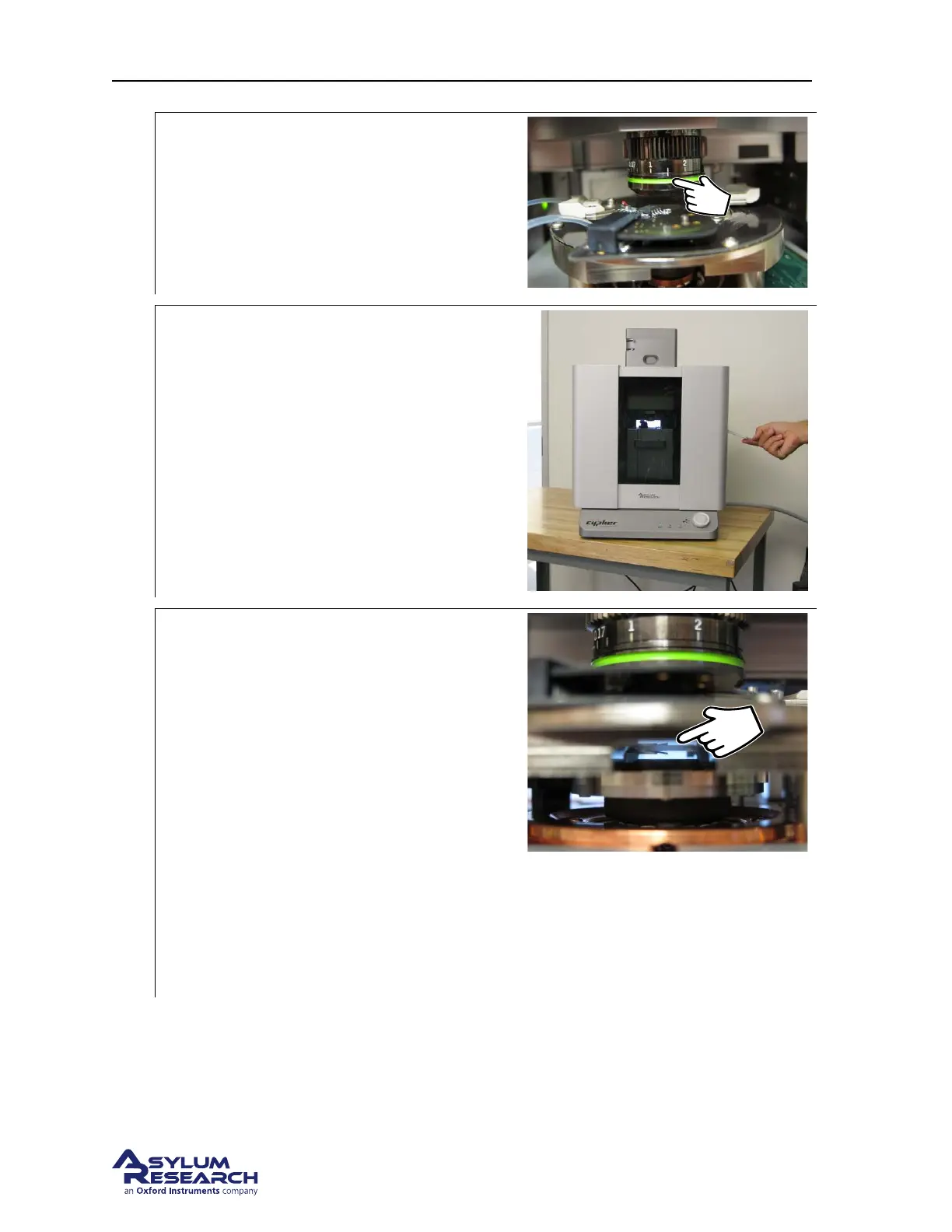
Check correction collar:
• Check that the green correction collar
on the objective is set properly. For the
Gas cantilever holder, set the correction
collar to 1.5.
27.
Close enclosure door:
• Gently close the door and latch it.
28.
Motor cantilever toward sample:
• Place your eyes level with the cantilever
and sample, so you can clearly see the
gap between cantilever and sample.
• Slowly turn the ‘Engage Control Knob’
on the AFM enclosure
counterclockwise. This will lower the
cantilever holder and objective toward
the sample. The more you turn, the
faster the stage moves.
• Close the gap between tip and sample to
about 1 millimeter.
Warning: Nothing but your attentiveness will
prevent the cantilever holder from crashing
into the sample. If you crash the cantilever
holder you may cause SERIOUS damage to
your cantilever holder and scanner.
29. This concludes the manual interaction with Cypher. We next turn our attention to the computer.
Please jump to Section 4.3 on page 26.
DRAFT
Page 140



 To Next Page