Ch. 7. iDrive Imaging Sec. 7.3. Older Models
7.
Optional final inspection
Optional Tools Ohm meter.
• Where the clips are widest, measure the
resistance between the two clips. It
should be infinite (open circuit). If it is
finite, then the clips are touching and
you should loosen the four button head
screws and repeat the previous step.
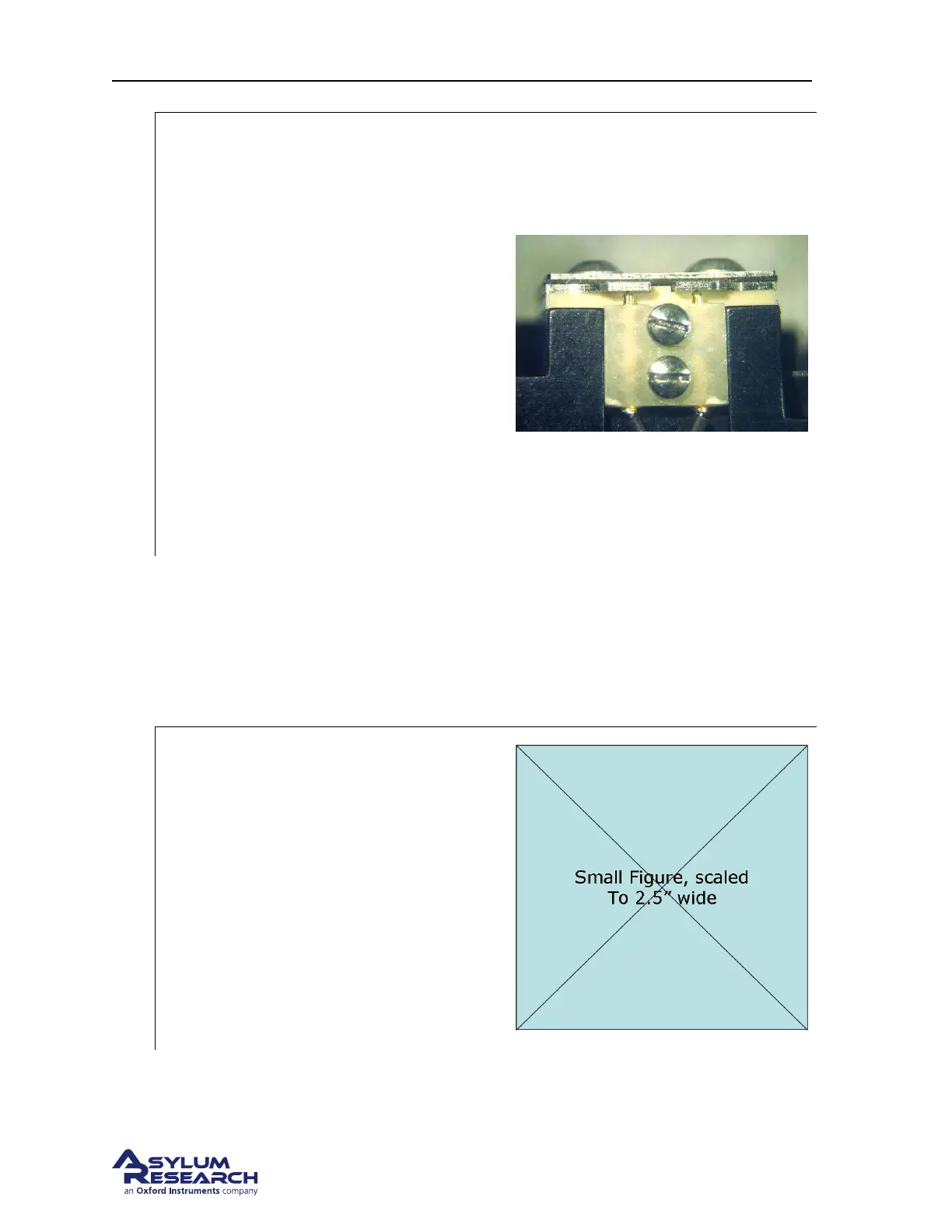
• The photo on the right shows a view
from behind where you should see a
stack-up (from top to bottom) of screw
heads, metal plate, plastic plate, clips,
thicker plastic plate, and then the
aluminum cantilever holder. Note the
two gold coated spring loaded pogo pins
that must make contact with the clips for
the iDrive system to function properly.
7.3.1.4. Adjusting Piezo Preload
When first disassembling the droplet holder for cleaning, the preload screw was loosened. Doing this
allows you to readjust the compression on the piezo element properly after it is reassembled. This is
recommended since the amount of compression is very small and the piezo position may change when
you remove and reinstall the glass window.
1.
Install the cantilever holder
Tools 0.050” hex driver or Allen wrench
• Take the assembled cantilever holder,
without cantilever installed, to the
Cypher SPM.
• Insert the cantilever holder into the
scanner.
• Finger tighten the screw which clamps it
down.
• No need to do any motoring up or down.
Move to the next step.
BETA
Page 90



 To Next Page