FlexiROC T30 R 4 Operation
88 No: 2969809547.1.2969824267 en-US
4.4.11 Loosening Automatically
n
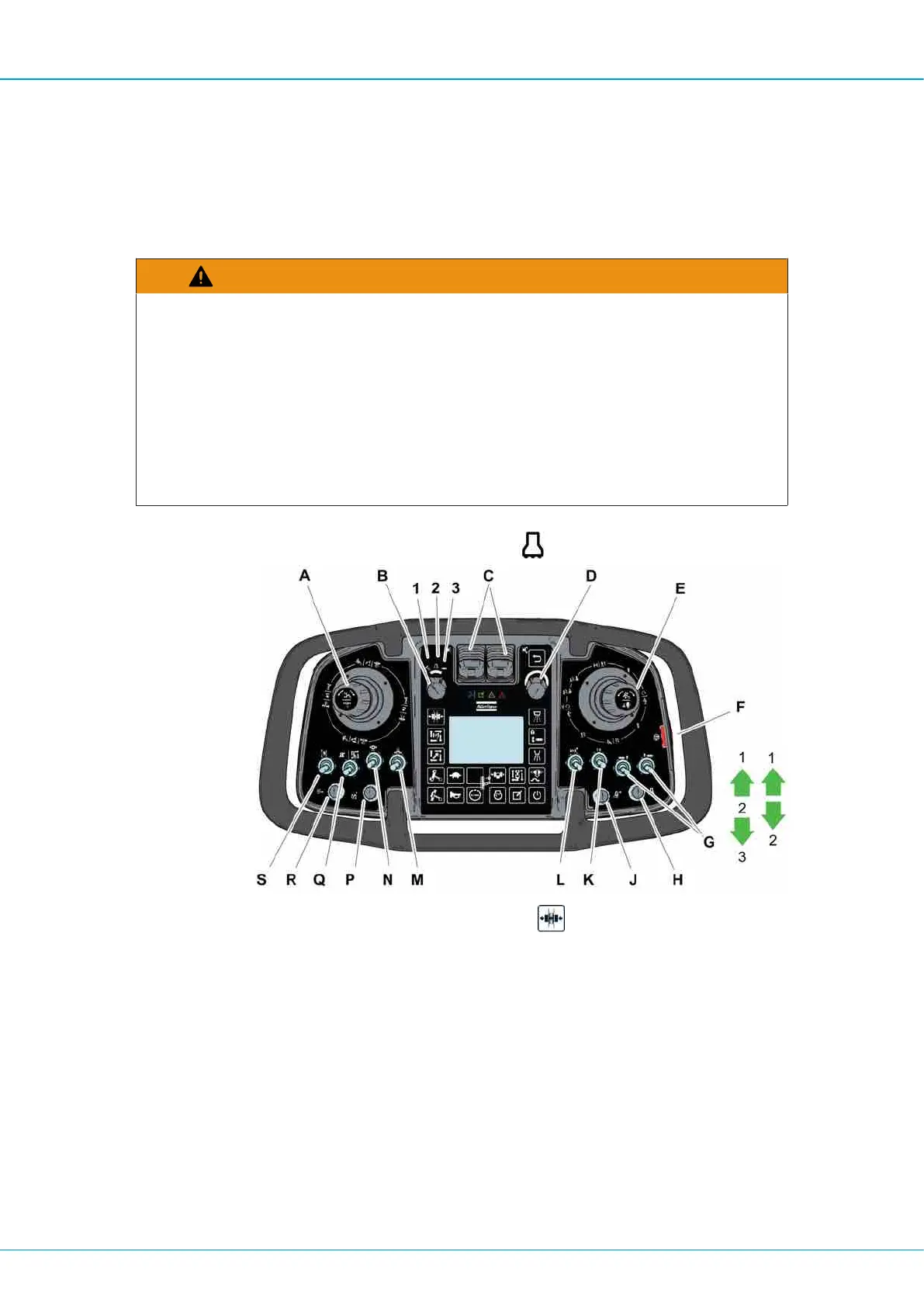
Select the settings in the operator panel.
4.4.12 Adding Extension Rods
WARNING
Accidental Operation
Accidental operation can cause serious injury or damage property.
u The operator must have a clear line of sight when working with a remotely operated
machine.
u Before operating the machine, always check that the controls are correctly adjusted.
u Always deactivate the remote control when not in use.
u Never stand on the machine during operation.
1.
Set the mode switch (B) in drilling position
.
2.
Activate the sleeve retainer with touch button
if drill rods with loose sleeve are
used.
3.
Position the drill rod in drill center with the left multi-function lever (A).
4.
Move the left multi-function lever to section (C) to obtain hard grip.
5.
Move the right multi-function lever (E) to sector (G) to thread the drill rod into the rock
drill.
6.
Move the left multi-function lever to neutral position to obtain loose grip.
7.
Continue to move the right multi-function lever to sector (G) to thread the drill rod into
the existing drill rod.
8.
Turn the right multi-function lever to sector (E) to open the claws.
9.
Move the left multi-function lever to sector (A) to position the arms from drill center.


 To Next Page
 Loading...