FlexiROC T30 R 4 Operation
93 No: 2969809547.1.2969824267 en-US
6.
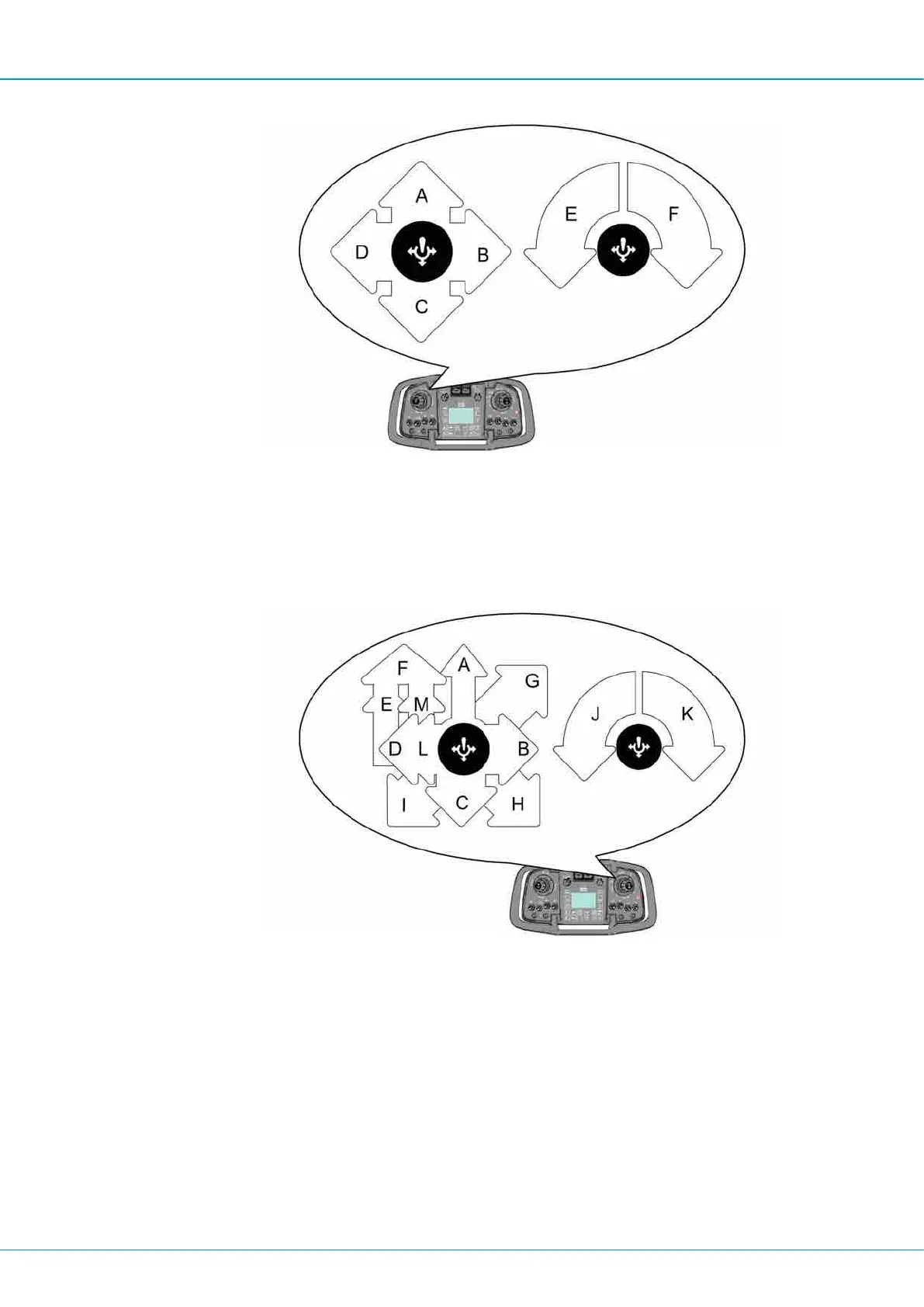
Move left multi-function lever (1) to sector (C) to move the rod handling arms into drill
center.
7.
Turn the left-hand multi-function lever (1) to neutral position to obtain hard grip. Hold
the left-hand multi-function lever in position (C).
8.
Move the right-hand multi-function lever (5) to threading position, sector (G) to tighten
the joint between the shank adapter and the sleeve.
9.
Move left multi-function lever to neutral position (loose grip).
10.
Move right multi-function lever (to sector (H) to activate unthreading (break loose rod
joints).
11.
Move right multi-function lever to sector (C). The rock drill stops automatically in the
correct position to be able to insert the drill rods into the carousel.
12.
Move left multi-function lever to sector (C) to obtain hard grip.
13.
Move right multi-function lever to sector (H) to unthread the shank adapter from the
drill string.
14.
Move left multi-function lever to sector (A) to insert the drill rod into the carousel.
15.
Move left multi-function lever to sector (D) to rotate the carousel.


 To Next Page
 Loading...