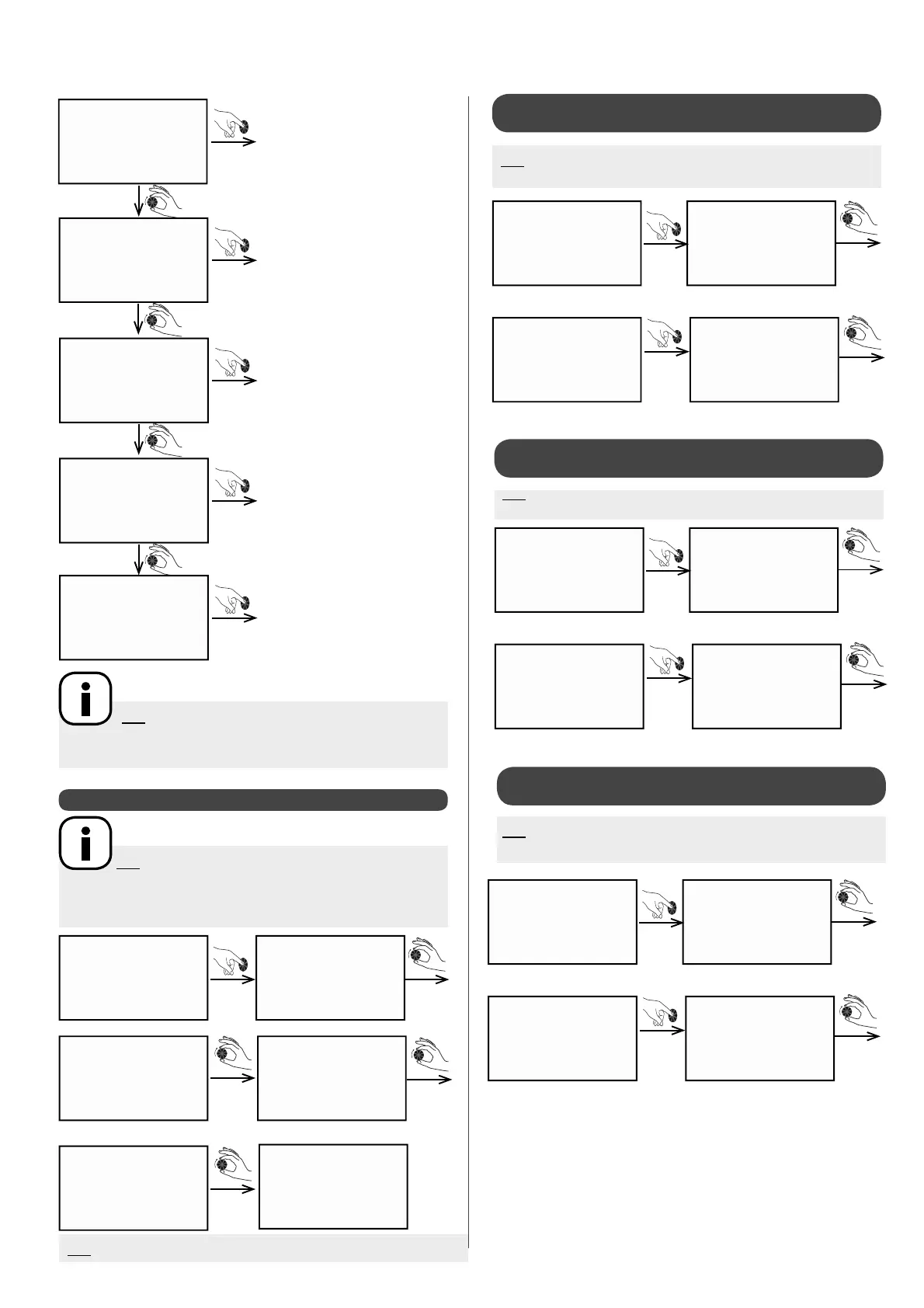
Enter turn
Enter
turn
turn
Enter
Enter
Enter
Enter
Enter
se t t i n g A M B I e N C E
E C O
DH w s et
sw i m . p o o l
a n t i fr e e z
bo o s t
su m m . /W I N T .
l a n g u a g e
be e p
in s t . m e n u
Switch to Boost mode
Switch to summer / winter
mode
Change language
Beep activated when dial
pressed
Access installer menu
N.B: When the circuit(s) are controlled by a thermostat
(ou aquastat for domestic hot water), the Setting sub-menu will
not appear.
N.B: When 2 circuits are used for heating and each one
has a room temperature sensor, the setting sub-menu o ers the
following options:
ambience 1 ambience 2 eco 1 eco 2 anti freez 1 anti freez 2
N.B: The temperature sensor is connected and the parametres set.
5.3.1 - Setting target temperatures
5.3.1.3 - Setting the anti freez target
temperature
a n t i fr e e z
7 . 0 °C
by default
a n t i fr e e z
8 . 0 °C
example
Enter
Enter
a n t i fr e e z
N.B : Only where there is a room temperature sensor and
display
turn to
modify
target
temperature
turn to go to
next setting,
dhw set
a n t i fr e e z
a m b i e nc e
2 0 . 0 °C
by default
a m b i e nc e
2 2 . 0 °C
example
Enter
Enter
A M B I e NC E
5.3.1.1 - Setting the AmbiEnce target
temperature
5.3.1.2 - Setting the eco target temperature
N.B: Only when there is a room temperature sensor and display
on circuit 1.
turn to
modify
target
temperature
turn to go to
next setting,
ECO
a m b i e nc e
E C O
1 7 . 0 °C
by default
E C O
1 6 . 0 °C
example
Enter
Enter
E C O
N.B: Only when there is a room temperature sensor and a
display
turn to
modify
target
temperature
turn to go
to next
setting,
anti
freeze
E C O


 To Next Page