- INSTALLER 7 & 11kW HRC
70
HIGH TEMPERATURE HEAT PUMP
-
46
0
50
100
150
200
250
300
350
-40 -30 -20 -10 0 10 20
°C
k:
0
1
2
3
4
5
6
7
8
9
10
11
12
20 30 40 50 60 70 80 90
°C
k:
0,2
0,3
0,4
0,5
0,6
0,7
0,8
0,9
1,0
90 100 110 120 130 140
°C
k:
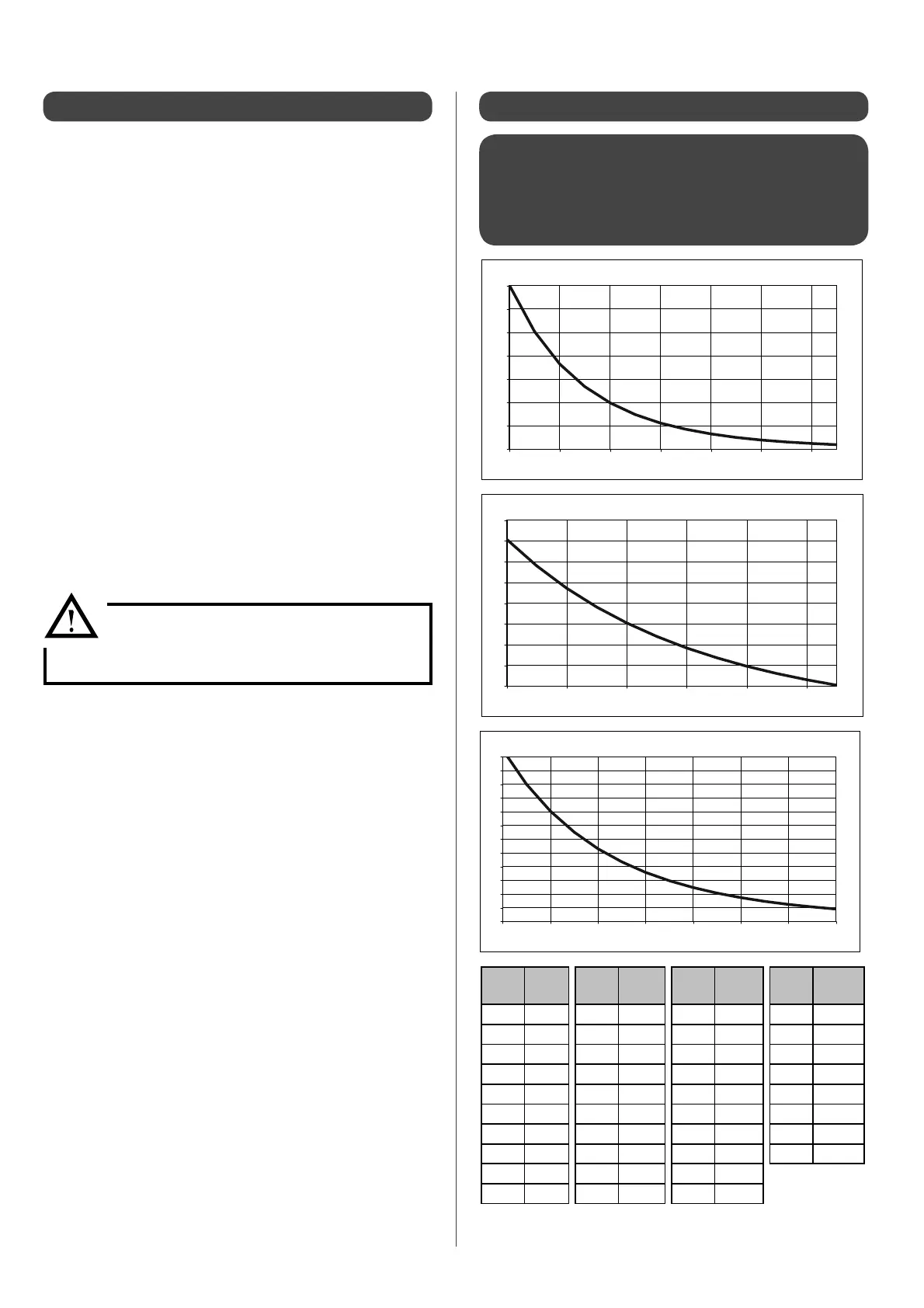
6.11 - Sensor data curve charts6.10 - Extracting the USB les
6.11.1 - Water inlet and outlet HRC
70
Heat Pump
and HRC
70
Pilot De-icing sensor - Air
intake sensor -
Sensors tted to compressors 1 and 2 -
Swimming pool sensor - DHW sensor
Temp.
(°C)
Sensor
value
(KOhms)
Temp.
(°C)
Sensor
value
(KOhms)
Temp.
(°C)
Sensor
value
(KOhms)
Temp.
(°C)
Sensor
value
(KOhms)
-40 351.078 10 20.017 60 2.472 110 0.504
-35 251.277 15 15.768 65 2.068 115 0.439
-30 182.451 20 12.513 70 1.739 120 0.384
-25 133.827 25 10.000 75 1.469 125 0.336
-20 99.221 30 8.045 80 1.246 130 0.296
-15 74.316 35 6.514 85 1.061 135 0.261
-10 56.202 40 5.306 90 0.908 140 0.231
-5 42.894 45 4.348 95 0.779 145 0.204
0 33.024 50 3.583 100 0.672
5 25.607 55 2.968 105 0.581
In case of breakdown, please send the following information to
the AUER technical assistance service:
• The customer’s name and full contact details
• Name and full contact details of the installer of the
appliance
• Equipment references:
- Model
- Outer unit serial n°
- HRC
70
Pilot serial n°
• Error message displayed on HRC
70
Pilot
• USB les (USB le extraction procedure is described
opposite).
To extract the USB le from the HRC
70
Pilot, please follow this
procedure:
1) Take a USB stick (preferably one which is blank and
formatted)
2) Insert the USB stick into the USB port in the front of the
HRC
70
Pilot
3) "USB stick" will be displayed on the screen with 3
dashes underneath the message
4) After a few minutes, the message "remove usb stick"
will appear.
You can now remove the USB stick, but be sure not to
do it before this message is displayed.
5) Two les named ‘‘C4E.txt’’ and ‘‘C4E00... .txt’’ are
generated onto the USB stick.
The second le contains the heat pump operating
history and should be about 5Mo.
6) Send both of these les to the AUER technical
assistance service, along with the essential information
mentioned opposite.
From this moment on, do not touch either:
- the USB stick , or
- the keys on the HRC
70
Pilot


 To Next Page