Page 206 – 12. User Settings and other options
TitanUniversal_Man_v8-0_TT.doc 05 August 2014
you to set detailed properties such as IP address ranges and net
masks.
If you have further networked DMX processing nodes connected,
these can be individually configured using the tabs across the top of
the screen.
12.4.2 TitanNet Overview
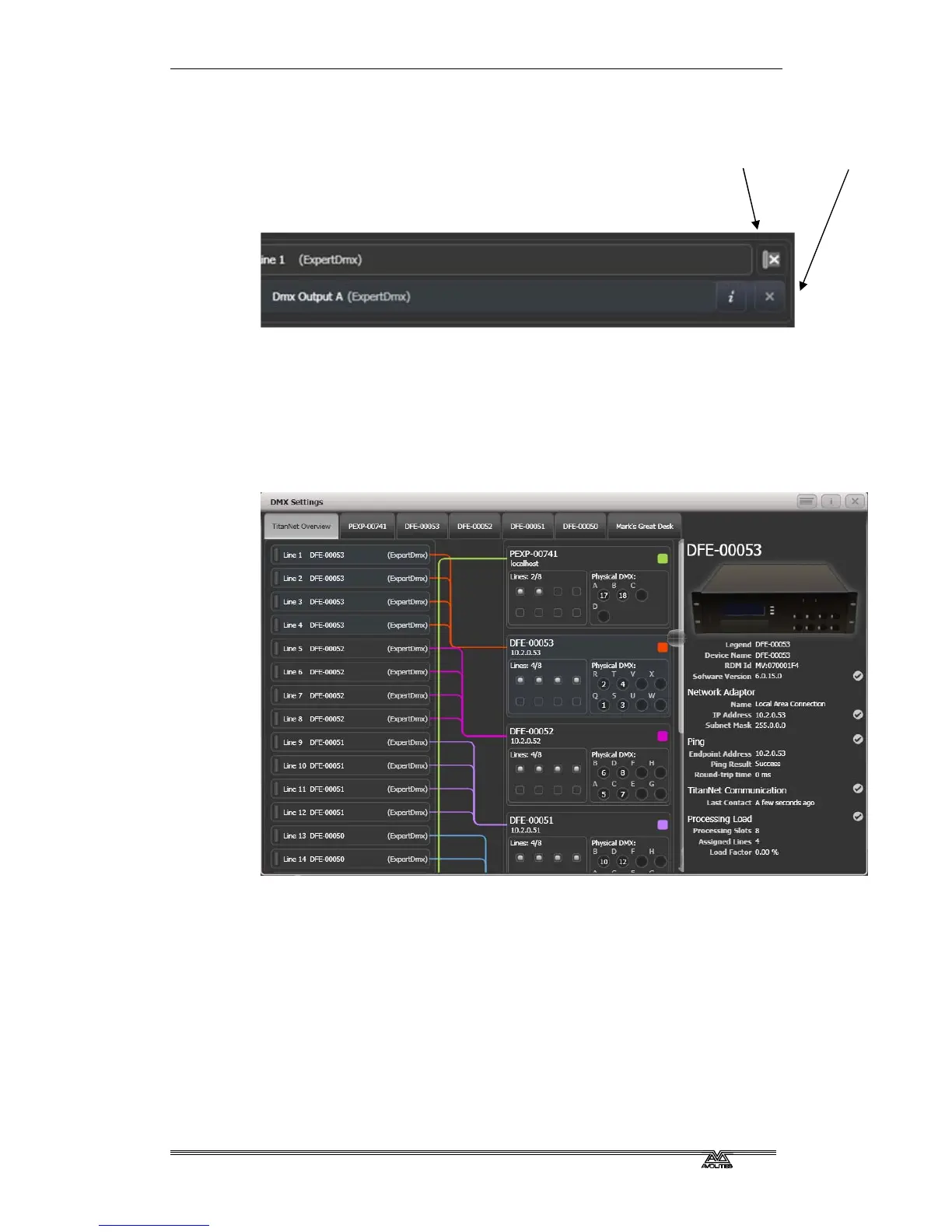
If you select the TitanNet Overview tab at the top of the screen, you
can see all the DMX nodes which are connected and which output
lines they are allocated to.
The left side of the screen shows the 64 possible DMX output lines on
the console. To the right of this are the processing nodes which are
connected, the top one being the console itself. Each node shows how
the lines are allocated to the physical outputs on the device. Clicking
this area will open the detail tab for the node.
Clicking any one of the nodes will show detailed information about
that node on the right, including the IP address, number of available
processing slots, number of lines assigned, status of the connection
with the node, and the processing load of the device. If more lines
are assigned than the maximum number of slots, a warning will be
displayed.
Group delete Individual delete



 To Next Page