Operating Instructions
Controls and Indicators
DV14307.03 Issue 04 March 2016 Transceiver Family 620X 99
3.2. Controls and Indicators
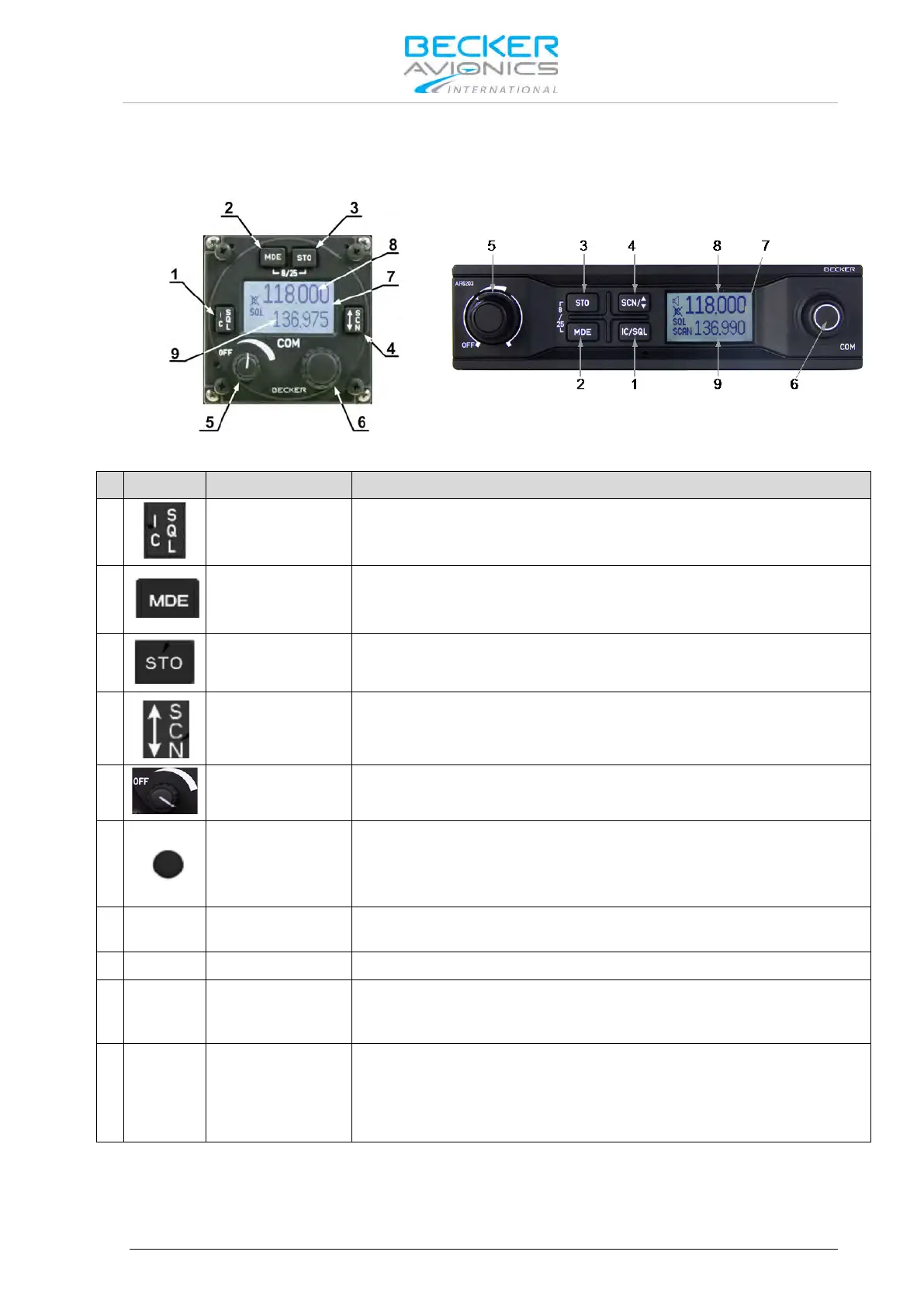
Figure 3-1: Controls and indicators
1
(Intercom/Squelch)
"Short press" during normal operation toggles the RX -SQL ON/OFF.
"Long press" during normal operation activates Intercom Menu.
2
(Mode)
"Short press" during normal operation changes the frequency selection
mode.
"Long press" during normal operation activates the user menu.
3
(Store)
"Short press" during normal operation activates storage procedure.
4
(Exchange/SCAN)
"Short press" during standard mode, or scan mode toggles between
preset and active frequency.
"Long press" activates scan mode.
5
Volume Knob
Switches the transceiver ON/OFF and adjusts volume level of received
signal.
6
Turning "ROTARY ENCODER" changes the settings of several
parameters (frequency, IC-volume, VOX, …).
Pushing the "ROTARY ENCODER" toggles between the digits and acts
as an enter key.
-8/25-
Channel Spacing
Keeping the MOD and STO button pressed simultaneously longer than
2 seconds changes 8.33 to 25 kHz channel spacing and vice versa.
LCD: Liquid Crystal Display
8
Only on the active frequency, transmitting is possible and receiving has
priority, even in scan mode. Frequency tuning is not possible in standard
mode.
9
Frequency tuning is possible in standard mode. In scan mode both
frequencies, active and preset are in listening watch. If no receive signal
is detected on the active frequency, receiving signals on the preset
frequency will be audible, but will be muted as soon as a signal on the
active frequency is detected.
The device detects a:
"Long press": when pressing and holding down a key for at least 2 seconds.
"Short press": any pressing below 2 seconds.



 To Next Page