BENNING IT 130 Measurements
- 68 -
6.6 USB and RS232 interface
The installation tester is provided with the two communication interfaces USB and RS 232. The
transmission mode is selected automatically by the installation tester depending on the interface
used. Here, the USB interface is given priority.
BENNING PC-Win IT 130 logging software. The PC software automatically recognizes the
installation tester and thus allows data transmission between the installation tester and the PC.
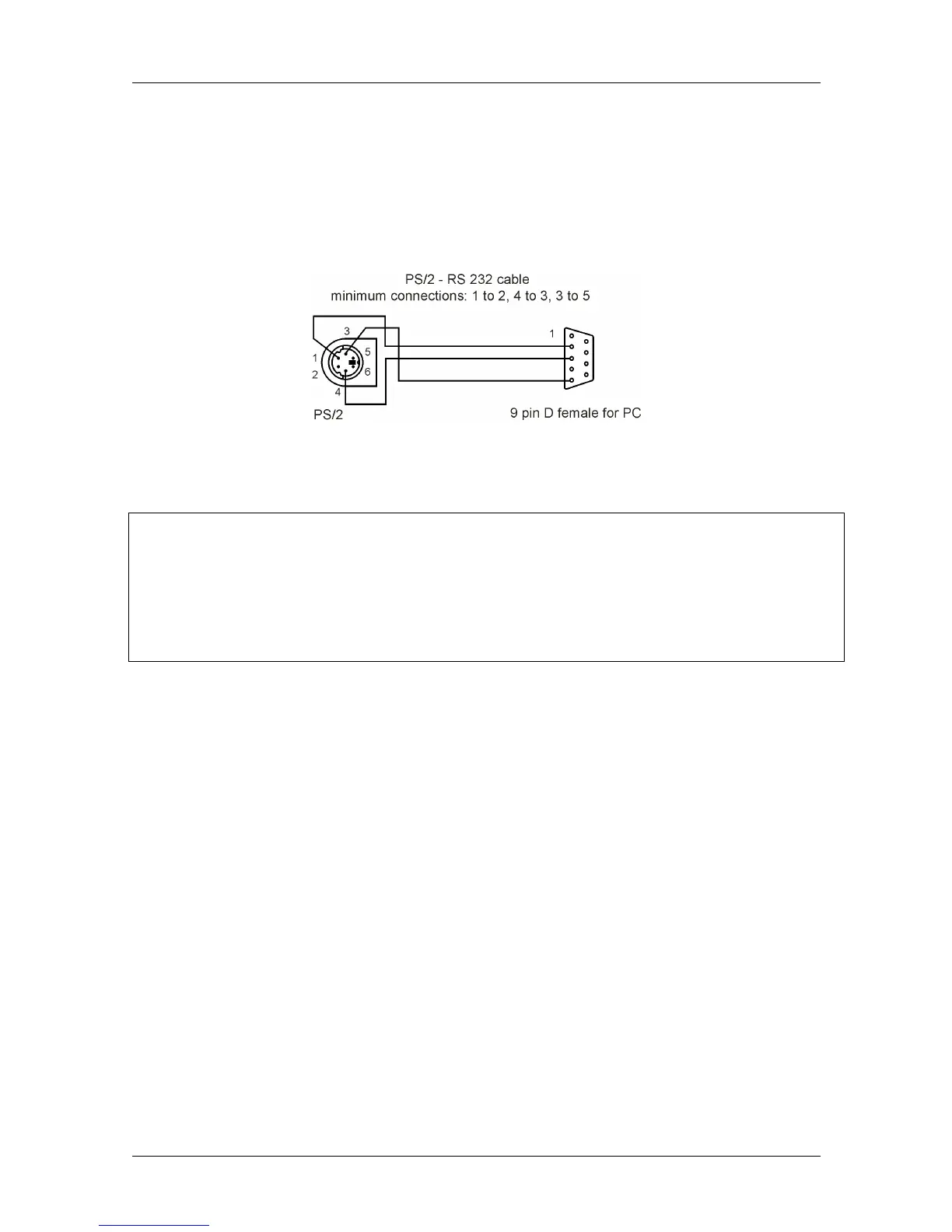
Figure 6.14: Pin assignment of the serial RS232 cable
How to set up a USB or RS232 connection
RS232 interface: Connect the serial PS/2-RS232 interface cable to a COM port of the PC
and to the PS/2 connector of the installation tester.
USB interface: Connect the USB cable to a USB port of the PC and to the USB port of the
installation tester.
Switch on both the PC and the installation tester.
Start the BENNING PC-Win IT 130 program.
The PC and the installation tester automatically recognize each other.
The installation tester is prepared for communication with a PC.
The BENNING PC-Win IT 130 logging software is compatible with Windows XP, Windows Vista,
Windows 7 and Windows 8.
Note:
Before using the USB interface, the USB driver should be installed on the PC. Please
refer to the installation CD for installation instructions of the USB driver.



 To Next Page