Creative embroidering
177
Endless Embroidery
Allows to resume embroidering borders which have already been started even if the machine has been
switched off and on again.
Prerequisite:
• An embroidery motif for borders must be saved in the Personal Memory. The reference points must be
defined in the embroidery motif.
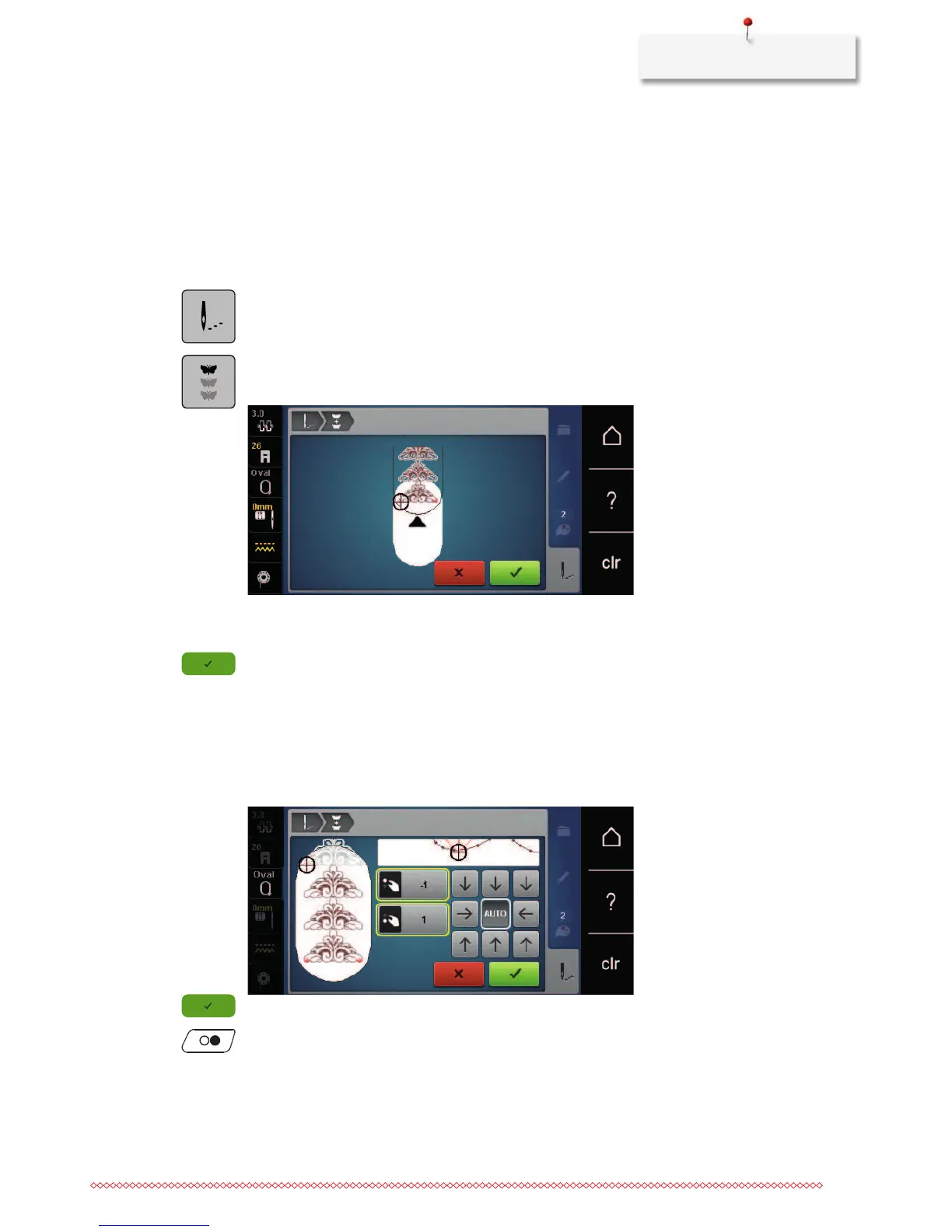
> Select border embroidery motif from the Personal Memory.
> Touch the icon «Embroidering».
> The icon «Endless embroidery» becomes visible in the right bar by scrolling upwards.
> Touch the icon «Endless Embroidery».
> Remove the hoop and rehoop the fabric so that the stitched out reference points are in the upper part of
the embroidery area and at least 3 cm (1.18 inch) from the top edge of the hoop.
> Attach the hoop.
> Touch the icon «Confirm».
– The hoop is moved automatically near the last stitch.
– The icon «AUTO» is activated and the hoop moves automatically near the last reference point.
> Via the arrow icons, determine on which side of the embroidered part the next reference point shall be
placed.
> Turn the «Upper Multifunctional knob» or the «Lower Multifunctional knob» to position the hoop
exactly.
> Touch the icon «Confirm».
> Push the button «Start/Stop» and resume embroidering.
> Repeat these steps until the desired length of the border is embroidered.



 To Next Page