159
Embroidery Support
Embroidery Sequence Control
when Thread Breaks
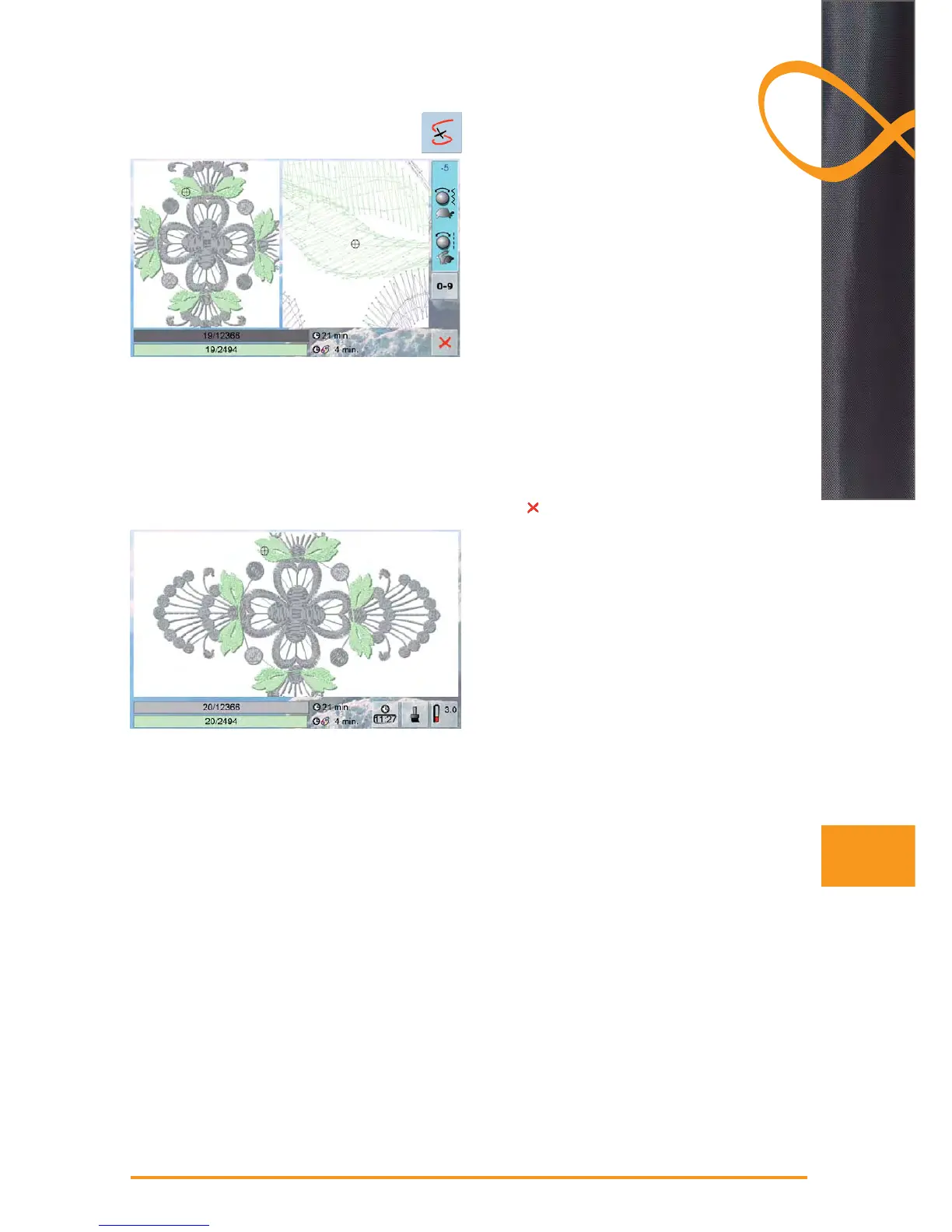
a special screen opens ►
motif appears in original size on the left-hand side of the ►
screen and in an enlarged view on the right
this makes it easier to check the embroidery sequence ►
the information area for operating the stitch width and ►
stitch length knobs is displayed
turn knobs counterclockwise (or clockwise, the hoop is ►
moved backwards (or forwards) in the embroidery
sequence
turn stitch width knob slowly, hoop is moved stitch by ►
stitch
turn stitch length knob, hoop is moved in large steps ►
(approx. 50 steps)
the number in the information area shows the number of ►
stitches in the embroidery sequence
use the «0-9» field to go directly to a stitching position ►
position the needle back far enough so that it will ►
resume stitching several stitches before the thread
breakage
to return to original position, touch information area ►
touch ►
to close the special screen
Resuming Embroidering
to continue embroidering, touch the start-stop-button or ►
press the foot control



 To Next Page