40
Setup Program
Monitoring
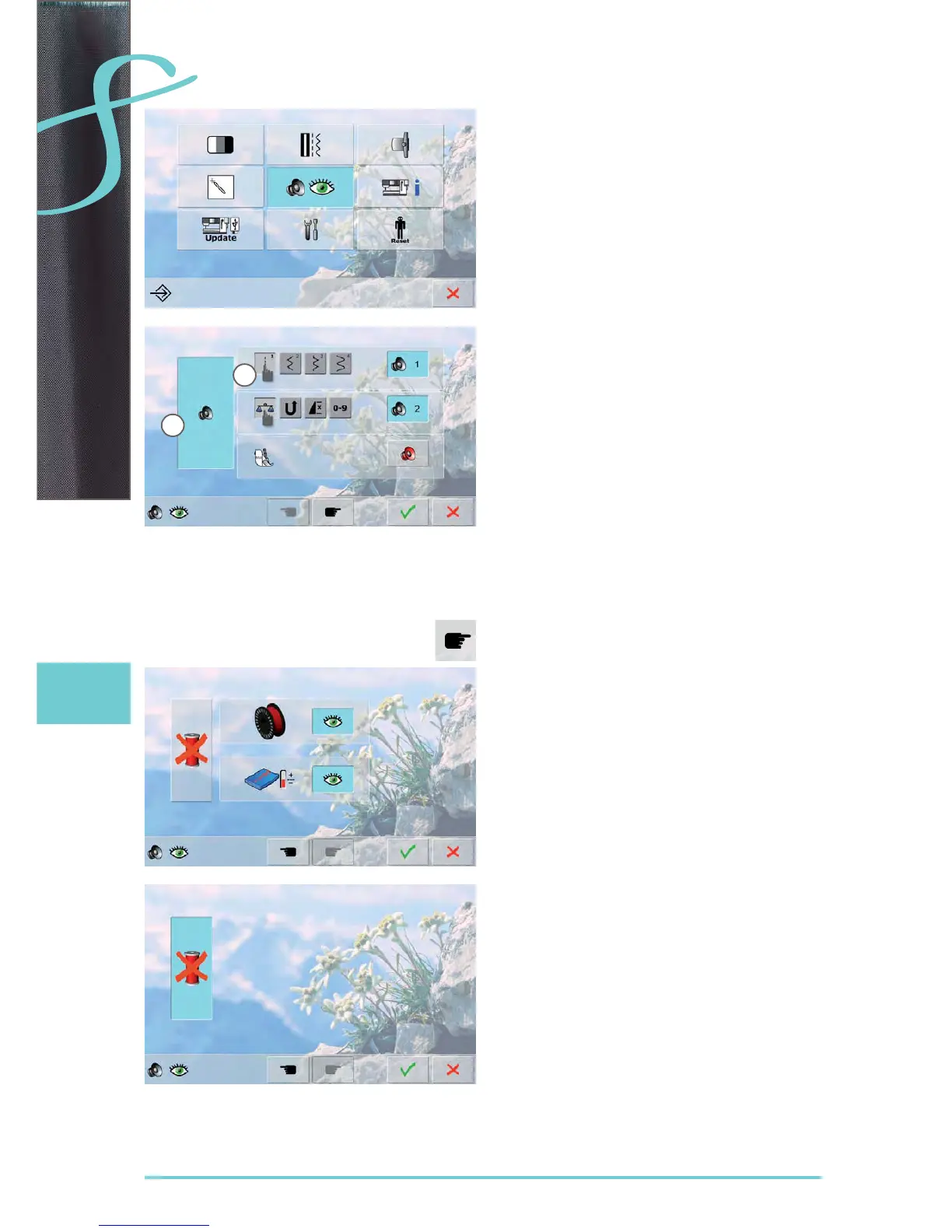
Audio System
sounds can be activated or deactivated ► 1
Selecting Stitch Pattern/ Function/ BSR
stitch patterns and function selection ► 2 can be confirmed
acoustically
touch the speaker icon until you hear the desired sound ►
there are six different sounds to choose from ►
this icon is blue and the sound is indicated by a number ►
(1-6)
the sounds for functions (center) and the sound for ►
quilting with BSR (bottom) can be activated or deactiva-
ted in the same way
deactivation is the last option shown when scrolling
►
through the different sounds
Monitoring Functions
The following monitoring functions can be activated or
deactivated:
Lower thread indicator
Optimum interlocking of upper and lower thread
Sewing without thread
blue with open eye = function active ►
gray with closed eye = function inactive ►
the sound type for the monitoring functions is set in the ►
audio settings for function
Sewing without thread
don‘t thread the sewing computer with upper thread ►
(or remove it entirely)
press the large field on the left ►
sewing without thread is activated ►
the other two monitoring functions are deactivated and ►
disappear
selecting another presser foot or switching the sewing ►
computer off deactivates the function
1
2



 To Next Page