Section 2 System Description
15
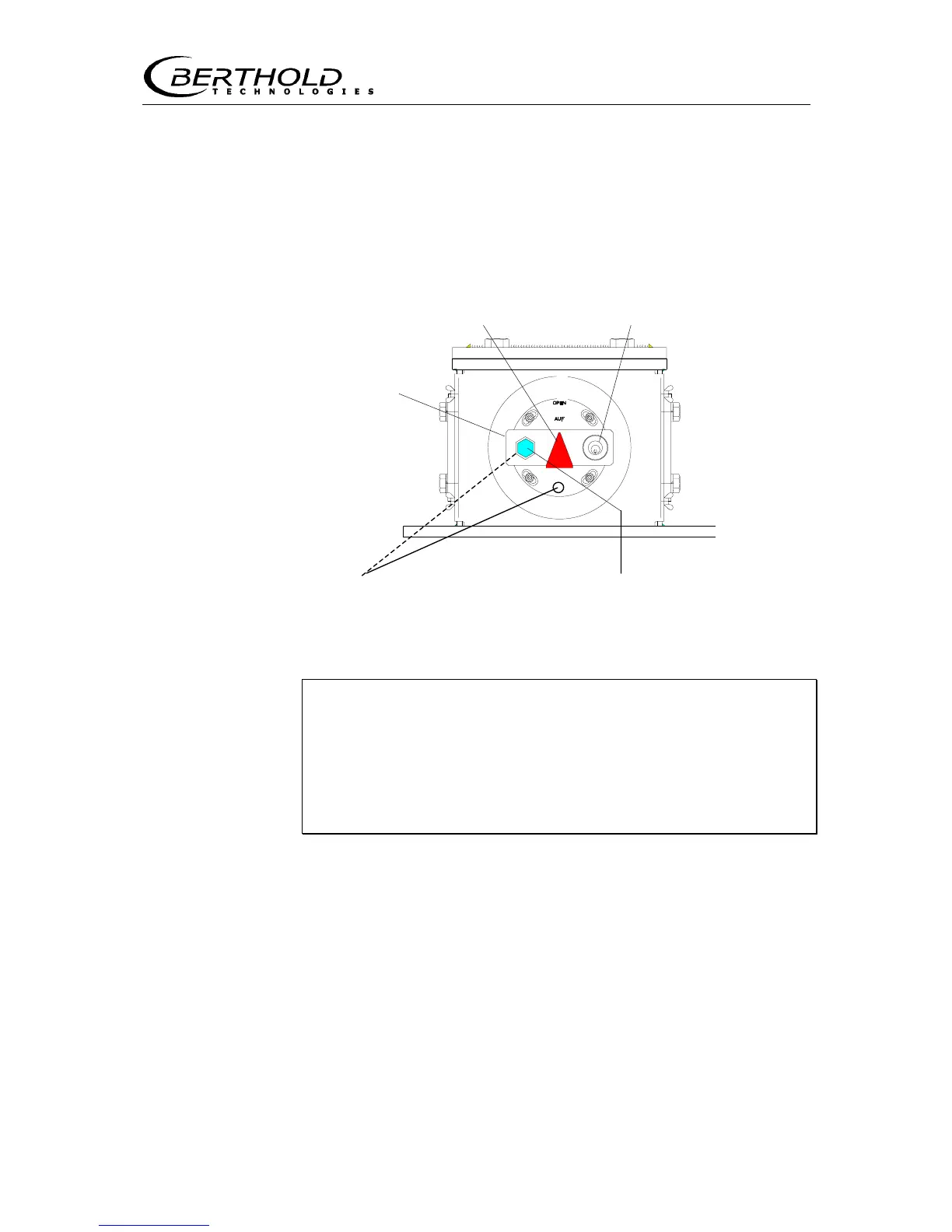
On the other side of the shielding is a device for opening and clos-
ing the radiation exit channel. To open or close the radiation exit
channel, turn the lever to the respective position (see Figure
6(a)).
The red arrow indicates the position of the radiation exit channel.
If it points up, the useful beam is opened toward the detector. If
this arrow points horizontally, the radiation exit channel of the
shielding is closed.
(e)
OPEN position (c) Lock
(d) Threaded - (b) Hexagon head cap screw
bore hole for arresting the shielding
Figure 6: Shielding (side view) in foot of measuring frame
Open radiation exit channel only for measurement opera-
tion!
Do not stay or reach into the radiation path!
With the radiation exit channel open, the hexagon head cap
screw must be tightened firmly!
Closing the radiation exit channel (see Figure 6)
1. Unscrew hexagon head cap screw (b) on metal plate (a).
2. Insert key in lock (c).
3. Push in lock and turn key to open the lock. Now you can move
the radiation exit channel by turning the lever (a).
4. Turn metal plate until the bore hole on the metal plate sits over
the next threaded bore hole (d). The red arrow (e) now points
horizontally.
5. Turn in hexagon head cap screw.
6. Turn key in lock and pull it out.
(a) Lever
for turning
the shielding









 To Next Page