124
Attribute
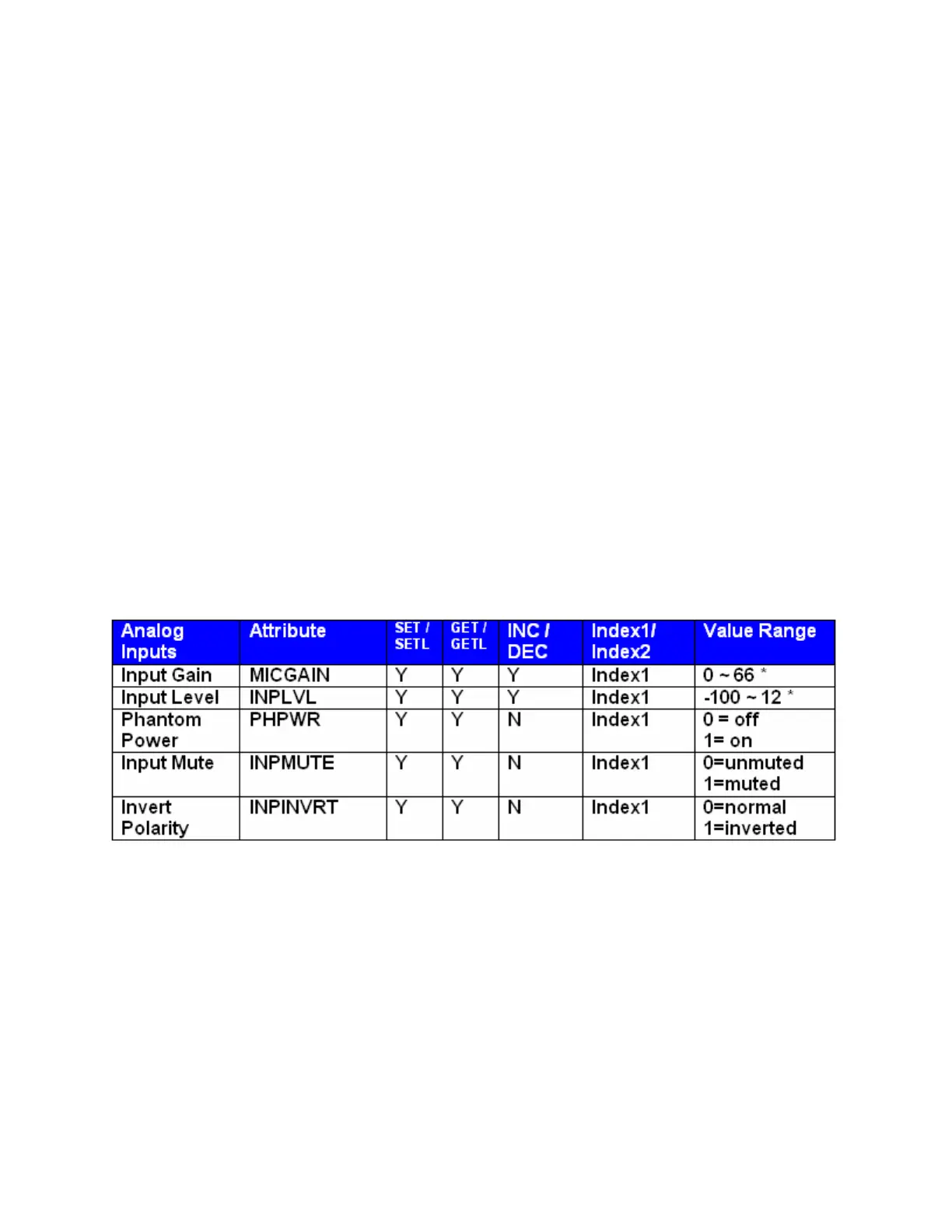
The Attribute defines the portion of the DSP block to be controlled (fader level, crosspoint mute etc). The
following tables show whether each ATP Attribute supports SET/SETL, GET/GETL, INC, and DEC
Commands, as well as the Value range that the Attribute will accept. Index1/Index2 determines whether
Index1, Index2 or BOTH are needed for a ATP String to be complete.
ATP Strings can address: (click on the links to view the tables in each topic)
Input/Output Blocks
Mixer Blocks
Equalizer Blocks
Filter Blocks
Crossover Blocks
Dynamics Blocks
Router Blocks
Delay Blocks
Control Blocks
Meter Blocks
Generator Blocks
Input/Output Blocks
* Can contain a decimal number.
Example: In the command: SET 1 INPLVL 6 3 –10<LF>
We are telling Audia
®
device 1 to set an input fader, Instance ID 6, input 3 (index1), to –10dB. (We set
channel 3 input level of instance 6 to –10dB)



 To Next Page