38
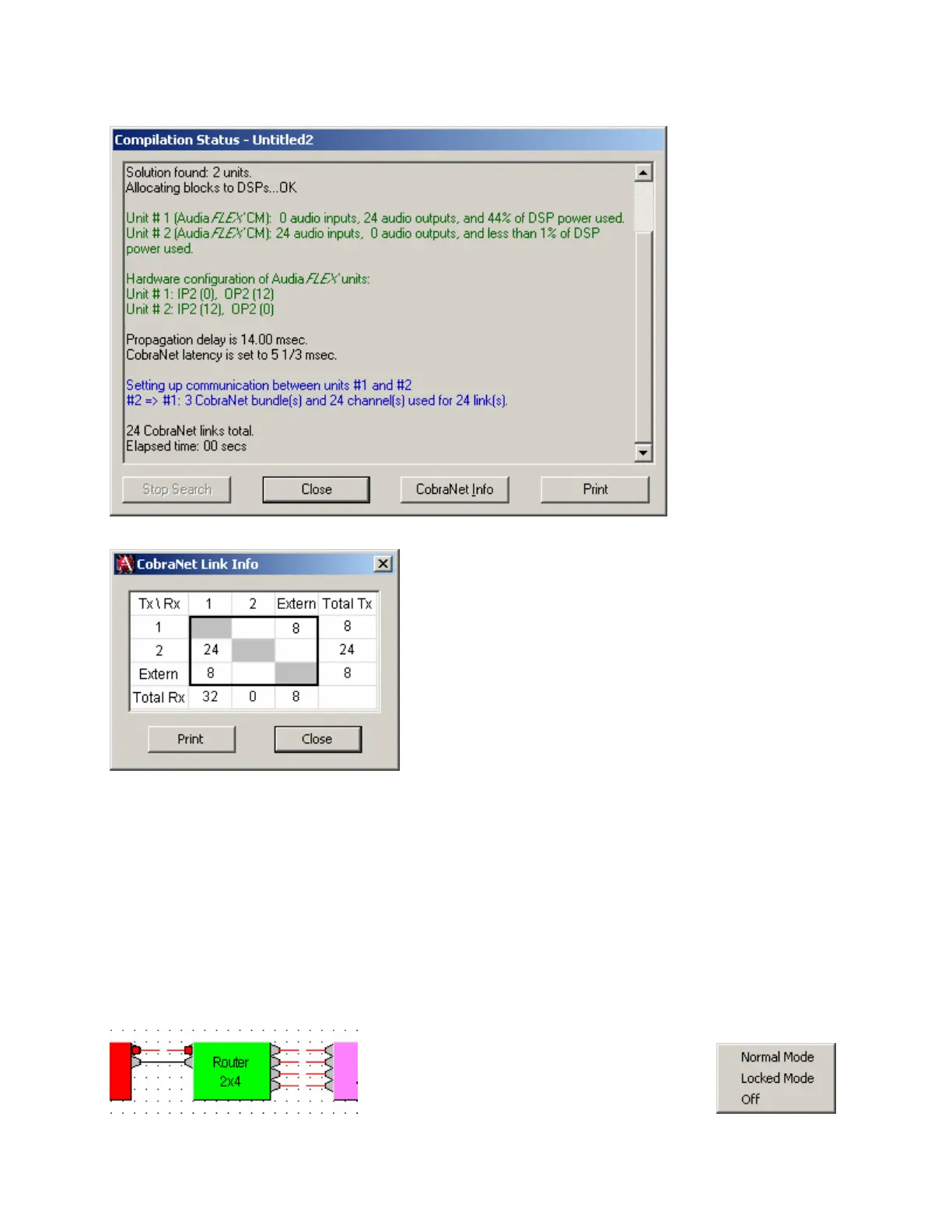
Layout Compile Results
Provides the most recent Compile results. This information may be viewed at any time.
Clicking on CobraNet Info provides a spreadsheet
of CobraNet channels used in the system. The
upper row and left column are the Audia unit IDs
taken from the Equipment Table. 'Extern' denotes
external CobraNet I/O devices of all types.
CobraNet Info is enabled via Compile Options.
Signal Path Identifier
Provides a temporary color-coded identification of all audio signal paths (Lines) which are associated with a
selected Line Object. See example below, where the selected input is shown as being routed to four
outputs. Signal Path Identifier is represented by a thin dashed red line. However, the Signal Path Identifier
color may be changed in Display Options. When using Signal Path Identifier on a compiled design,
propagation delay will appear in the Status Bar. Persistent Signal Path Identifier is available in Normal
Mode (follows subsequent line selections), Locked Mode (remains on original line selection), or Off
(temporary selection).



 To Next Page