VDL (E3) 09/2019 Page 111/234
11.4 Activating / deactivating temperature control
11.4.1 MB2 controller
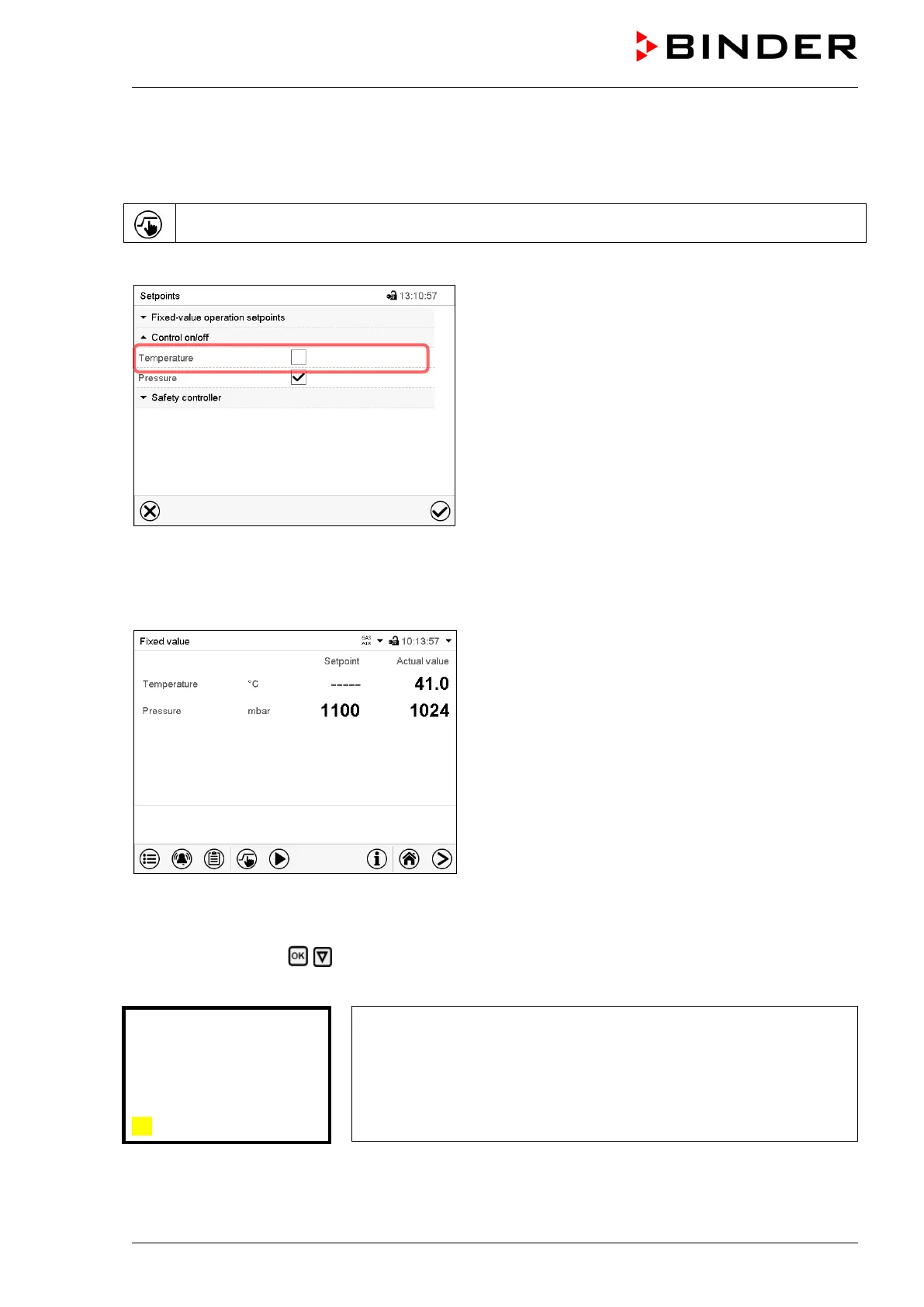
Press the Setpoint setting icon to access the “Setpoint” setting menu from Normal display..
Path: Setpoint > Control on/off
“Setpoints” menu.
Select the field “Control on/off” (example: deactivated
temperature control).
Mark / unmark the “Temperature” checkbox to activate /
deactivate temperature control and press the Confirm
icon.
• Checkbox marked: temperature control active
• Checkbox unmarked: temperature control deactivated
The actual temperature value continues to be displayed in Normal display:
Normal display with deactivated temperature control.
11.4.2 RD4 controller
Path: Normal display Temperature control
Press the OK button to enable the setting.
Setting the “Temperature control” function.
Use the arrow buttons to select between “On” (temperature control
active) and “Off” (temperature control deactivated).
Confirm the setting with the OK button.
After confirming with the OK button or with the Back button you go back to Normal display.



 To Next Page