VDL (E3) 09/2019 Page 112/234
If the setting “Off” (temperature control deactivated) has been selected, the information message “Tempe-
rature control off” is displayed. The „Info“ icon flashes slowly.
The actual temperature value continues to be displayed in Normal display.
11.5 Activating / deactivating pressure control
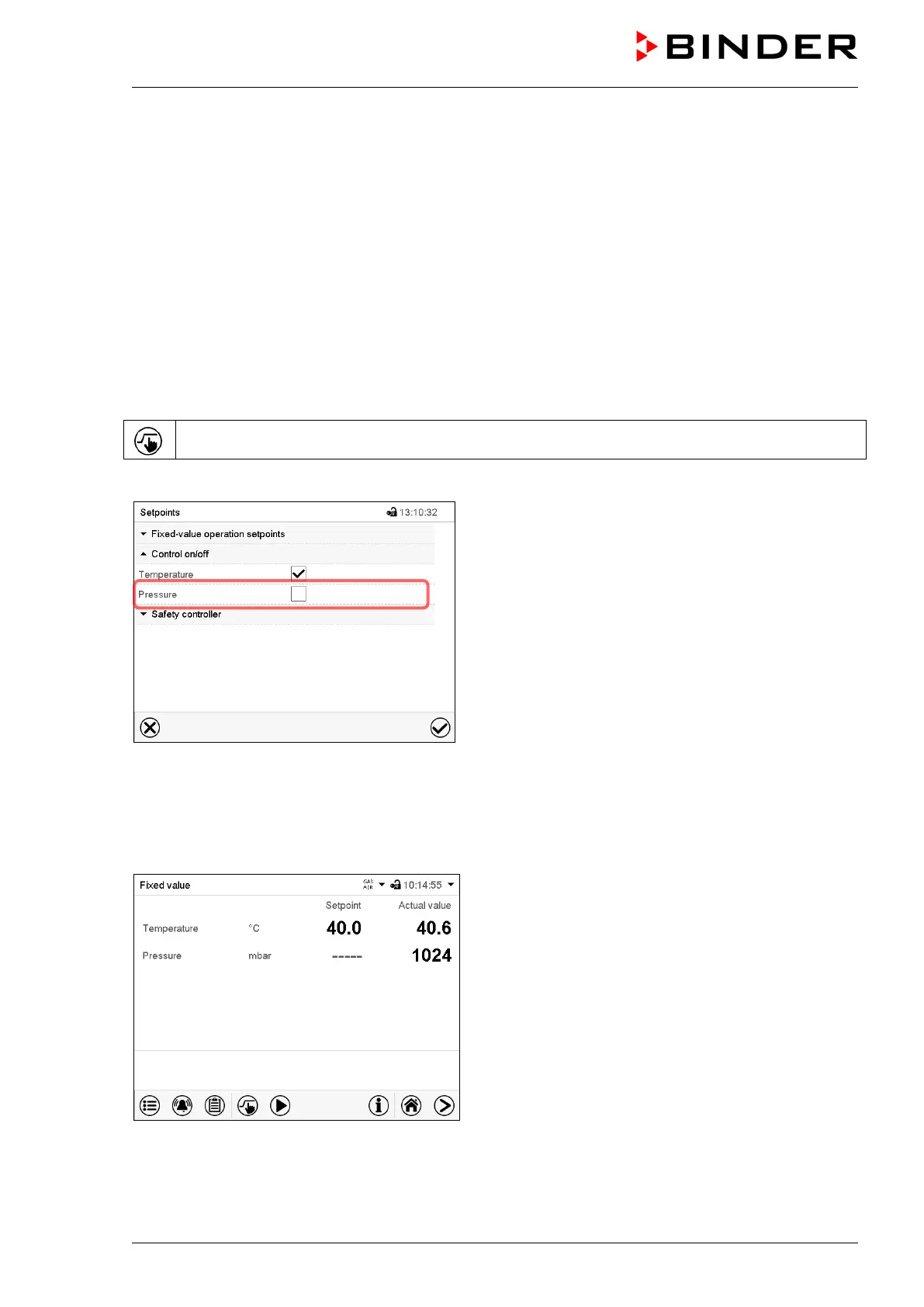
When operating the chamber without a vacuum connection, you can deactivate pressure control with the
to avoid alarms of the pressure system. No pressure tolerance range alarms and no pressure alarm will
be emitted.
Evacuation and ventilation via the controller are then no longer possible. The chamber is ventilated.
11.5.1 MB2 controller
Press the Setpoint setting icon to access the “Setpoint” setting menu from Normal display..
Path: Setpoint > Control on/off
“Setpoints” menu.
Select the field “Control on/off” (example: deactivated
pressure control).
Mark / unmark the “Pressure” checkbox to activate /
deactivate pressure control and press the Confirm icon
• Checkbox marked: pressure control active
• Checkbox unmarked: pressure control deactivated
The actual pressure value continues to be displayed in Normal display:
Normal display with deactivated pressure control.



 To Next Page