VDL (E3) 09/2019 Page 82/234
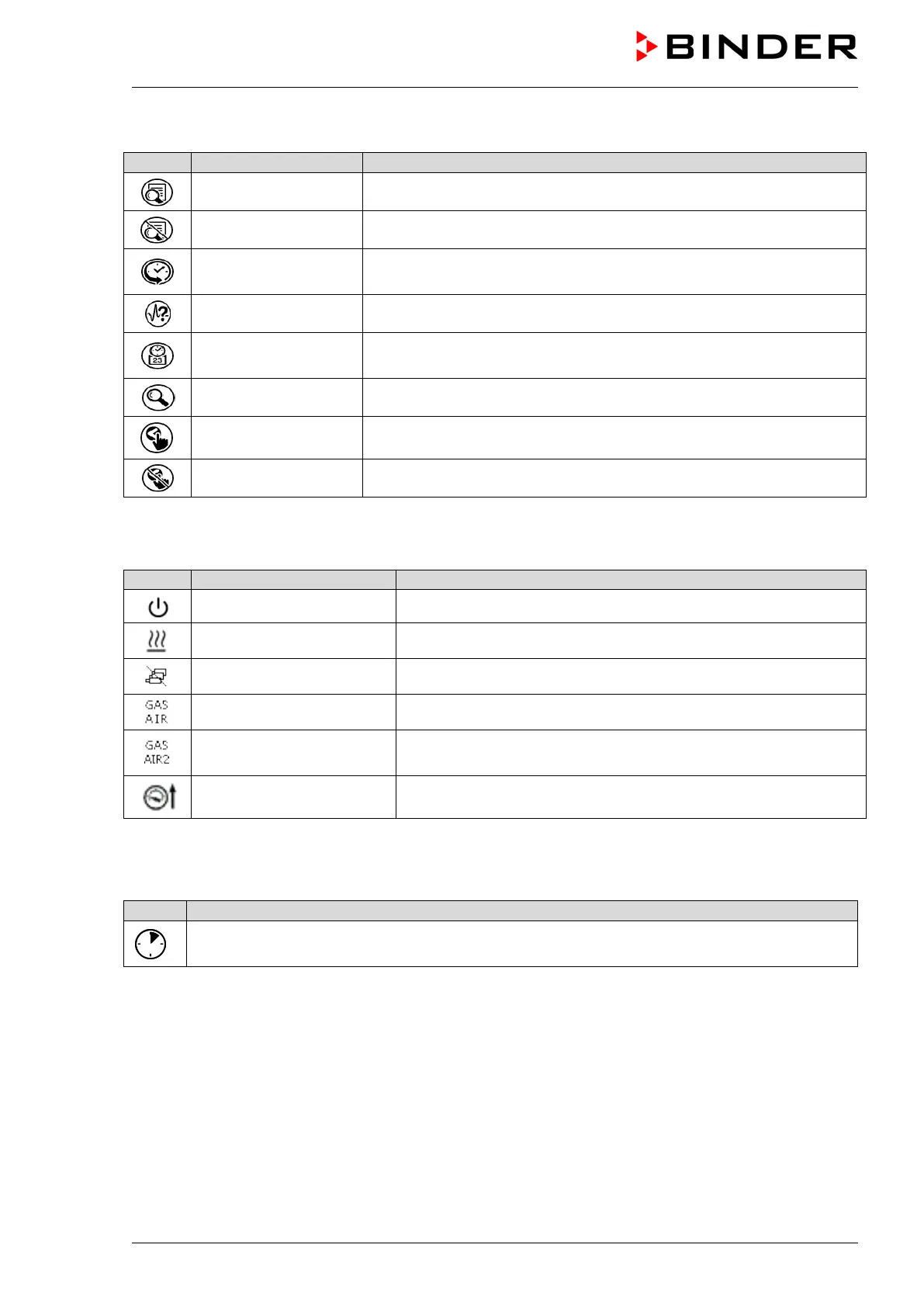
Functional icons in the chart recorder display
Show legend Show legend
Hide legend Hide legend
History display
Pause chart recorder and change to history display. Data recording
continues.
Curve selection Go to “Curve selection” submenu in the history display
Search
Go to “Search” submenu in the history display to select the required
instant
Zoom Go to “Zoom” submenu in the history display to select the zoom factor
Show scroll buttons Show scroll buttons in the history display to scroll to an instant
Hide scroll buttons Hide scroll buttons in the history display to scroll to an instant
Information icons referring to chamber conditions
„Standby“ Chamber is in Standby mode
“Heating active” Chamber is heating up
“All valves are closed” All valves are closed
“GAS/AIR” Ventilation via regular connection “GAS/AIR” (9)
“GAS/AIR 2”
Ventilation via optional connection “GAS/AIR2” (10)
Regular connection “GAS/AIR” (9) deactivated.
“Press.thresh. not reached“ Pressure threshold of 100 mbar not reached
Information icon for data processing
Waiting icon: Data processing is running.
Remaining time to touch the display when calibrating the touchscreen.



 To Next Page