Rear entertainment
Vehicle equipment
All standard, country-specific and optional
equipment that is offered in the model series is
described in this chapter. Therefore, equip‐
ment is also described that is not available in a
vehicle, e. g., because of the selected optional
equipment or country variant. This also applies
for safety-related functions and systems.
Controls
Control Installation location
Screens In the front seat back-
rests.
Rear CD/DVD
player
On the center console.
Rear controller Between the rear seats.
Remote control In the center armrest in
the rear.
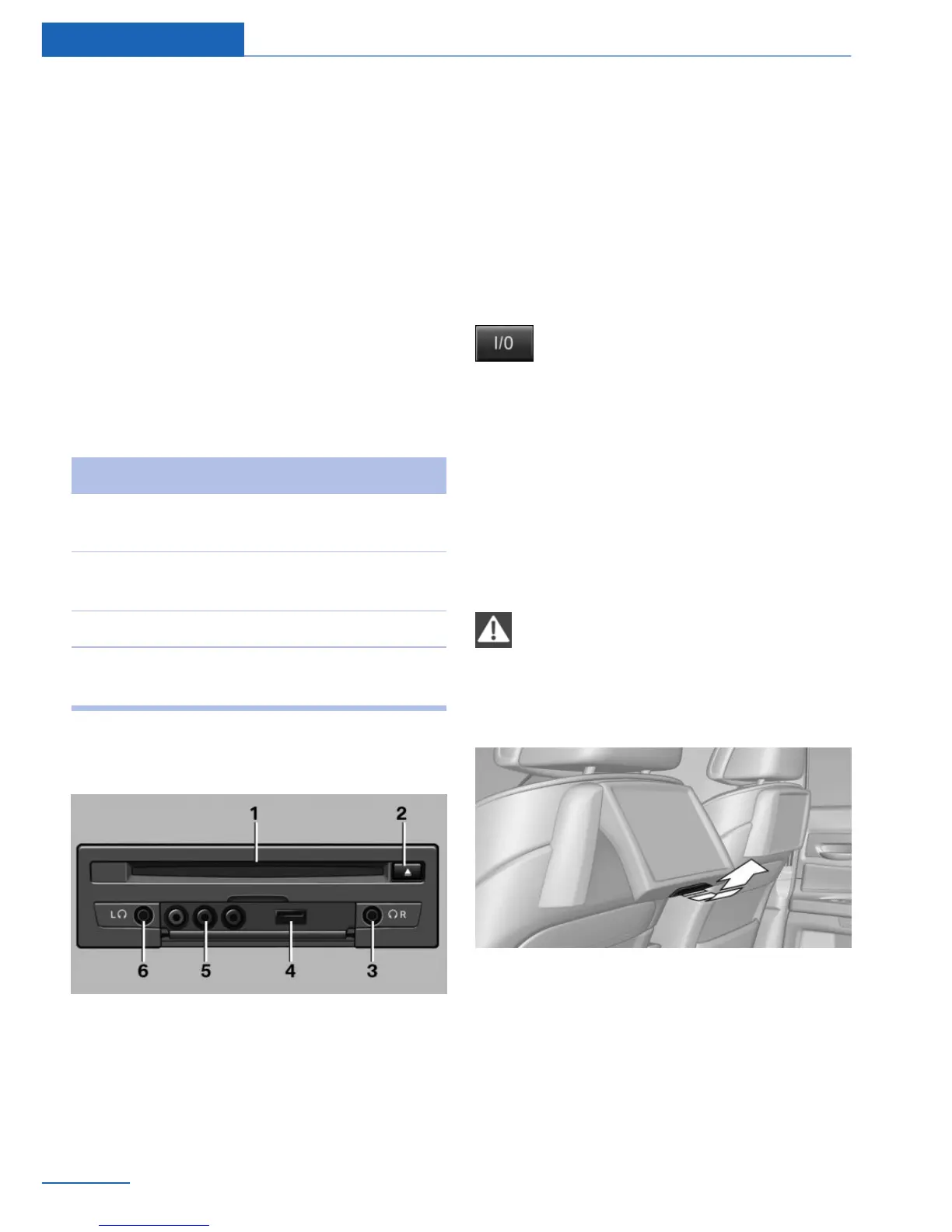
Rear CD player
1 CD/DVD slot
2 Eject CD/DVD
3 Headphone connection, right
4 USB interface
5 RCA sockets
6 Headphone connection, left
Switching the system on/off
Press the button on the bottom edge
of the screen.
Rear entertainment and the respective screen
are switched on/off.
After switching off the ignition, the system
must be switched on again.
Screens
Adjusting
Danger of burns when screen is folded
out
Do not reach behind the screen; otherwise,
there is the danger of getting burned. The back
of the screen can become very hot.◀
▷ To fold out: pull at the bottom edge.
▷ To fold in: press against the bottom edge.
Hints
▷ When loading the rear seats and adjusting
the backrest of the front seat, fold in the
screens.
Seite 68
Entertainment Rear entertainment
68
Online Edition for Part no. 01 40 2 926 935 - X/13



 To Next Page