▷ Hold the mobile phone.
▷ Recharge the battery.
▷ Connect to the outside antenna of the ve‐
hicle.
This provides for better network reception and
consistent sound quality.
General information
Detailed information about the snap-in
adapter, which supports the functions of the
mobile phone, is available from the service
center.
Hints
At high temperatures, the charge functions of
the mobile phone can be limited under certain
circumstances, and functions are no longer
executed.
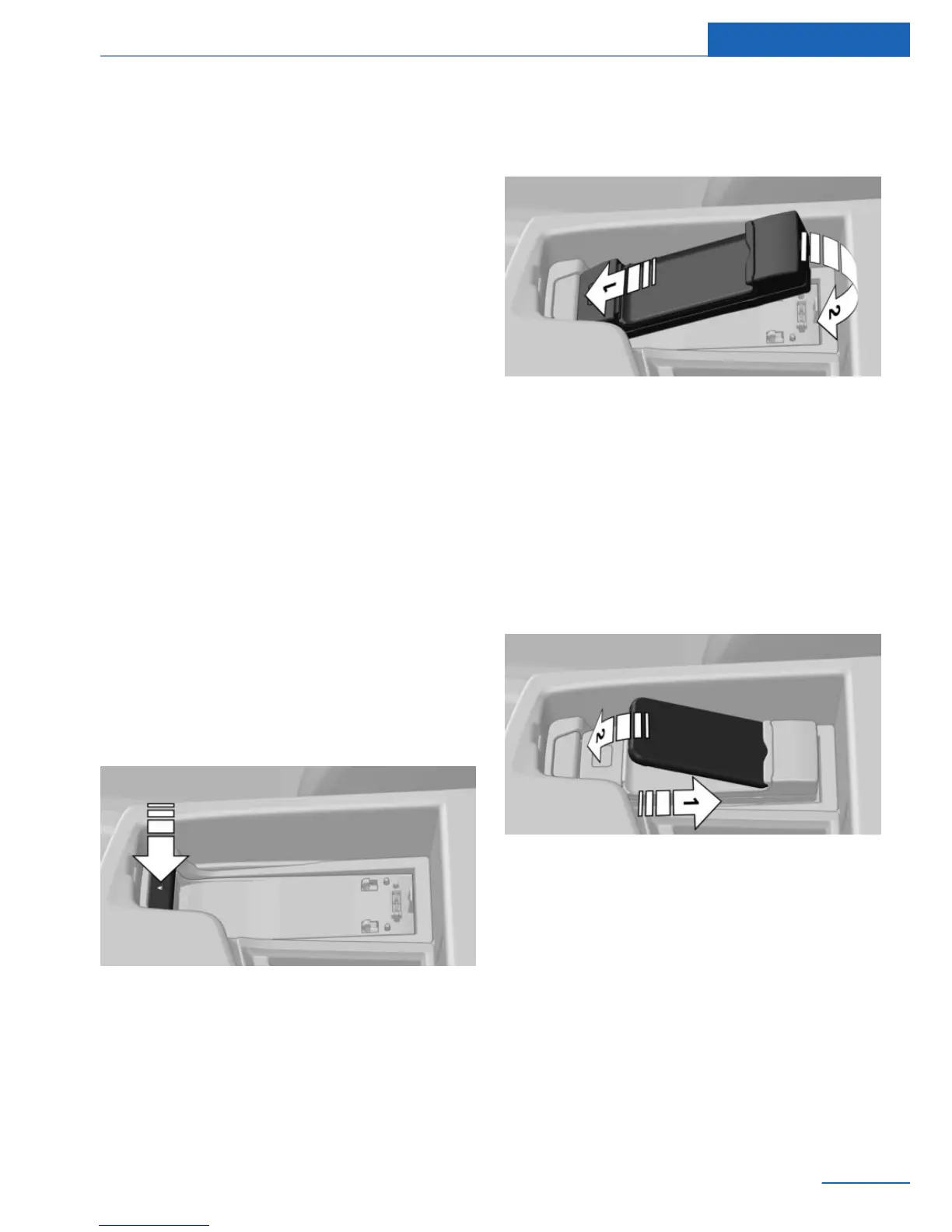
Installation position
The snap-in adapter is located in the front of
the center armrest. The direction of installation
in the center armrest varies according to the
vehicle.
Inserting the snap-in adapter
1.
Press the button and remove the cover.
2. Insert the snap-in adapter at the front, ar‐
row 1, and press down, arrow 2, until it en‐
gages.
Inserting the mobile phone
1.
Depending on the mobile phone, remove
the protective cap from the antenna con‐
nector and from the USB connection of the
mobile phone.
2. Slide the mobile phone with the buttons
facing up in the direction of the electrical
connections, arrow 1, and push downward,
arrow 2, until it engages.
Seite 87
Telephone Communications
87
Online Edition for Part no. 01 40 2 926 935 - X/13



 To Next Page