787 Flight Crew Operations Manual
DO NOT USE FOR FLIGHT
Flight Instruments, Displays -
Controls and Indicators
Copyright © The Boeing Company. See title page for details.
D615Z003-TBC 10.10.33
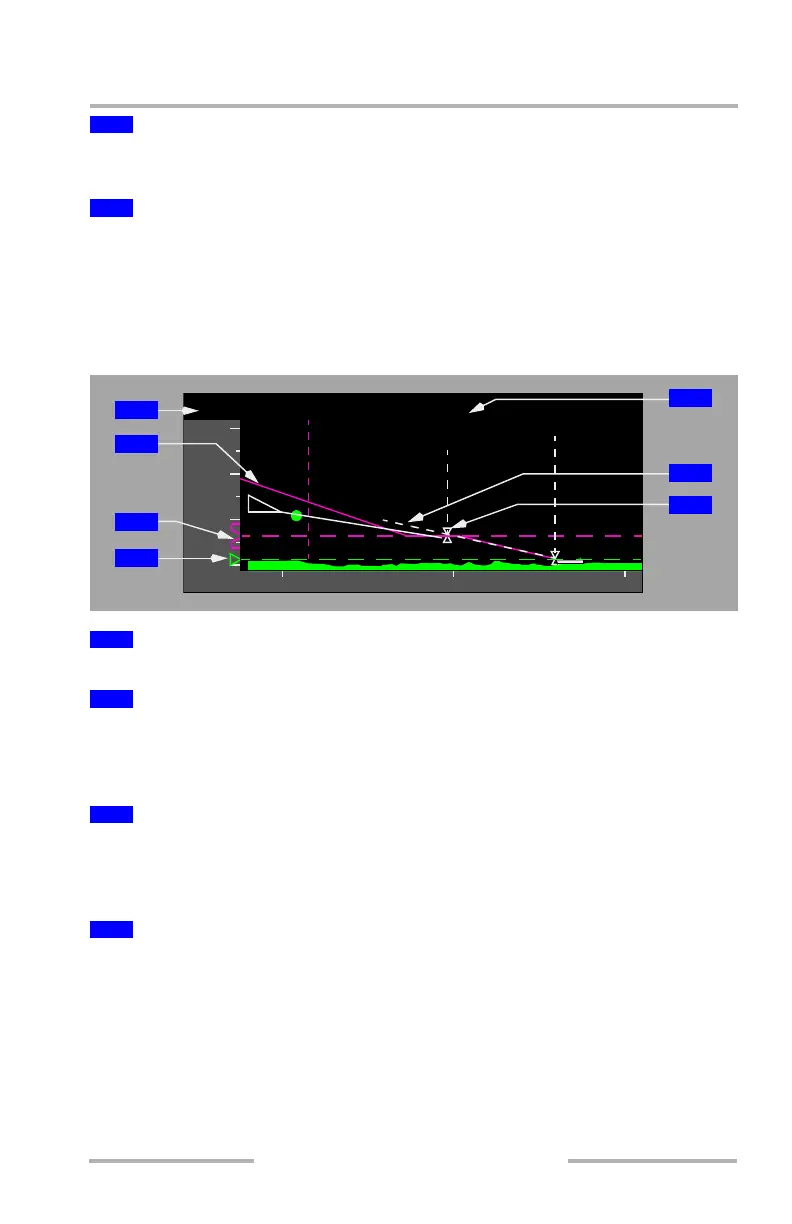
Indicates current airplane altitude (bottom of the triangle) and lateral position
(point of the triangle) relative to terrain.
Displays range in nautical miles.
The scale is the full range selected on the EFIS control panel when the
Normal-display ND is used. The scale is twice the full range selected when the
Full-display ND is used.
Vertical Situation Display (VSD) - General Background
Displays the altitude set in the MCP altitude window.
Displays the path that VNAV commands if it is engaged.
During climbs, there is no VNAV path, so the line extends from the nose of the
airplane to the predicted altitudes at each waypoint in the climb.
Indicates the altitude set in the MCP altitude window.
When the selected altitude is off scale, the bug is parked at the top or bottom, with
only one half the bug visible. The dashed line does not park.
Indicates the barometric minimums selected on the EFIS control panel:
• pointer and dashed line turn amber when airplane descends below selected
minimum altitude
• reset with the RST switch on the EFIS control panel
3
Airplane Symbol
4
Horizontal Reference Scale
1
MCP Selected Altitude Readout
2
Active Vertical Path
3
Selected Altitude Bug
4
BARO Minimums Pointer
20100
8
4
12
000
000
000
000
CF13R
63
RW13R
2
200
NOLLA
2200
(2115)
1
3
4
5
6
7
2
February 15, 2010



 To Next Page