User menu
EN
bora.com 125
6.5
Menu item 5: Touch zone
reaction speed
The reaction speed of the touch zones can be
set using menu item 5.
T
Reaction speed : slow
T
Reaction speed : medium
T
Reaction speed : fast
T
The current reaction speed is displayed.
Selecting the reaction speed
u
Tap the corresponding slider segment .
u
Move to another menu item or close the menu.
Fig.6.5
Menu item 5: Reaction speed
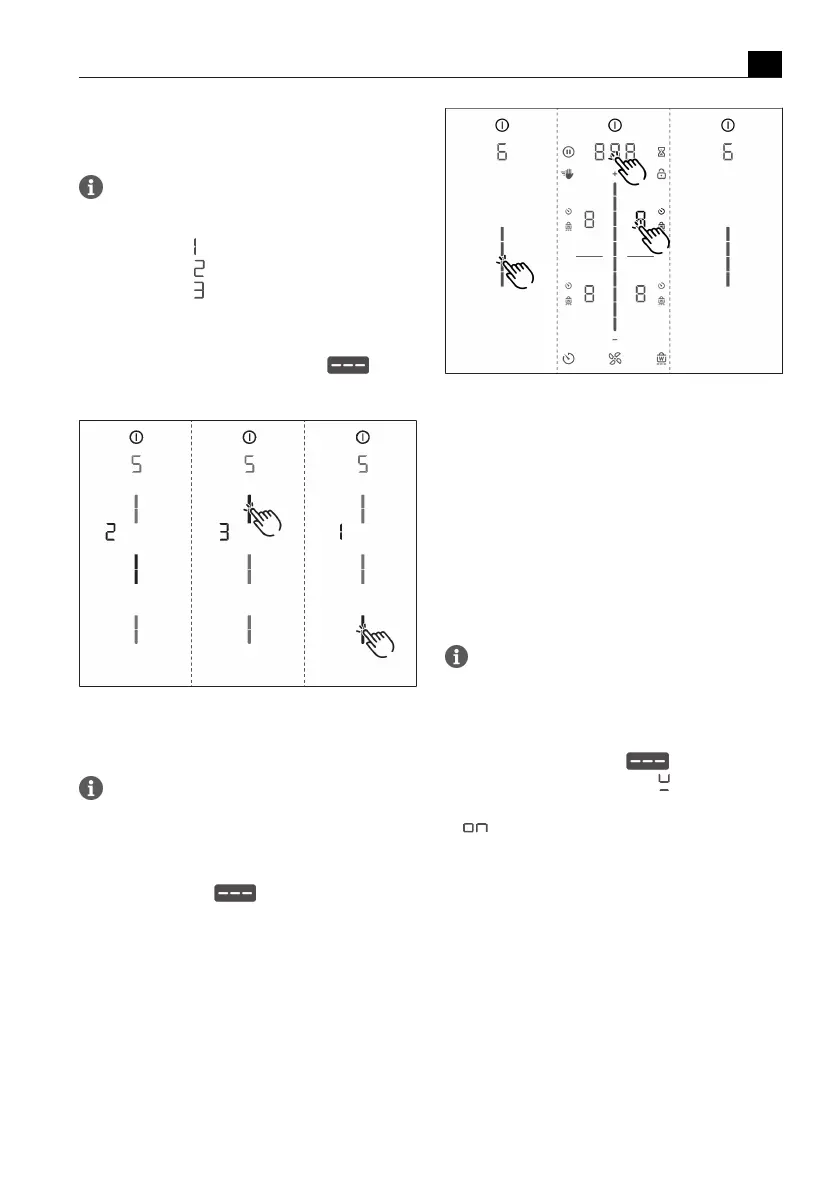
6.6
Menu item 6: LED test
With menu item 6 all LEDs in the individual
touch zones can be tested to ensure that they
are working.
Starting the LED test
u
Tap the slider zone .
T
All indicators are displayed at 50 % brightness.
u
Tap any indicator you wish.
T
The selected indicator will be displayed at 100%
brightness for one second.
T
Any other indicators can be tested by touch as
required.
Fig.6.6
Menu item 6: LED test
Ending the LED test
T
The LED test will be automatically ended when there
has been no activity for 5 seconds.
or
u
Long press on the multi-function display.
T
The LED test is ended.
u
Move to another menu item or close the menu.
6.7
Menu item 7: Permanent
pan size recognition
With menu item 7 the permanent pan size
recognition can be permanently switched on or
off.
Activating permanent pan size recognition
u
Tap the top slider segment .
T
The pan size recognition symbol is displayed on all
cooking zones for one second.
T
is displayed.
u
Move to another menu item or close the menu.



 To Next Page